> ## Documentation Index
> Fetch the complete documentation index at: https://doc.lucidworks.com/llms.txt
> Use this file to discover all available pages before exploring further.
# Product Grouping
export const LwTemplate = ({title = "Key questions to get you started", icon = "sparkles", cta = "Powered by Agent Studio", linkHref = "https://lucidworks.com/demo/?utm_source=docs&utm_medium=referral&utm_campaign=docs_cta_ai"}) => {
const [isLoaded, setIsLoaded] = useState(false);
useEffect(() => {
const timer = setTimeout(() => {
setIsLoaded(true);
}, 500);
return () => clearTimeout(timer);
}, []);
return
{isLoaded && `
}} />}
Powered by Lucidworks Agent Studio
;
};
[localhost link]: http://localhost:3000/docs/5/fusion/getting-data-out/curating-your-search-experience/predictive-merchandiser/product-grouping
[mintlify link]: https://doc.lucidworks.com/docs/5/fusion/getting-data-out/curating-your-search-experience/predictive-merchandiser/product-grouping
[old doc.lw link]: https://doc.lucidworks.com/fusion/5.9/596
Predictive Merchandiser makes it easy to group products together so they can be presented to the user. This can be useful when you want to show a product in all of its color variants or the various versions of a product (basic or advanced, for example).
Product groups can be boosted or blocked. If you want to promote a product group that is on sale, for example, you can boost the group to the top of the results.
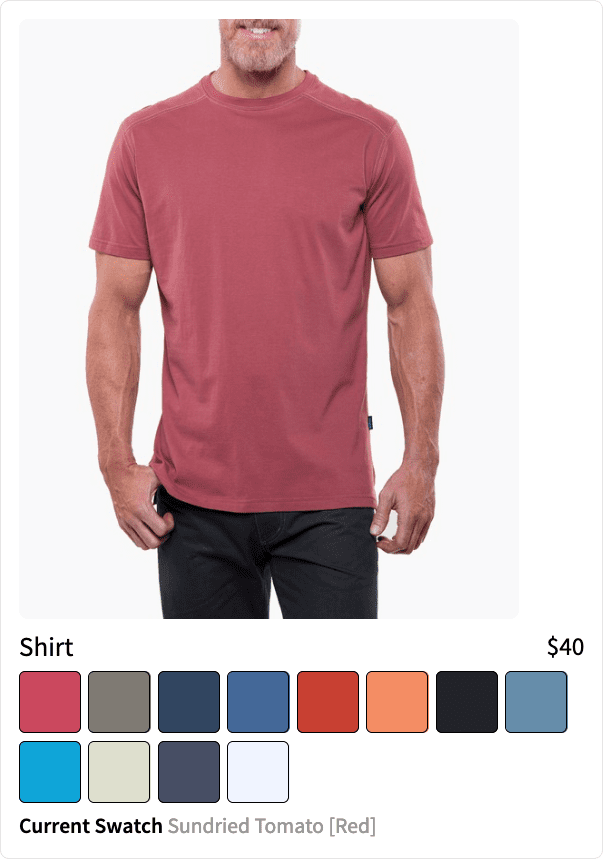
You can still apply rules individually to products within a group. This allows you to boost a product based on a specific user’s search behavior. If a user typically favors the color red, you can boost the red variant of the product to the top of the group.
## Best practices
These parameters group products, and are defined in the Additional Query Parameters Stage:
| Parameter Name | Parameter Value | Update Policy |
| -------------- | --------------- | ---------------------------------------------------------------------------------------------------------------------------------------------------------------------- |
| group | true | default |
| group.format | grouped | default |
| group.ngroups | true | default |
| group.field | style\_id\_s | default
NOTE: You must configure `groupField=` if you use [App Studio](/docs/5/fusion/dev-portal/appkit/overview) to create your search application. |
For more information about adding a query pipeline and additional query parameters, see:
* **Add a Query Pipeline Stage**
* [Additional Query Parameters Stage](/docs/5/fusion/reference/config-ref/pipeline-stages/query-stages/set-query-params-stage)
In the Query Workbench, click **Add a Stage** to add query pipeline stages that can perform query setup, results relevancy, troubleshooting, and more.
The Solr Query stage is the only pipeline stage that is required for querying processes to complete, and therefore exists in every query pipeline. It is always the last stage in a series.
**See these pages for more information:**
Fusion 5.x:
* [Query Workbench](/docs/5/fusion/intro/ui-tour/query-workbench)
* [query pipeline stages](/docs/5/fusion/reference/config-ref/pipeline-stages/query-stages/overview)
* [Solr Query stage](/docs/5/fusion/reference/config-ref/pipeline-stages/query-stages/solr-query-stage)
Fusion 4.x:
* [Query Workbench](/docs/4/fusion-server/concepts/querying/query-workbench)
* [query pipeline stages](/docs/4/fusion-server/reference/pipeline-stages/query/overview)
* [Solr Query stage](/docs/4/fusion-server/reference/pipeline-stages/query/solr-query-stage)
### Collapse/Expand parser grouping
The Collapse/Expand parser allows grouping with the following parameters:
| Parameter Name | Parameter Value |
| --------------- | --------------- |
| expand | true |
| enableElevation | true |
| group | false |
See [Collapse and Expand Results](https://solr.apache.org/guide/collapse-and-expand-results.html) for more information.
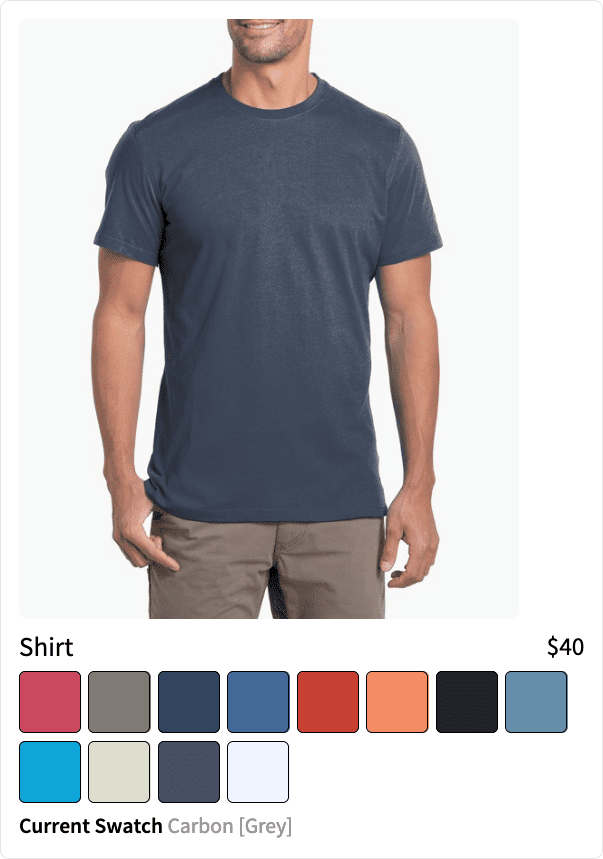 Product groups can be boosted or blocked. If you want to promote a product group that is on sale, for example, you can boost the group to the top of the results.
You can still apply rules individually to products within a group. This allows you to boost a product based on a specific user’s search behavior. If a user typically favors the color red, you can boost the red variant of the product to the top of the group.
Product groups can be boosted or blocked. If you want to promote a product group that is on sale, for example, you can boost the group to the top of the results.
You can still apply rules individually to products within a group. This allows you to boost a product based on a specific user’s search behavior. If a user typically favors the color red, you can boost the red variant of the product to the top of the group.
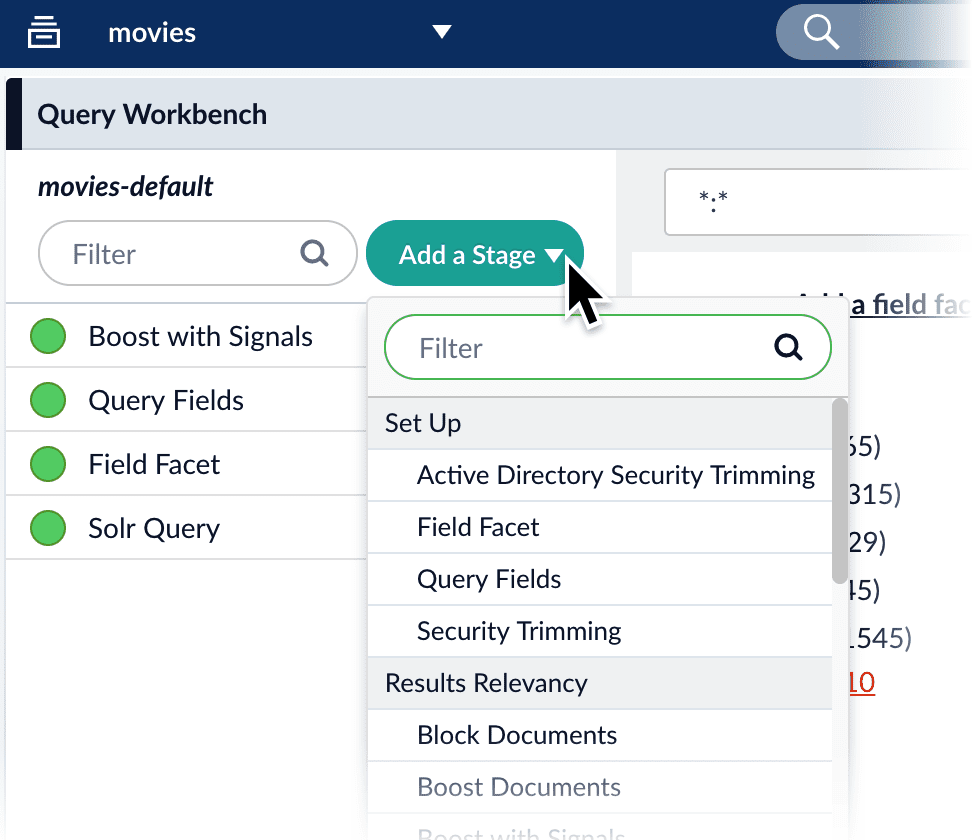 The Solr Query stage is the only pipeline stage that is required for querying processes to complete, and therefore exists in every query pipeline. It is always the last stage in a series.
**See these pages for more information:**
Fusion 5.x:
* [Query Workbench](/docs/5/fusion/intro/ui-tour/query-workbench)
* [query pipeline stages](/docs/5/fusion/reference/config-ref/pipeline-stages/query-stages/overview)
* [Solr Query stage](/docs/5/fusion/reference/config-ref/pipeline-stages/query-stages/solr-query-stage)
Fusion 4.x:
* [Query Workbench](/docs/4/fusion-server/concepts/querying/query-workbench)
* [query pipeline stages](/docs/4/fusion-server/reference/pipeline-stages/query/overview)
* [Solr Query stage](/docs/4/fusion-server/reference/pipeline-stages/query/solr-query-stage)
The Solr Query stage is the only pipeline stage that is required for querying processes to complete, and therefore exists in every query pipeline. It is always the last stage in a series.
**See these pages for more information:**
Fusion 5.x:
* [Query Workbench](/docs/5/fusion/intro/ui-tour/query-workbench)
* [query pipeline stages](/docs/5/fusion/reference/config-ref/pipeline-stages/query-stages/overview)
* [Solr Query stage](/docs/5/fusion/reference/config-ref/pipeline-stages/query-stages/solr-query-stage)
Fusion 4.x:
* [Query Workbench](/docs/4/fusion-server/concepts/querying/query-workbench)
* [query pipeline stages](/docs/4/fusion-server/reference/pipeline-stages/query/overview)
* [Solr Query stage](/docs/4/fusion-server/reference/pipeline-stages/query/solr-query-stage)