> ## Documentation Index
> Fetch the complete documentation index at: https://doc.lucidworks.com/llms.txt
> Use this file to discover all available pages before exploring further.
# Hierarchical Facets
export const LwTemplate = ({title = "Key questions to get you started", icon = "sparkles", cta = "Powered by Agent Studio", linkHref = "https://lucidworks.com/demo/?utm_source=docs&utm_medium=referral&utm_campaign=docs_cta_ai"}) => {
const [isLoaded, setIsLoaded] = useState(false);
useEffect(() => {
const timer = setTimeout(() => {
setIsLoaded(true);
}, 500);
return () => clearTimeout(timer);
}, []);
return
{isLoaded && `
}} />}
Powered by Lucidworks Agent Studio
;
};
[localhost link]: http://localhost:3000/docs/5/fusion/getting-data-out/curating-your-search-experience/predictive-merchandiser/hierarchical-faceting
[mintlify link]: https://doc.lucidworks.com/docs/5/fusion/getting-data-out/curating-your-search-experience/predictive-merchandiser/hierarchical-faceting
[old doc.lw link]: https://doc.lucidworks.com/fusion/5.9/vfdq6w
Facets of multiple levels under a parent facet are known as hierarchical facets. Hierarchical facets allow faster navigation through facet submenus and breadcrumbs when navigating through the available options. Facets with children can be indicated by an arrow to indicate they have children that become visible when the arrow is selected. Selecting a child facet after expanding the facet menu allows the user to bypass the options between the top page and their choice.
Hierarchical facets are split according to the delimiter set in the [Apply Rules](/docs/5/fusion/reference/config-ref/pipeline-stages/query-stages/query-rules-query-stage) query pipeline stage.
For more information, see **Use Hierarchical Facets**.
## Fusion
To configure hierarchical fields settings:
1. Access the application and click **Relevance > Rules > Templates**.
2. Click the three vertical dots to the right of the application name to display the Hierarchical fields settings section.
3. Complete one of the following:
* To add a new field, click **+ Add**. Enter values in the **Field** and **Delimiter** fields and click **Apply**.
Any symbol can be used as a delimiter.
* To edit an existing field, click **Field** and select the value to edit. Enter the appropriate value in the **Delimiter** field and click **Apply**.
* To delete a field setting, select the value in **Field**, click **X**, and then click **Apply**.
* To cancel any changes before you apply them, click **Cancel**.
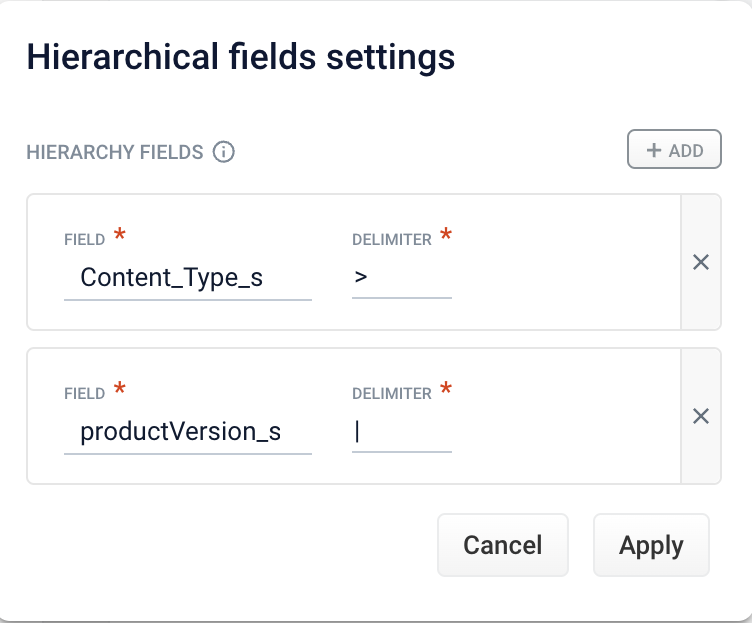 3. Complete one of the following:
* To add a new field, click **+ Add**. Enter values in the **Field** and **Delimiter** fields and click **Apply**.
3. Complete one of the following:
* To add a new field, click **+ Add**. Enter values in the **Field** and **Delimiter** fields and click **Apply**.
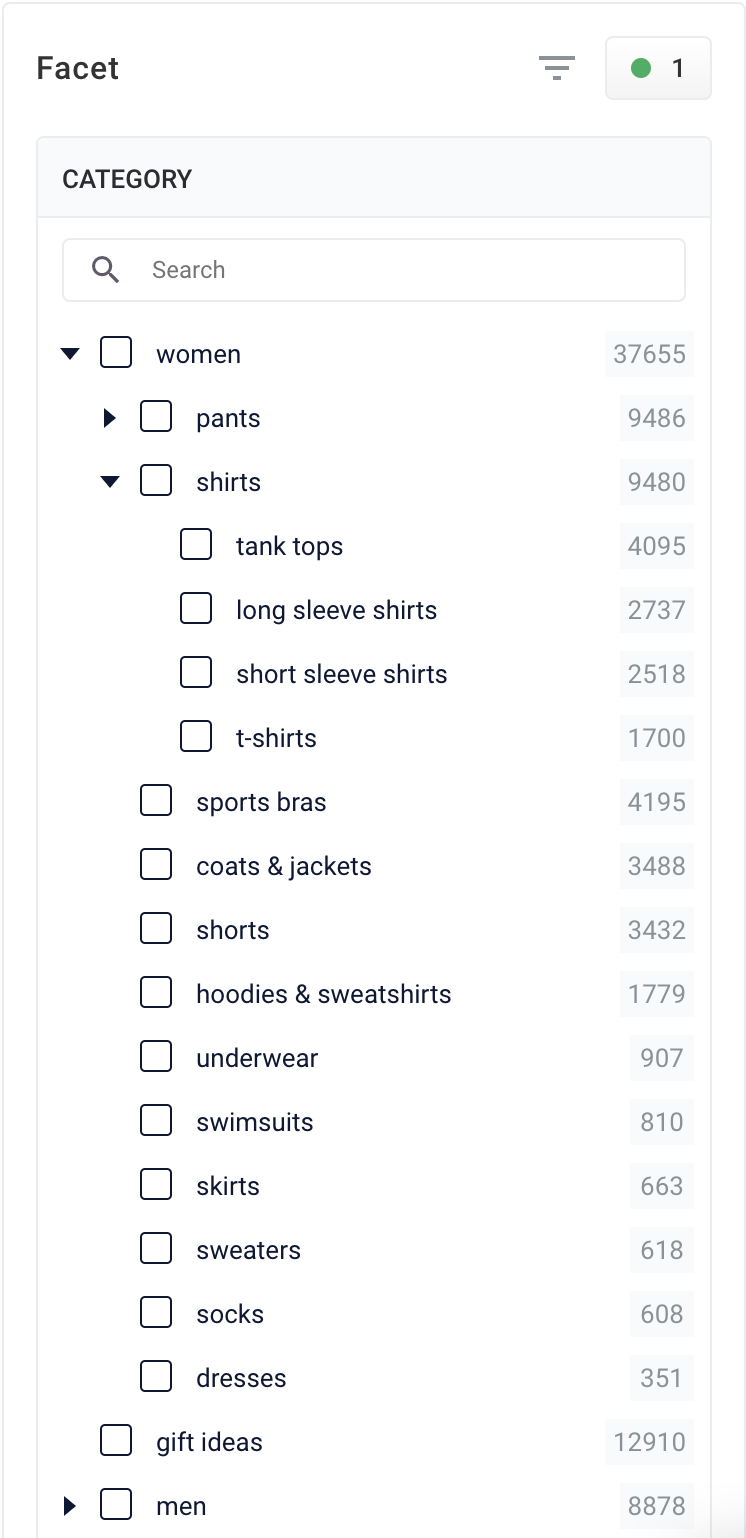 Hierarchical facets are split according to the delimiter set in the [Apply Rules](/docs/5/fusion/reference/config-ref/pipeline-stages/query-stages/query-rules-query-stage) query pipeline stage.
For more information, see **Use Hierarchical Facets**.
Hierarchical facets are split according to the delimiter set in the [Apply Rules](/docs/5/fusion/reference/config-ref/pipeline-stages/query-stages/query-rules-query-stage) query pipeline stage.
For more information, see **Use Hierarchical Facets**.