> ## Documentation Index
> Fetch the complete documentation index at: https://doc.lucidworks.com/llms.txt
> Use this file to discover all available pages before exploring further.
# Search Rewrites
> Experience Optimizer
export const LwTemplate = ({title = "Key questions to get you started", icon = "sparkles", cta = "Powered by Agent Studio", linkHref = "https://lucidworks.com/demo/?utm_source=docs&utm_medium=referral&utm_campaign=docs_cta_ai"}) => {
const [isLoaded, setIsLoaded] = useState(false);
useEffect(() => {
const timer = setTimeout(() => {
setIsLoaded(true);
}, 500);
return () => clearTimeout(timer);
}, []);
return
{isLoaded && `
}} />}
Powered by Lucidworks Agent Studio
;
};
export const InlineImage = ({src, alt = '', height = '2em'}) => {
return ;
};
[localhost link]: http://localhost:3000/docs/5/fusion/getting-data-out/curating-your-search-experience/experience-optimizer/eo-search-rewrites
[mintlify link]: https://doc.lucidworks.com/docs/5/fusion/getting-data-out/curating-your-search-experience/experience-optimizer/eo-search-rewrites
[old doc.lw link]: https://doc.lucidworks.com/fusion/5.9/orstay
Search rewriting is a way of modifying search queries so that they more accurately reflect the intentions of your customers. You can create a misspelling search rewrite, for example, to correct a spelling mistake that commonly occurs when searching for a particular document. The misspelled query will then produce the same results as a correctly spelled search.
There are four rewrite types:
* **Head/Tail** - improves poorly performing searches.
* **Misspelling detection** - corrects common spelling mistakes.
* **Phrase detection** - identifies products with matching phrases.
* **Synonym detection** - includes alternative words with the same meaning.
You can create query rewrite rules in Experience Optimizer. This is similar to using the Rules Editor to create query rewrite rules, except there are additional options in Experience Optimizer.
1. In Fusion, navigate to **Relevance** > **Rules** > **Optimizer**.
2. Enter a search term or phrase in the search bar.
3. Click **Start Task**.
4. Hover your cursor next to the query. A **+** button will appear:
5. Click the **+** button. A list of query rewrites options will appear: [Head/Tail](#head-tail), [Misspelling](#misspelling), [Phrase](#phrase), [Synonym](#synonym), and [Remove Words](#remove-words).
6. Click on the type of rule you’d like to configure.
The course for **Experience Optimizer: Rewrites Manager** focuses on how to create search rewrites that optimize your user's search results.
## Head/Tail
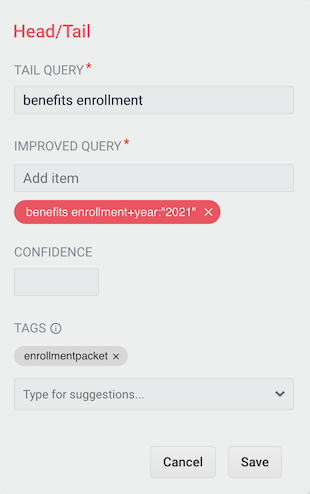
You can create a Head/Tail rewrite to improve search results using methods other than correcting for misspellings or synonym expansion. When a poorly defined search term is identified, the original term is replaced by an improved search term.
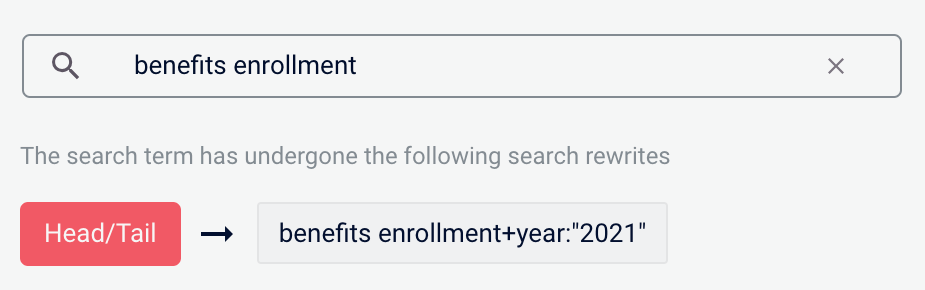
For example, a search for `benefits enrollment` could be improved by using the search term `benefits enrollment+year:"2021"` (in this case making use of the year field in the data).
Most Head/Tail rewrites will typically be created automatically via machine learning. However, if desired, custom rewrites can be manually created using the following steps.
1. From the list of query rewrite options, select **Head/Tail**. A form will appear:
This form contains the following fields:
| | | |
| -------------- | -------------------------------------------------------------------------- | --------------------------------- |
| Parameter | Description | Example Value |
| Tail Query | The tail query itself. | `benefits enrollment` |
| Improved Query | The query that will replace the tail query phrase. | `benefits enrollment+year:"2021"` |
| Tags | Optional metadata tags that can be used to identify and organize rewrites. | `enrollmentpacket` |
2. Enter one or more improved search terms in the **Improved Query** field.
3. Click the **Save** button.
The search is re-run using the improved search term, and a Search box information panel drops down to show that the new query rewrite has fired:
## Misspelling
You can create a misspelling query rewrite to detect and correct common spelling mistakes. When a customer enters a search term containing a known misspelling, the incorrect spelling is replaced with the spelling correction.
{/* // NOTE: The example does not match the image. Use another datasource. */}
For example, if your clients frequently misspell or mistype the word `questionnaire` as `questionare`, you can set up a query rewrite to automatically correct it.
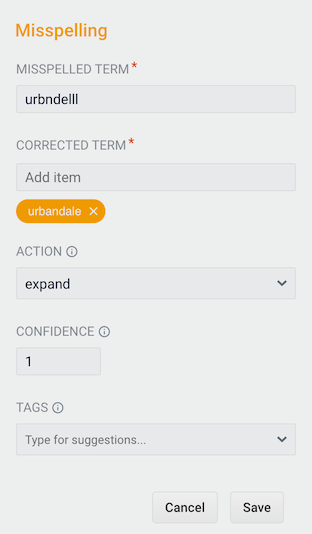
1. From the list of query rewrite options, select **Misspelling**. A form will appear:
{/* // NOTE: The examples in table do not match the image. Use another datasource. */}
This form contains the following fields:
| | | |
| --------------- | ------------------------------------------------------------------------------------------------------------------------------------------------------------------------------------------------------------------------------- | ------------------ |
| Parameter | Description | Example Value |
| Misspelled Term | The phrase itself. | `questionare` |
| Corrected Term | The term that will replace the misspelled term. | `questionnaire` |
| Action | Action to perform. | `expand` |
| Confidence | Confidence score from the phrase job. A confidence level of `1` represents 100% confidence. For rules created automatically via machine learning, the confidence level will reflect the output from the machine learning model. | `1` |
| Tags | Optional metadata tags that can be used to identify and organize rewrites. | `enrollmentpacket` |
2. Enter one or more spelling corrections in the **Corrected Term** field.
3. Click the **Save** button.
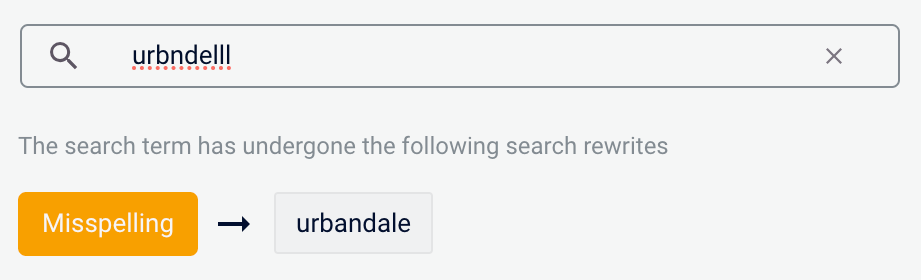
The search is re-run using the corrected spelling, and a Search box information panel drops down to show that the new query rewrite has fired:
## Phrase
You can use query rewriting to identify phrases used in search terms so that products with matching phrases are boosted in the search results. This is helpful when users do not use quotation marks to identify phrases in their search terms.
{/* // NOTE: The example does not match the image. Use another datasource. */}
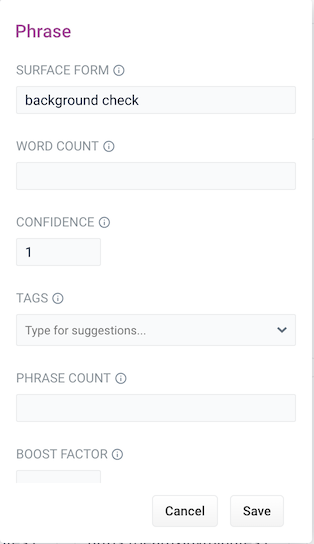
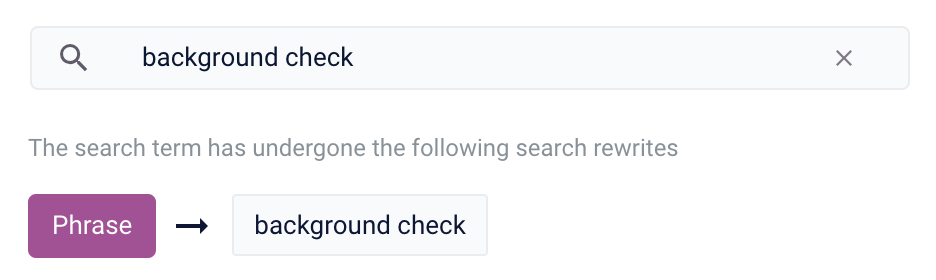
For example, without phrase detection a search for the words `background check` would show results for both `background` and `check`. With phrase detection, this search would correctly boost results for `"background check"`.
1. From the list of query rewrite options, select **Phrase**. A form will appear:
This form contains the following fields:
| | | |
| ------------ | ------------------------------------------------------------------------------------------------------------------------------------------------------------------------------------------------------------------------------- | ------------------ |
| Parameter | Description | Example Value |
| Surface Form | The phrase itself. | `background check` |
| Word Count | Indicates how many words are included in the phrase. | `2` |
| Confidence | Confidence score from the phrase job. A confidence level of `1` represents 100% confidence. For rules created automatically via machine learning, the confidence level will reflect the output from the machine learning model. | `1` |
| Tags | Optional metadata tags that can be used to identify and organize rewrites. | `enrollmentpacket` |
| Phrase Count | Denotes how many times this phrase was found in the source. This value is automatically set via machine learning. It does not need to be set manually. | `5` |
| Boost Factor | The factor to use to boost this phrase in matching queries. | `2.0` |
| Slop Factor | Phrase slop, or the distance between the terms of the query while still considering it a phrase match. | `10` |
2. Enter the number of words in the phrase in the **Word Count** field.
3. Click the **Save** button.
The search is re-run, with your search words identified as a phrase, and a Search box information panel drops down to show that the new query rewrite has fired:
## Synonym
You can specify synonyms for a specified search term so that alternative words with the same meaning are automatically used in the search query. When a customer enters a search term with a synonym match, the alternative words are used instead of, or in addition to, the original search term.
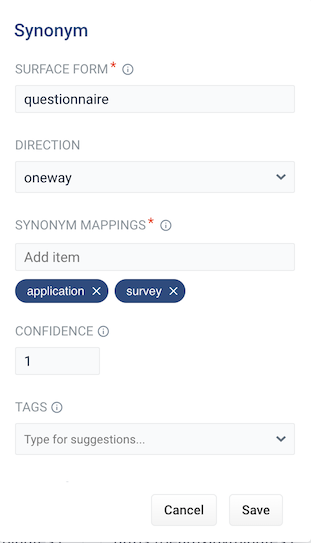
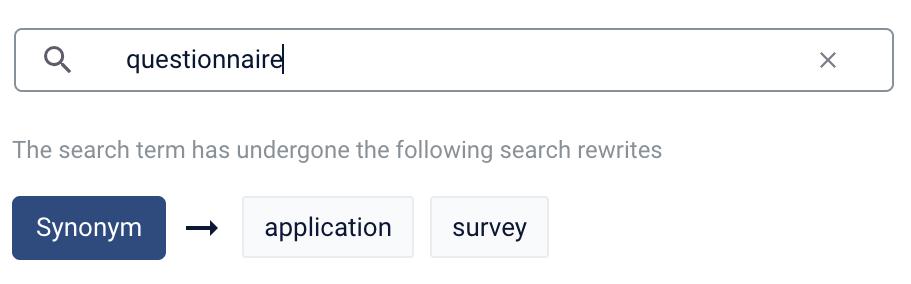
For example, the search term `questionnaire` could have the synonyms `application` and `survey`.
1. From the list of query rewrite options, select **Synonym**. A form will appear:
This form contains the following fields:
| | | |
| ---------------- | ----------------------------------------------------------------------------------------------------------------------------------------------------------------------------------------------------------------------------------------------------------------------------------------------------------------------------------------------------------------------------------------------------------------------------------------------------------- | ----------------------- |
| Parameter | Description | Example Value |
| Surface Form | The term that has synonyms. | `questionnaire` |
| Direction | With a **oneway** search, the original search term is replaced by the synonym. In the example above, `questionnaire` would be replaced by the alternative words `application` and `survey`. With a **symmetric** search, the search query is expanded to include the original term and the synonyms, resulting in a greater number of potential hits. In the example above, this time the query would include `questionnaire`, `application`, and `survey`. | `symmetric` |
| Synonym Mappings | Synonyms for the surface form. | `application, `survey\` |
| Confidence | Confidence score from the phrase job. A confidence level of `1` represents 100% confidence. For rules created automatically via machine learning, the confidence level will reflect the output from the machine learning model. | `1` |
| Tags | Optional metadata tags that can be used to identify and organize rewrites. | `enrollmentpacket` |
| Count | How many times this term occurred in the signal data when it was discovered. This value is optional when a rewrite is being defined manually. | `5` |
2. Choose whether the direction is **oneway** or **symmetric**.
3. Enter one or more alternative words in the **Synonym Mappings** field.
4. Click the **Save** button.
The search is re-run using the synonyms, and a Search box information panel drops down to show that the new query rewrite has fired:
## Remove Words
The Remove Words feature is available in Fusion 5.4 and later.
{/* // tag::remove-words[] */}
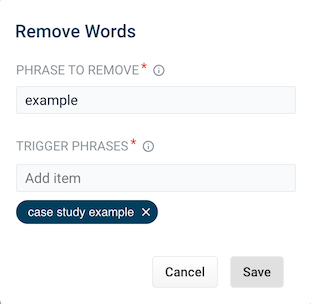
You can create a Remove Words query rewrite to remove words from a query. This query rewrite is helpful when a word in the search query does not add value to the search results.
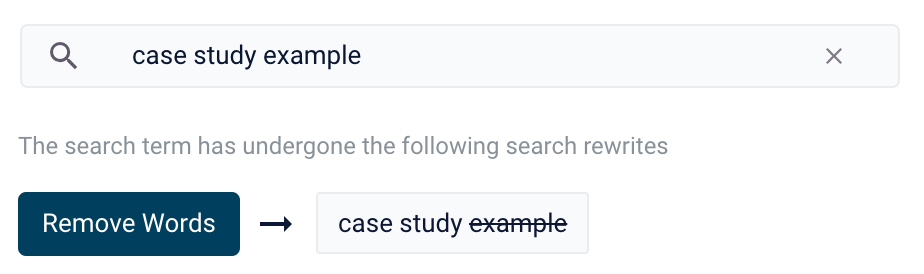
For example, you can rewrite a search query for `case study examples` to remove `examples` and then display results for `case study`.
1. From the list of query rewrite options, select Remove Words. A form appears:
2. This form contains the following fields:
| Parameter | Description | Example Value |
| ---------------- | ----------------------------------------------------------------------------------------------------------------------------------------------------------------------------------------------------------------- | --------------------- |
| Phrase to remove | The words to remove from the trigger phrase. | `examples` |
| Trigger phrases | The query that prompts the removal of the phrase. The trigger phrase is not necessarily a complete query. If the query contains the trigger phrase, then Fusion removes the phrase in the Phrase to Remove field. | `case study examples` |
1. Enter a phrase to remove and a trigger phrase. Note that the phrase to remove is auto-populated with the query.
2. Click **Save**.
The search is re-run, and a Search box information panel drops down to show that the new query rewrite has fired:
{/* // end::remove-words[] */}
In Experience Optimizer, you can create search rewrites manually. You can also edit, test, review and publish the search rewrites that are generated automatically in Fusion from signals data.
The course for **Experience Optimizer: Rewrites Manager** focuses on how to create search rewrites that optimize your user’s search results.
 This form contains the following fields:
| | | |
| -------------- | -------------------------------------------------------------------------- | --------------------------------- |
| Parameter | Description | Example Value |
| Tail Query | The tail query itself. | `benefits enrollment` |
| Improved Query | The query that will replace the tail query phrase. | `benefits enrollment+year:"2021"` |
| Tags | Optional metadata tags that can be used to identify and organize rewrites. | `enrollmentpacket` |
2. Enter one or more improved search terms in the **Improved Query** field.
3. Click the **Save** button.
The search is re-run using the improved search term, and a Search box information panel drops down to show that the new query rewrite has fired:
This form contains the following fields:
| | | |
| -------------- | -------------------------------------------------------------------------- | --------------------------------- |
| Parameter | Description | Example Value |
| Tail Query | The tail query itself. | `benefits enrollment` |
| Improved Query | The query that will replace the tail query phrase. | `benefits enrollment+year:"2021"` |
| Tags | Optional metadata tags that can be used to identify and organize rewrites. | `enrollmentpacket` |
2. Enter one or more improved search terms in the **Improved Query** field.
3. Click the **Save** button.
The search is re-run using the improved search term, and a Search box information panel drops down to show that the new query rewrite has fired:
 ## Misspelling
You can create a misspelling query rewrite to detect and correct common spelling mistakes. When a customer enters a search term containing a known misspelling, the incorrect spelling is replaced with the spelling correction.
{/* // NOTE: The example does not match the image. Use another datasource. */}
For example, if your clients frequently misspell or mistype the word `questionnaire` as `questionare`, you can set up a query rewrite to automatically correct it.
1. From the list of query rewrite options, select **Misspelling**. A form will appear:
## Misspelling
You can create a misspelling query rewrite to detect and correct common spelling mistakes. When a customer enters a search term containing a known misspelling, the incorrect spelling is replaced with the spelling correction.
{/* // NOTE: The example does not match the image. Use another datasource. */}
For example, if your clients frequently misspell or mistype the word `questionnaire` as `questionare`, you can set up a query rewrite to automatically correct it.
1. From the list of query rewrite options, select **Misspelling**. A form will appear:
 {/* // NOTE: The examples in table do not match the image. Use another datasource. */}
This form contains the following fields:
| | | |
| --------------- | ------------------------------------------------------------------------------------------------------------------------------------------------------------------------------------------------------------------------------- | ------------------ |
| Parameter | Description | Example Value |
| Misspelled Term | The phrase itself. | `questionare` |
| Corrected Term | The term that will replace the misspelled term. | `questionnaire` |
| Action | Action to perform. | `expand` |
| Confidence | Confidence score from the phrase job. A confidence level of `1` represents 100% confidence. For rules created automatically via machine learning, the confidence level will reflect the output from the machine learning model. | `1` |
| Tags | Optional metadata tags that can be used to identify and organize rewrites. | `enrollmentpacket` |
2. Enter one or more spelling corrections in the **Corrected Term** field.
3. Click the **Save** button.
The search is re-run using the corrected spelling, and a Search box information panel drops down to show that the new query rewrite has fired:
{/* // NOTE: The examples in table do not match the image. Use another datasource. */}
This form contains the following fields:
| | | |
| --------------- | ------------------------------------------------------------------------------------------------------------------------------------------------------------------------------------------------------------------------------- | ------------------ |
| Parameter | Description | Example Value |
| Misspelled Term | The phrase itself. | `questionare` |
| Corrected Term | The term that will replace the misspelled term. | `questionnaire` |
| Action | Action to perform. | `expand` |
| Confidence | Confidence score from the phrase job. A confidence level of `1` represents 100% confidence. For rules created automatically via machine learning, the confidence level will reflect the output from the machine learning model. | `1` |
| Tags | Optional metadata tags that can be used to identify and organize rewrites. | `enrollmentpacket` |
2. Enter one or more spelling corrections in the **Corrected Term** field.
3. Click the **Save** button.
The search is re-run using the corrected spelling, and a Search box information panel drops down to show that the new query rewrite has fired:
 ## Phrase
You can use query rewriting to identify phrases used in search terms so that products with matching phrases are boosted in the search results. This is helpful when users do not use quotation marks to identify phrases in their search terms.
{/* // NOTE: The example does not match the image. Use another datasource. */}
For example, without phrase detection a search for the words `background check` would show results for both `background` and `check`. With phrase detection, this search would correctly boost results for `"background check"`.
1. From the list of query rewrite options, select **Phrase**. A form will appear:
## Phrase
You can use query rewriting to identify phrases used in search terms so that products with matching phrases are boosted in the search results. This is helpful when users do not use quotation marks to identify phrases in their search terms.
{/* // NOTE: The example does not match the image. Use another datasource. */}
For example, without phrase detection a search for the words `background check` would show results for both `background` and `check`. With phrase detection, this search would correctly boost results for `"background check"`.
1. From the list of query rewrite options, select **Phrase**. A form will appear:
 This form contains the following fields:
| | | |
| ------------ | ------------------------------------------------------------------------------------------------------------------------------------------------------------------------------------------------------------------------------- | ------------------ |
| Parameter | Description | Example Value |
| Surface Form | The phrase itself. | `background check` |
| Word Count | Indicates how many words are included in the phrase. | `2` |
| Confidence | Confidence score from the phrase job. A confidence level of `1` represents 100% confidence. For rules created automatically via machine learning, the confidence level will reflect the output from the machine learning model. | `1` |
| Tags | Optional metadata tags that can be used to identify and organize rewrites. | `enrollmentpacket` |
| Phrase Count | Denotes how many times this phrase was found in the source. This value is automatically set via machine learning. It does not need to be set manually. | `5` |
| Boost Factor | The factor to use to boost this phrase in matching queries. | `2.0` |
| Slop Factor | Phrase slop, or the distance between the terms of the query while still considering it a phrase match. | `10` |
2. Enter the number of words in the phrase in the **Word Count** field.
3. Click the **Save** button.
The search is re-run, with your search words identified as a phrase, and a Search box information panel drops down to show that the new query rewrite has fired:
This form contains the following fields:
| | | |
| ------------ | ------------------------------------------------------------------------------------------------------------------------------------------------------------------------------------------------------------------------------- | ------------------ |
| Parameter | Description | Example Value |
| Surface Form | The phrase itself. | `background check` |
| Word Count | Indicates how many words are included in the phrase. | `2` |
| Confidence | Confidence score from the phrase job. A confidence level of `1` represents 100% confidence. For rules created automatically via machine learning, the confidence level will reflect the output from the machine learning model. | `1` |
| Tags | Optional metadata tags that can be used to identify and organize rewrites. | `enrollmentpacket` |
| Phrase Count | Denotes how many times this phrase was found in the source. This value is automatically set via machine learning. It does not need to be set manually. | `5` |
| Boost Factor | The factor to use to boost this phrase in matching queries. | `2.0` |
| Slop Factor | Phrase slop, or the distance between the terms of the query while still considering it a phrase match. | `10` |
2. Enter the number of words in the phrase in the **Word Count** field.
3. Click the **Save** button.
The search is re-run, with your search words identified as a phrase, and a Search box information panel drops down to show that the new query rewrite has fired:
 ## Synonym
You can specify synonyms for a specified search term so that alternative words with the same meaning are automatically used in the search query. When a customer enters a search term with a synonym match, the alternative words are used instead of, or in addition to, the original search term.
For example, the search term `questionnaire` could have the synonyms `application` and `survey`.
1. From the list of query rewrite options, select **Synonym**. A form will appear:
## Synonym
You can specify synonyms for a specified search term so that alternative words with the same meaning are automatically used in the search query. When a customer enters a search term with a synonym match, the alternative words are used instead of, or in addition to, the original search term.
For example, the search term `questionnaire` could have the synonyms `application` and `survey`.
1. From the list of query rewrite options, select **Synonym**. A form will appear:
 This form contains the following fields:
| | | |
| ---------------- | ----------------------------------------------------------------------------------------------------------------------------------------------------------------------------------------------------------------------------------------------------------------------------------------------------------------------------------------------------------------------------------------------------------------------------------------------------------- | ----------------------- |
| Parameter | Description | Example Value |
| Surface Form | The term that has synonyms. | `questionnaire` |
| Direction | With a **oneway** search, the original search term is replaced by the synonym. In the example above, `questionnaire` would be replaced by the alternative words `application` and `survey`. With a **symmetric** search, the search query is expanded to include the original term and the synonyms, resulting in a greater number of potential hits. In the example above, this time the query would include `questionnaire`, `application`, and `survey`. | `symmetric` |
| Synonym Mappings | Synonyms for the surface form. | `application, `survey\` |
| Confidence | Confidence score from the phrase job. A confidence level of `1` represents 100% confidence. For rules created automatically via machine learning, the confidence level will reflect the output from the machine learning model. | `1` |
| Tags | Optional metadata tags that can be used to identify and organize rewrites. | `enrollmentpacket` |
| Count | How many times this term occurred in the signal data when it was discovered. This value is optional when a rewrite is being defined manually. | `5` |
2. Choose whether the direction is **oneway** or **symmetric**.
3. Enter one or more alternative words in the **Synonym Mappings** field.
4. Click the **Save** button.
The search is re-run using the synonyms, and a Search box information panel drops down to show that the new query rewrite has fired:
This form contains the following fields:
| | | |
| ---------------- | ----------------------------------------------------------------------------------------------------------------------------------------------------------------------------------------------------------------------------------------------------------------------------------------------------------------------------------------------------------------------------------------------------------------------------------------------------------- | ----------------------- |
| Parameter | Description | Example Value |
| Surface Form | The term that has synonyms. | `questionnaire` |
| Direction | With a **oneway** search, the original search term is replaced by the synonym. In the example above, `questionnaire` would be replaced by the alternative words `application` and `survey`. With a **symmetric** search, the search query is expanded to include the original term and the synonyms, resulting in a greater number of potential hits. In the example above, this time the query would include `questionnaire`, `application`, and `survey`. | `symmetric` |
| Synonym Mappings | Synonyms for the surface form. | `application, `survey\` |
| Confidence | Confidence score from the phrase job. A confidence level of `1` represents 100% confidence. For rules created automatically via machine learning, the confidence level will reflect the output from the machine learning model. | `1` |
| Tags | Optional metadata tags that can be used to identify and organize rewrites. | `enrollmentpacket` |
| Count | How many times this term occurred in the signal data when it was discovered. This value is optional when a rewrite is being defined manually. | `5` |
2. Choose whether the direction is **oneway** or **symmetric**.
3. Enter one or more alternative words in the **Synonym Mappings** field.
4. Click the **Save** button.
The search is re-run using the synonyms, and a Search box information panel drops down to show that the new query rewrite has fired:
 ## Remove Words
 2. This form contains the following fields:
| Parameter | Description | Example Value |
| ---------------- | ----------------------------------------------------------------------------------------------------------------------------------------------------------------------------------------------------------------- | --------------------- |
| Phrase to remove | The words to remove from the trigger phrase. | `examples` |
| Trigger phrases | The query that prompts the removal of the phrase. The trigger phrase is not necessarily a complete query. If the query contains the trigger phrase, then Fusion removes the phrase in the Phrase to Remove field. | `case study examples` |
1. Enter a phrase to remove and a trigger phrase. Note that the phrase to remove is auto-populated with the query.
2. Click **Save**.
The search is re-run, and a Search box information panel drops down to show that the new query rewrite has fired:
2. This form contains the following fields:
| Parameter | Description | Example Value |
| ---------------- | ----------------------------------------------------------------------------------------------------------------------------------------------------------------------------------------------------------------- | --------------------- |
| Phrase to remove | The words to remove from the trigger phrase. | `examples` |
| Trigger phrases | The query that prompts the removal of the phrase. The trigger phrase is not necessarily a complete query. If the query contains the trigger phrase, then Fusion removes the phrase in the Phrase to Remove field. | `case study examples` |
1. Enter a phrase to remove and a trigger phrase. Note that the phrase to remove is auto-populated with the query.
2. Click **Save**.
The search is re-run, and a Search box information panel drops down to show that the new query rewrite has fired:
 {/* // end::remove-words[] */}