> ## Documentation Index
> Fetch the complete documentation index at: https://doc.lucidworks.com/llms.txt
> Use this file to discover all available pages before exploring further.

# Regex Field Extraction Index Stage

export const schema = {
  "type": "object",
  "title": "Regex Field Extraction",
  "description": "This stage allows you to extract text using regular expressions",
  "properties": {
    "skip": {
      "type": "boolean",
      "title": "Skip This Stage",
      "description": "Set to true to skip this stage.",
      "default": false,
      "hints": ["advanced"]
    },
    "label": {
      "type": "string",
      "title": "Label",
      "description": "A unique label for this stage.",
      "hints": ["advanced"],
      "maxLength": 255
    },
    "condition": {
      "type": "string",
      "title": "Condition",
      "description": "Define a conditional script that must result in true or false. This can be used to determine if the stage should process or not.",
      "hints": ["code", "code/javascript", "advanced"]
    },
    "rules": {
      "type": "array",
      "title": "Regex Rules",
      "items": {
        "type": "object",
        "required": ["source", "target", "pattern"],
        "properties": {
          "source": {
            "type": "array",
            "title": "Source Fields",
            "minItems": 1,
            "items": {
              "type": "string",
              "format": "regex"
            }
          },
          "target": {
            "type": "string",
            "title": "Target Field"
          },
          "writeMode": {
            "type": "string",
            "title": "Write Mode",
            "description": "What to do if document has target field already",
            "enum": ["overwrite", "append"],
            "default": "append",
            "hints": ["advanced"]
          },
          "pattern": {
            "type": "string",
            "title": "Regex Pattern",
            "format": "regex"
          },
          "returnIfNoMatch": {
            "type": "string",
            "title": "Return if no Match",
            "enum": ["null", "input_string", "value"],
            "default": "null",
            "hints": ["advanced"]
          },
          "noMatchValue": {
            "type": "string",
            "title": "No Match Literal Value",
            "hints": ["advanced"]
          },
          "group": {
            "type": "integer",
            "title": "Regex Capture Group",
            "default": 0,
            "hints": ["advanced"],
            "minimum": 0,
            "exclusiveMinimum": false
          },
          "annotateAs": {
            "type": "string",
            "title": "Annotation Name",
            "description": "the name of the annotation to be added to the source field to mark the boundaries of the match",
            "hints": ["advanced"]
          }
        }
      }
    }
  },
  "category": "Field Transformation",
  "categoryPriority": 6,
  "unsafe": false
};

export const SchemaParamFields = ({schema}) => {
  const sanitize = str => {
    if (typeof str !== "string") return str;
    return str.replace(/^"(.*)"$/s, "$1").replace(/\\/g, "").replace(/"/g, "'");
  };
  const formatDescription = str => {
    const s = sanitize(str);
    return (/[.!?]\)*$/).test(s) ? s : `${s}.`;
  };
  const {description, properties = {}, required: requiredProps = []} = schema;
  const visibleProps = useMemo(() => Object.entries(properties).filter(([, prop]) => !prop.hints?.includes("hidden")), [properties]);
  return <div>
      {description && <p>{formatDescription(description)}</p>}

      {visibleProps.map(([name, prop]) => {
    const isRequired = requiredProps.includes(name);
    const hasDefault = prop.default !== undefined;
    const rawDefault = prop.default;
    const isComplexDefault = hasDefault && (typeof rawDefault === "object" || typeof rawDefault === "string" && (rawDefault.length > 20 || rawDefault.includes('"')));
    const fieldProps = {
      key: name,
      body: prop.title || name,
      type: prop.type,
      ...prop.title && ({
        post: [<><span className="text-stone-400 dark:text-stone-500">API property: </span>{name}</>]
      }),
      ...isRequired && ({
        required: true
      }),
      ...!isComplexDefault && hasDefault ? {
        default: sanitize(String(rawDefault))
      } : {}
    };
    const isObject = prop.type === "object" && prop.properties;
    const isArrayOfObjects = prop.type === "array" && prop.items?.type === "object" && prop.items.properties;
    return <ParamField {...fieldProps}>
            {prop.description && <p>{formatDescription(prop.description)}</p>}

            {isComplexDefault && <div className="flex">
                <p>
                  <strong>Default:</strong>
                </p>
                <pre className="!my-0">
                  <code>
                    {JSON.stringify(rawDefault, null, 2)}
                  </code>
                </pre>
              </div>}

            {isArrayOfObjects && <div className="flex">
              <p>
                <strong>Object attributes:</strong>
              </p>
              <pre className="!my-0">
                <code>
                  {'{\n'}
                  {Object.entries(prop.items.properties).map(([iname, iprop]) => <>
                      {`  ${iname}`}
                      {prop.items?.required?.includes(iname) && <span style={{
      color: 'red'
    }}> required</span>}
                      {`: {\n    display name: ${sanitize(iprop.title || '')}\n    type: ${iprop.type}\n  }\n`}
                    </>)}
                  {'}'}
                </code>
              </pre>
              </div>}

            {isObject && <Expandable title="properties">
                <SchemaParamFields schema={{
      properties: prop.properties,
      required: prop.required
    }} />
              </Expandable>}
          </ParamField>;
  })}
    </div>;
};

export const LwTemplate = ({title = "Key questions to get you started", icon = "sparkles", cta = "Powered by Agent Studio", linkHref = "https://lucidworks.com/demo/?utm_source=docs&utm_medium=referral&utm_campaign=docs_cta_ai"}) => {
  const [isLoaded, setIsLoaded] = useState(false);
  useEffect(() => {
    const timer = setTimeout(() => {
      setIsLoaded(true);
    }, 500);
    return () => clearTimeout(timer);
  }, []);
  return <div className="lw-template-container">
      <Card title={title} icon={icon}>
        {isLoaded && <span dangerouslySetInnerHTML={{
    __html: `<lw-template id="a029c1a9-28be-427e-b0e1-5d918920246a"></lw-template
            >`
  }} />}
        <Link href={linkHref} className="agent-studio-link text-left text-gray-600 gap-2 dark:text-gray-400 text-sm font-medium flex flex-row items-center hover:text-primary dark:hover:text-primary-light group-hover:text-primary group-hover:dark:text-primary-light">Powered by Lucidworks Agent Studio</Link>
      </Card>
    </div>;
};

export const InlineImage = ({src, alt = '', height = '2em'}) => {
  return <img src={src} alt={alt} style={{
    display: 'inline',
    verticalAlign: 'start',
    height: height,
    margin: '0'
  }} />;
};

[localhost link]: http://localhost:3000/docs/4/fusion-server/reference/pipeline-stages/indexing/regular-expression-extractor-index-stage

[mintlify link]: https://doc.lucidworks.com/docs/4/fusion-server/reference/pipeline-stages/indexing/regular-expression-extractor-index-stage

[old doc.lw link]: https://doc.lucidworks.com/fusion/5.9/238

The Regex Field Extraction stage (called the Regular Expression Extractor stage in versions earlier than 3.0) is used to extract entities from documents based on matching regular expressions. The resulting regex matches over the contents of the source field are copied to the target field. The regular expression, source, and target fields are defined properties of this stage.

If using the REST API, this stage type is named "regex-extractor".

Examples of how to use this stage in the Fusion UI:

<AccordionGroup>
  <Accordion title="Get Data In">
    Fusion’s Index Workbench provides the tools to configure datasources, parsers, and index pipelines. It lets you *preview* the results of indexing before you load your data into the actual index.

    Index Workbench first sets up the necessary data extraction configuration, and then retrieves a small number of documents as sample data. You can use the sample documents to test and refine your index pipeline. All processing is *simulated* processing of the test data. No actual data ingestion takes place.

    After you have a complete configuration, Index Workbench saves this as a Fusion datasource.
    To load your data into Fusion, use the Fusion Datasource tool to run the resulting configuration.

    Part 2 takes you through configuring a datasource using Index Workbench. In Part 3, you will load the data into Fusion and view it using Query Workbench.

    <LwTemplate />

    ## Before you begin

    To proceed with this part of the tutorial, you must first complete Part 1, which gives you a running instance of Fusion and a Fusion app.

    ## Download the MovieLens dataset

    1. [Download the dataset](https://files.grouplens.org/datasets/movielens/ml-latest-small.zip).

       This is a MovieLens dataset created by the [Grouplens](https://grouplens.org/) research lab.
    2. Unpack the `ml-latest-small.zip` file.

       Fusion can parse `.zip` files, but for simplicity we will index just one file from the archive (`movies.csv`).

    The `movies.csv` file contains a list of 9,125 movie titles, plus a header row. Here is a truncated listing:

    ```csv theme={"dark"}
    movieId,title,genres
    1,Toy Story (1995),Adventure|Animation|Children|Comedy|Fantasy
    2,Jumanji (1995),Adventure|Children|Fantasy
    3,Grumpier Old Men (1995),Comedy|Romance
    4,Waiting to Exhale (1995),Comedy|Drama|Romance
    5,Father of the Bride Part II (1995),Comedy
    6,Heat (1995),Action|Crime|Thriller
    7,Sabrina (1995),Comedy|Romance
    8,Tom and Huck (1995),Adventure|Children
    9,Sudden Death (1995),Action
    10,GoldenEye (1995),Action|Adventure|Thriller
    ```

    ## Open the Movie Search app

    1. If the Fusion UI is not already open, then open it.
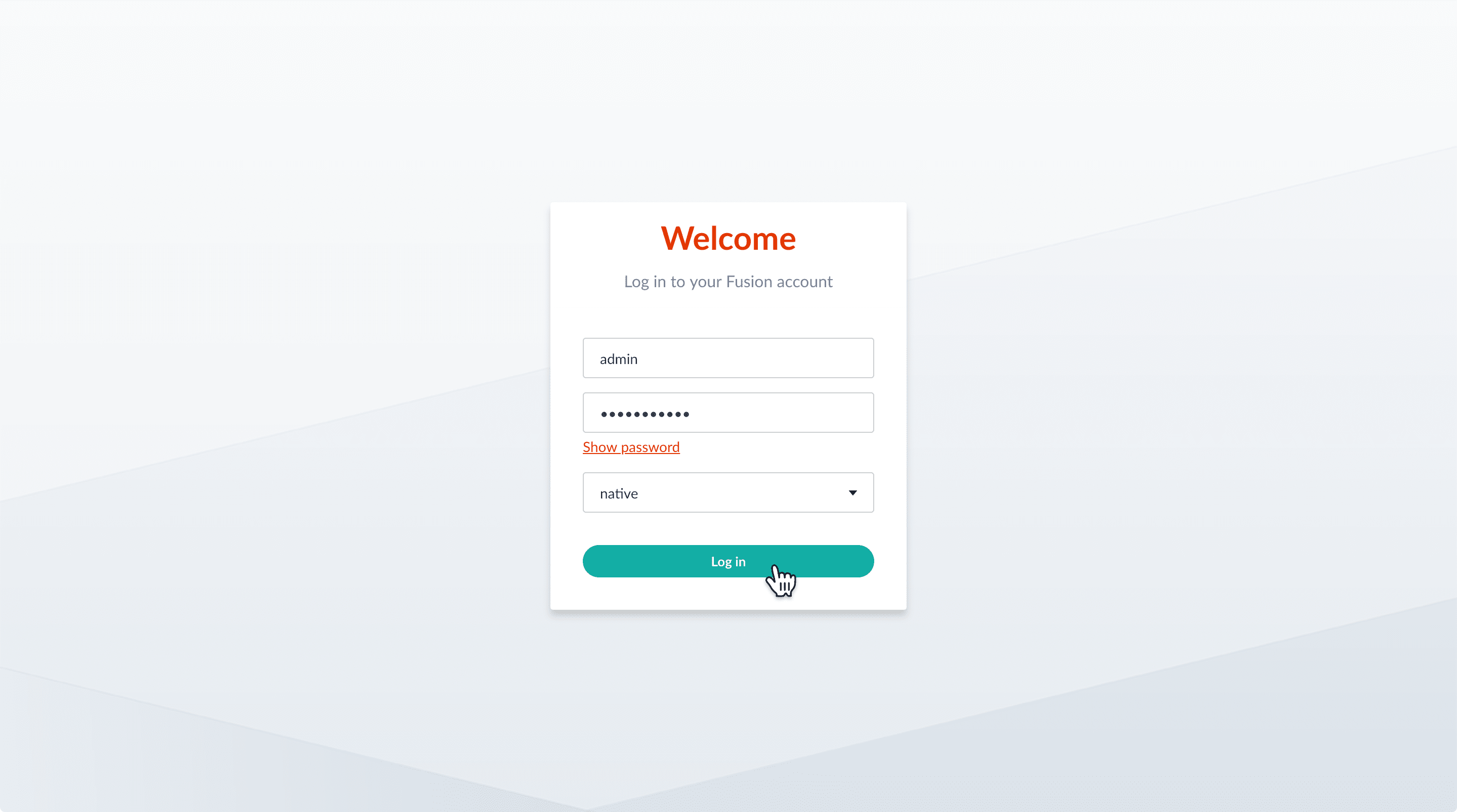
    2. Enter the password for the user `admin`, and then click **Log in**.

           <img src="https://mintcdn.com/lucidworks/TTnHmbCCHl-1HFoG/assets/images/5.0/welcome.png?fit=max&auto=format&n=TTnHmbCCHl-1HFoG&q=85&s=5f0870e736aa73d669cc9243718aad06" alt="Welcome" width="2880" height="1606" data-path="assets/images/5.0/welcome.png" />

       The Fusion launcher appears. You see the Movie Search app you created in Part 1:
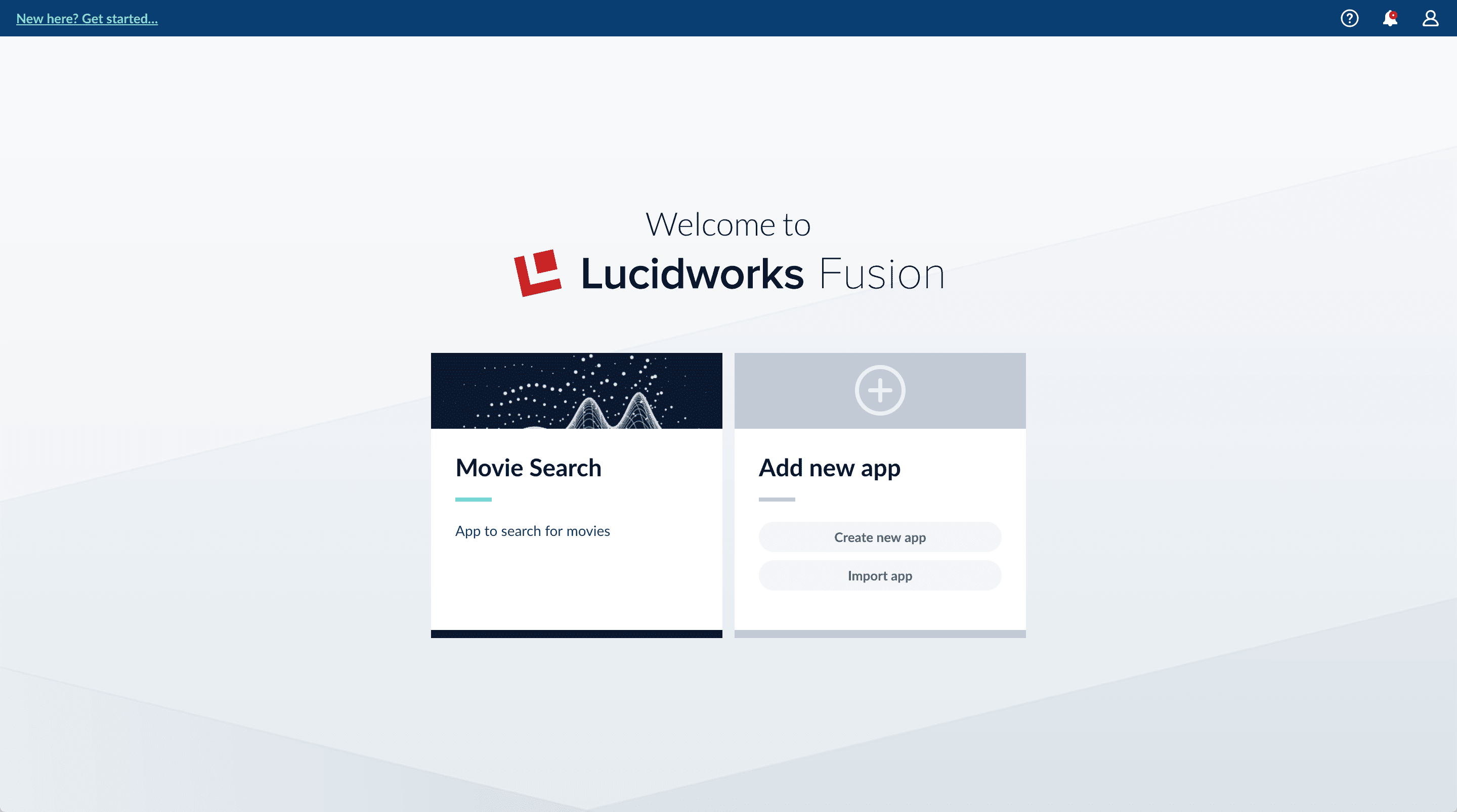
           <img src="https://mintcdn.com/lucidworks/de_1M1m_4TTyJqw0/assets/images/5.0/app-in-launcher.png?fit=max&auto=format&n=de_1M1m_4TTyJqw0&q=85&s=dfa829a498f1dfa1802810eee2f3df16" alt="Movie Search app in launcher" width="2880" height="1606" data-path="assets/images/5.0/app-in-launcher.png" />
    3. In the Fusion launcher, click the **Movie Search** app.

       The Fusion workspace appears. It has controls along the left and top sides.
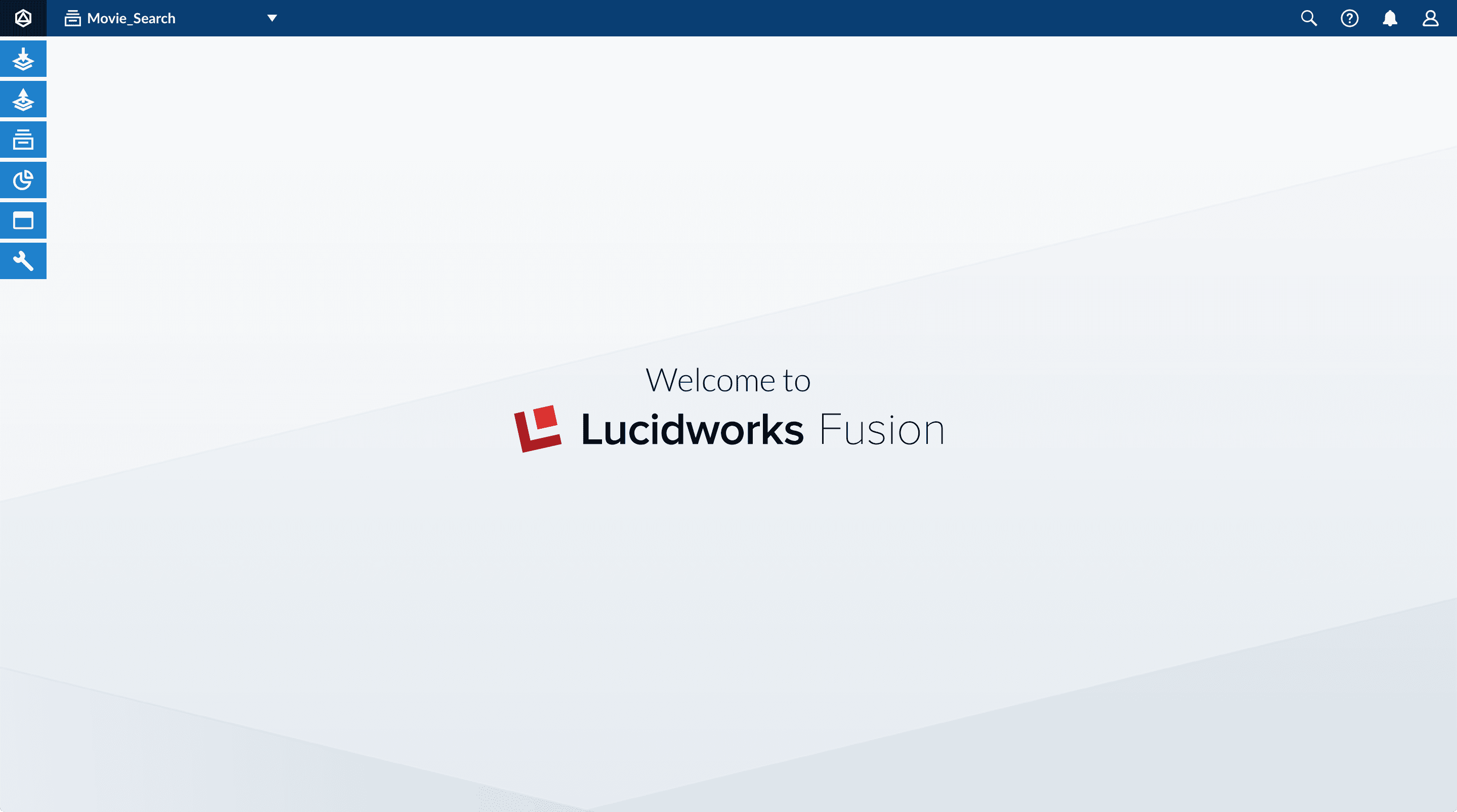
           <img src="https://mintcdn.com/lucidworks/de_1M1m_4TTyJqw0/assets/images/5.0/fusion-workspace.png?fit=max&auto=format&n=de_1M1m_4TTyJqw0&q=85&s=f73d2aef0f286cb3ee301bf83533ece1" alt="Fusion workspace" width="2880" height="1606" data-path="assets/images/5.0/fusion-workspace.png" />
    4. In the upper left, hover over Apps <InlineImage src="/assets/images/4.0/icons/workspace-menu-apps.png" alt="Apps" />. You can see that Movie Search is the currently selected app.

       Also, the user collection `Movie_Search` is selected in the collection picker. This is the default collection for the Movie Search app, and where Fusion will place index data.

    ## Configure the datasource

    A collection includes one or more datasources. A datasource is a configuration that manages the import, parsing, and indexing of data into a collection. You will use Index Workbench to configure a datasource for the movie data.

    1. In the collection picker, verify that the collection **Movie\_Search** is selected.

           <img src="https://mintcdn.com/lucidworks/zH_ln2rWO5G9pvTA/assets/images/5.0/movie-search-collection-selected.png?fit=max&auto=format&n=zH_ln2rWO5G9pvTA&q=85&s=b57370187dd28bfc4d4dd744dd348a29" alt="Collection Movie_Search is selected" style={{ width: "300px" }} width="487" height="68" data-path="assets/images/5.0/movie-search-collection-selected.png" />

    2. Open Index Workbench. Navigate to Indexing <InlineImage src="/assets/images/4.0/icons/workspace-menu-indexing.png" alt="Indexing" /> > **Index Workbench**.
       Initially, no data preview appears because no datasource has been configured. When you configure a datasource, Fusion samples the data and displays a preview of how it would be formatted in the index using the default parsing and index pipeline configurations.

    3. In the upper right, click **New**.

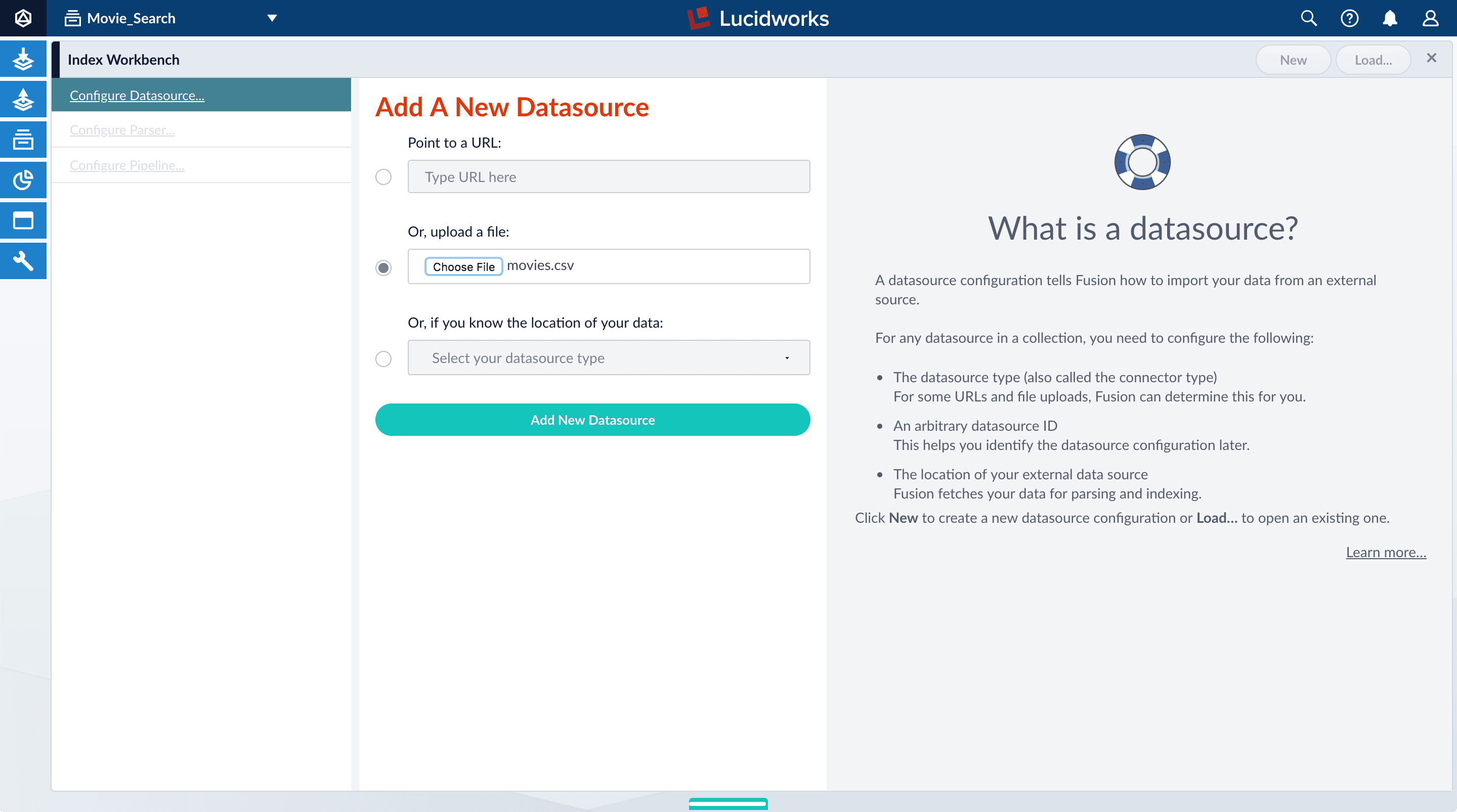
    4. Select **Or, upload a file**.

    5. Click **Choose File**.

    6. Navigate to the `movies.csv` file, select it, and then click **Open**.

           <img src="https://mintcdn.com/lucidworks/zH_ln2rWO5G9pvTA/assets/images/5.0/new-datasource.png?fit=max&auto=format&n=zH_ln2rWO5G9pvTA&q=85&s=9f2b9fdfe0b6ef3dccc6eba6b3420567" alt="New datasource" width="2880" height="1606" data-path="assets/images/5.0/new-datasource.png" />

    7. Click **Add New Datasource**.

       The Datasource (File Upload) configuration panel appears, with the default datasource ID `movies_csv-Movie_Search` and the default file ID `movies.csv`. These default values are fine.

    8. Enter the **Description** `Movies CSV file`.
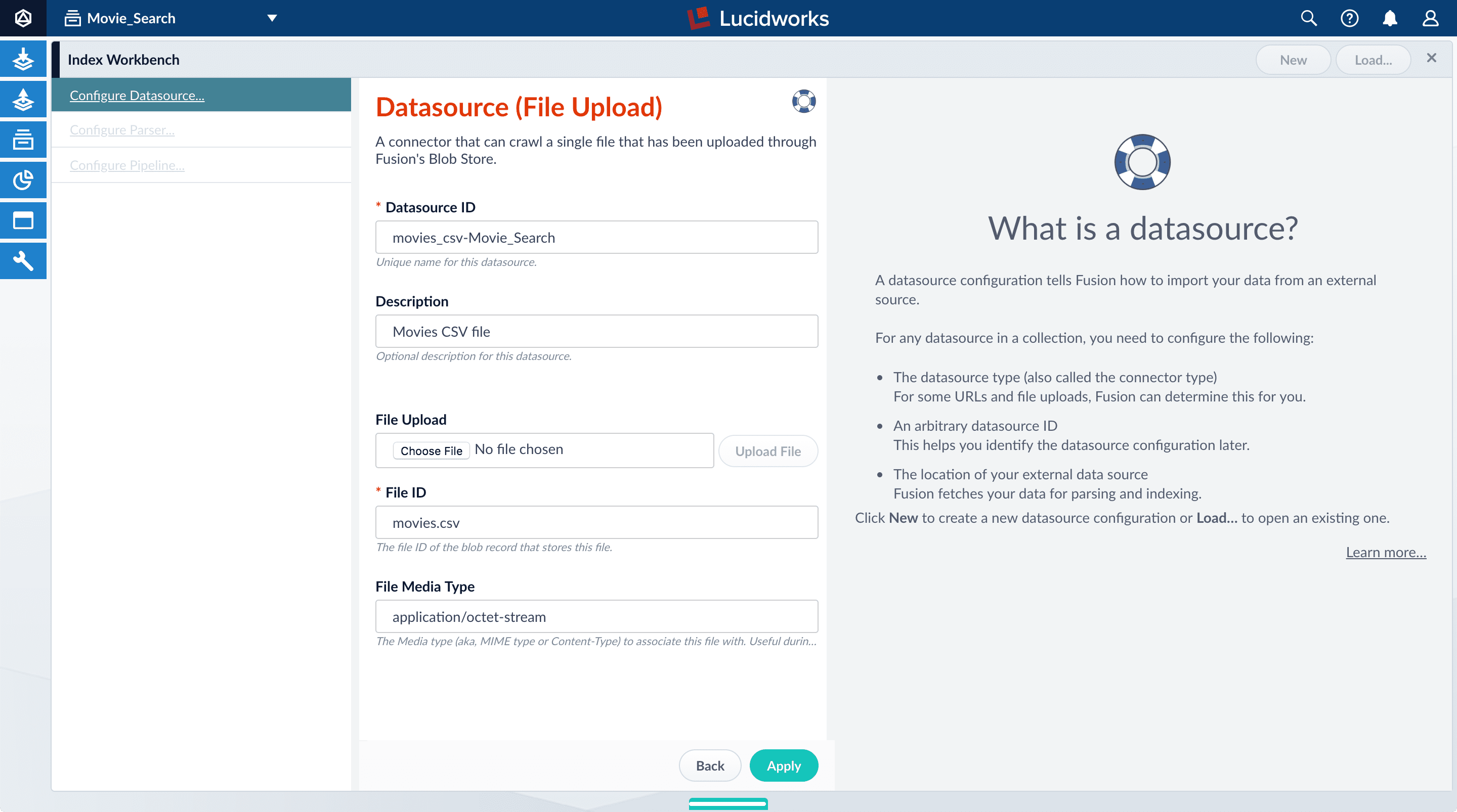
           <img src="https://mintcdn.com/lucidworks/de_1M1m_4TTyJqw0/assets/images/5.0/configure-datasource-panel.png?fit=max&auto=format&n=de_1M1m_4TTyJqw0&q=85&s=122dc6a2d030b7821f3c641c0a1fff65" alt="Configure datasource" width="2880" height="1606" data-path="assets/images/5.0/configure-datasource-panel.png" />

    9. Click **Apply**.

       Index Workbench reads up to 20 documents into memory from the `movies.csv` file, and then displays a preview of how they would be indexed.

       You have finished configuring the datasource. At the bottom of the page, click **Cancel**.
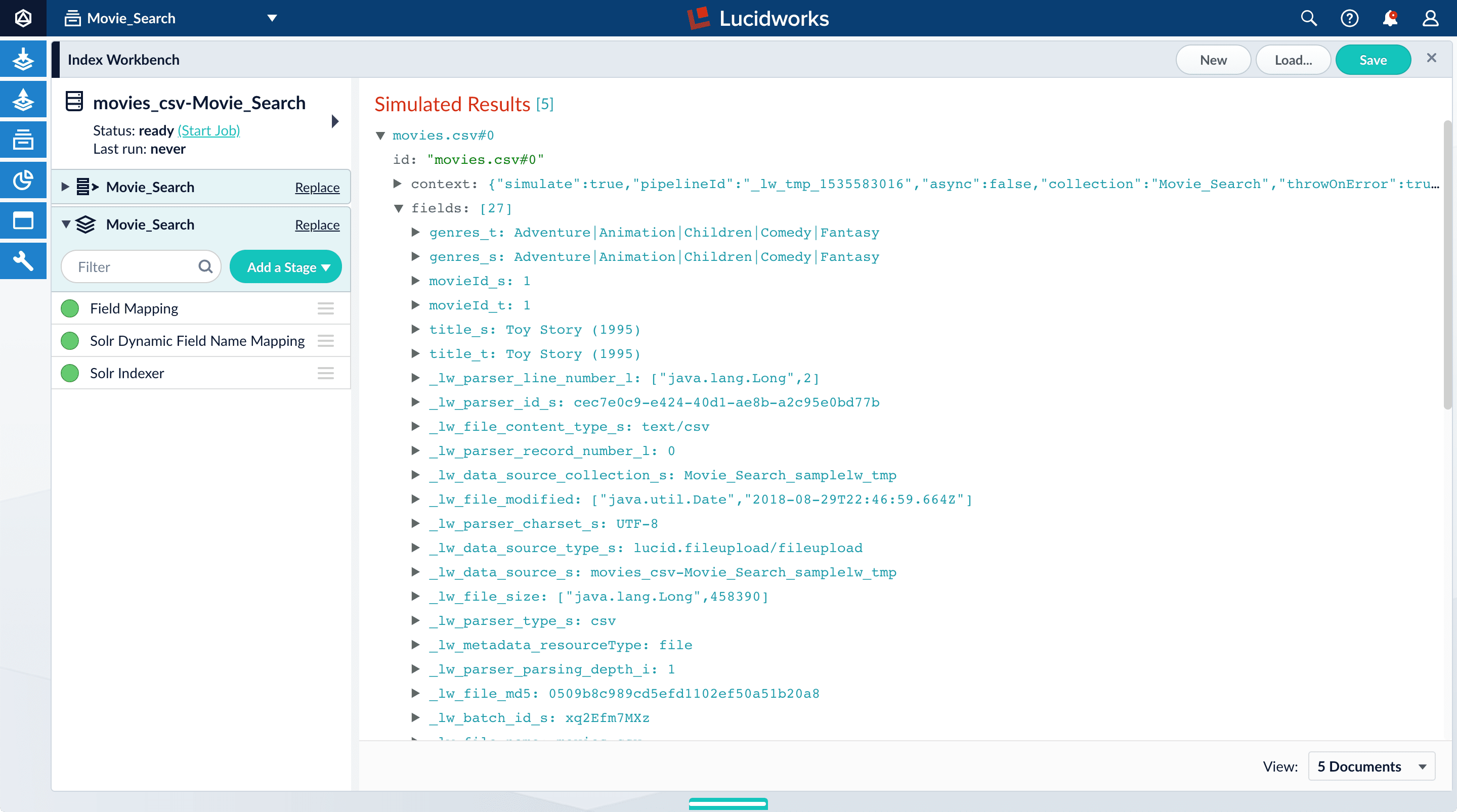
           <img src="https://mintcdn.com/lucidworks/de_1M1m_4TTyJqw0/assets/images/5.0/first-index-preview.png?fit=max&auto=format&n=de_1M1m_4TTyJqw0&q=85&s=c407d717f4603aab2e70c44b52f852ea" alt="First preview of index" width="2880" height="1606" data-path="assets/images/5.0/first-index-preview.png" />

       In the lower right, you can select the number of documents to preview.

    ## Analyze the default output

    1. Notice that Fusion made some assumptions about your original fields:

       * `genres` became `genres_t` (the `text_general` field type) and `genres_s` (the `string` field type). String fields are useful for faceting and sorting, while text fields are for full-text search. At this point, Fusion does not know whether you intend to use this field for faceting and sorting, for full-text search, or for both.
       * `title` became `title_t` and `title_s` for the same reason.
       * `movieId` became `movieId_t` and `movieId_s` for the same reason. This might seem odd, because the original field contains numbers. But, at this stage, Fusion creates `text_general` and `string` fields. To use the contents of this field as an integer, you would map the field to an integer field.

       You also see fields that begin with `_lw`. These fields contain data that Fusion creates for its own housekeeping. You can ignore them.

       These fields are created by the [Solr Dynamic Field Name Mapping stage](/docs/4/fusion-server/reference/pipeline-stages/indexing/solr-dynamic-field-name-mapping-index-stage) in the default index pipeline. This stage attempts to automatically detect field types, and renames fields accordingly. For this tutorial, you will manually configure the fields instead.
    2. Turn off the **Solr Dynamic Field Name Mapping** stage by clicking the green circle next to it.

       Your data’s original fields reappear: `genres`, `movieId`, and `title`.
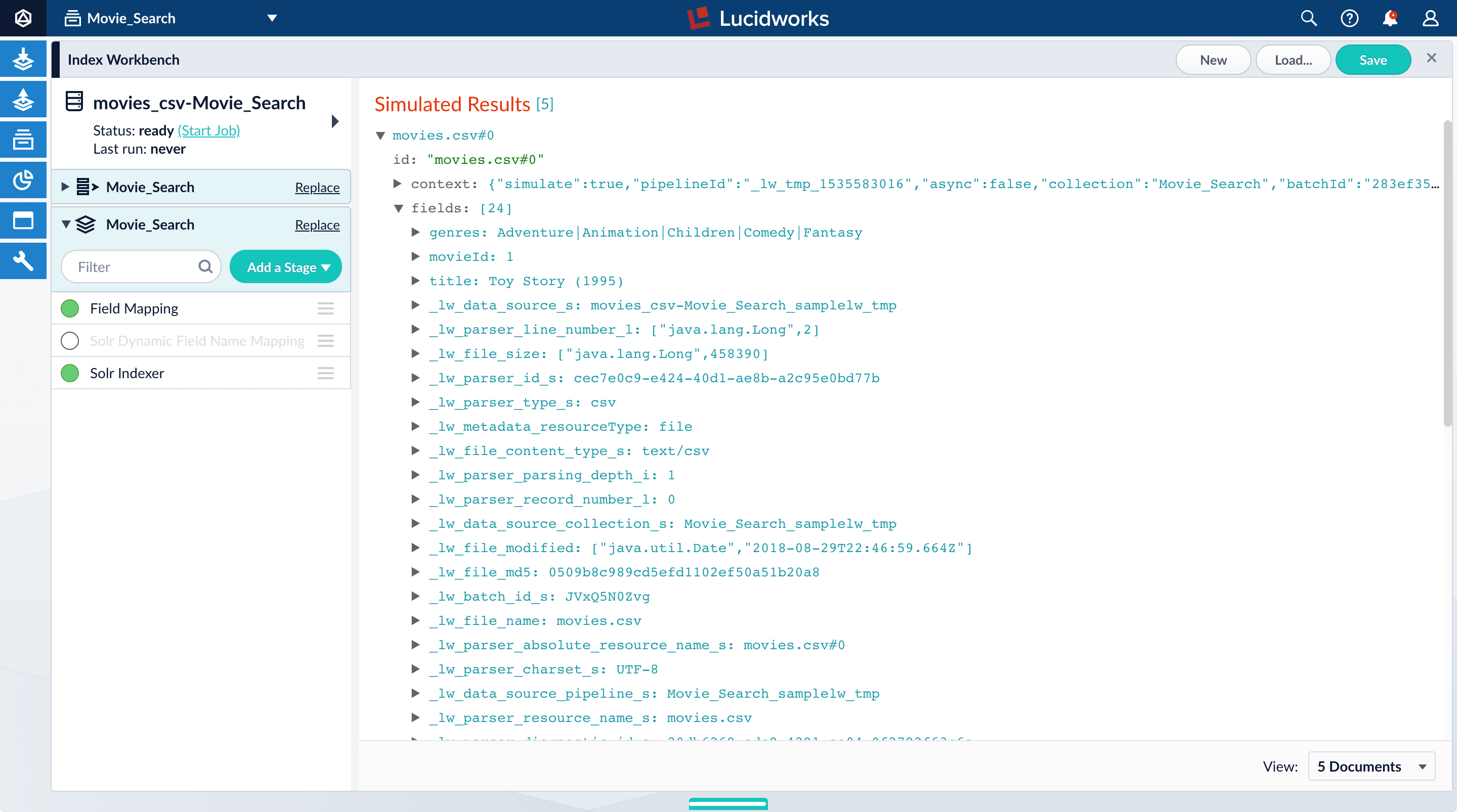
           <img src="https://mintcdn.com/lucidworks/de_1M1m_4TTyJqw0/assets/images/5.0/index-workbench-stage-disabled.png?fit=max&auto=format&n=de_1M1m_4TTyJqw0&q=85&s=3a6faf251d2f679c7ac66513310944cb" alt="Stage disabled" width="2880" height="1606" data-path="assets/images/5.0/index-workbench-stage-disabled.png" />

    ## Configure the index pipeline

    First you will configure the field mappings in the index pipeline so each field has the correct data type. Then you will split the `genres` field into multiple values so each value can be used as a facet in Part 3 of this tutorial.

    ### Configure field mappings

    Configure field mappings to control the field types of Fusion documents. Fusion uses field name suffixes to determine field types. When a field name has no suffix, Fusion stores it as a string field and treats it as an unanalyzed whole. For precise analysis and search, most fields need suffixes to indicate their specific types. You will see how this relates to the fields in the dataset.

    1. In the list of index pipeline stages on the left, click **Field Mapping** to open the Field Mapping stage configuration panel.

    2. In **Field Translations**, click Add <InlineImage src="/assets/images/4.0/icons/add-icon.png" alt="Add" /> to create a new field mapping rule.
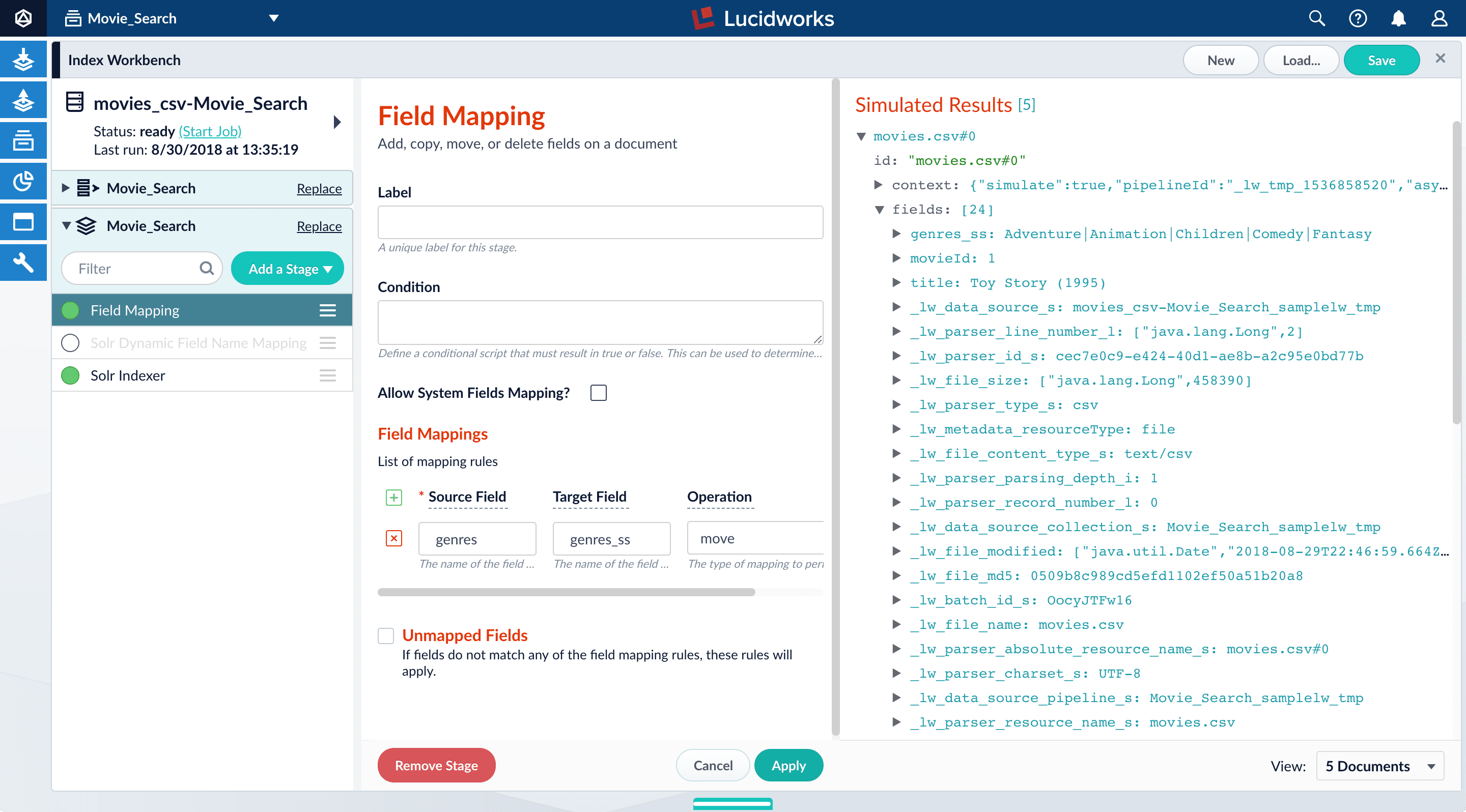
    3. Under **Source Field**, enter `genres`.

    4. Under **Target Field**, enter `genres_ss`.

       The field suffix `_ss` means that this field is a multi-valued string field.

       <Note>   Fusion currently interprets this field as having a single value. You can see that the field actually contains a pipe-delimited array of values. You will fix this after you finish configuring field mappings.</Note>

    5. Under **Operation**, select **move**.

       The move operation means that the resulting document no longer has a `genres` field; it only has `genres_ss`.

           <img src="https://mintcdn.com/lucidworks/de_1M1m_4TTyJqw0/assets/images/5.0/field-mapping-genres.png?fit=max&auto=format&n=de_1M1m_4TTyJqw0&q=85&s=afc044592e64fcb05949596810b90452" alt="Field mapping of genres field" width="2880" height="1596" data-path="assets/images/5.0/field-mapping-genres.png" />

    6. Click **Apply**.

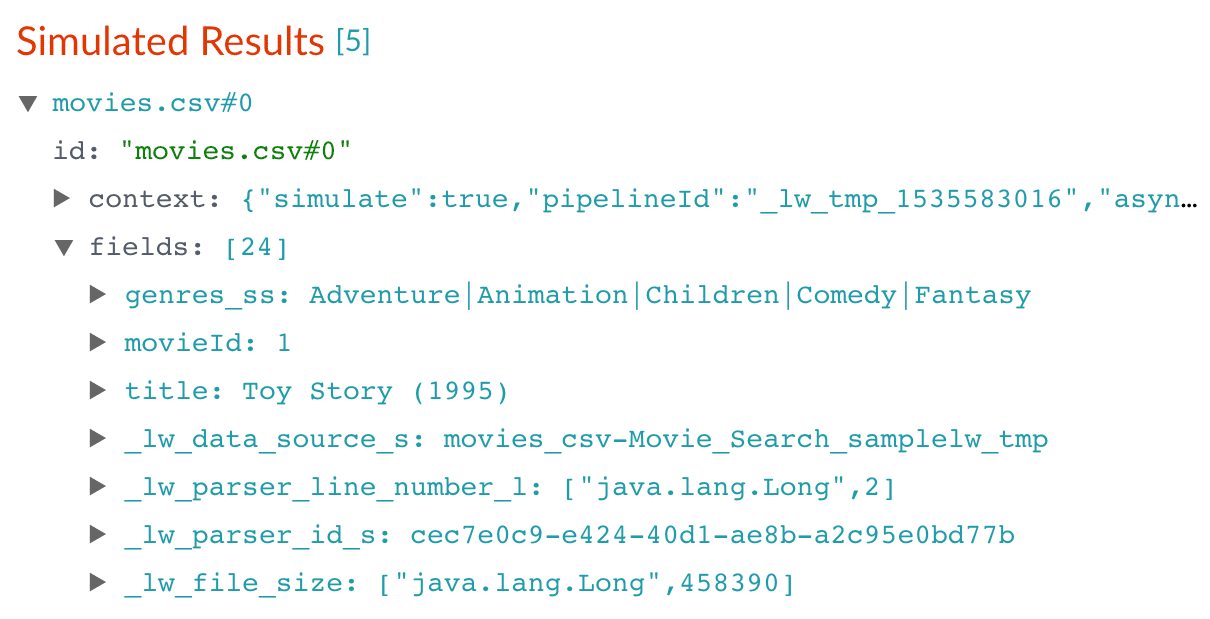
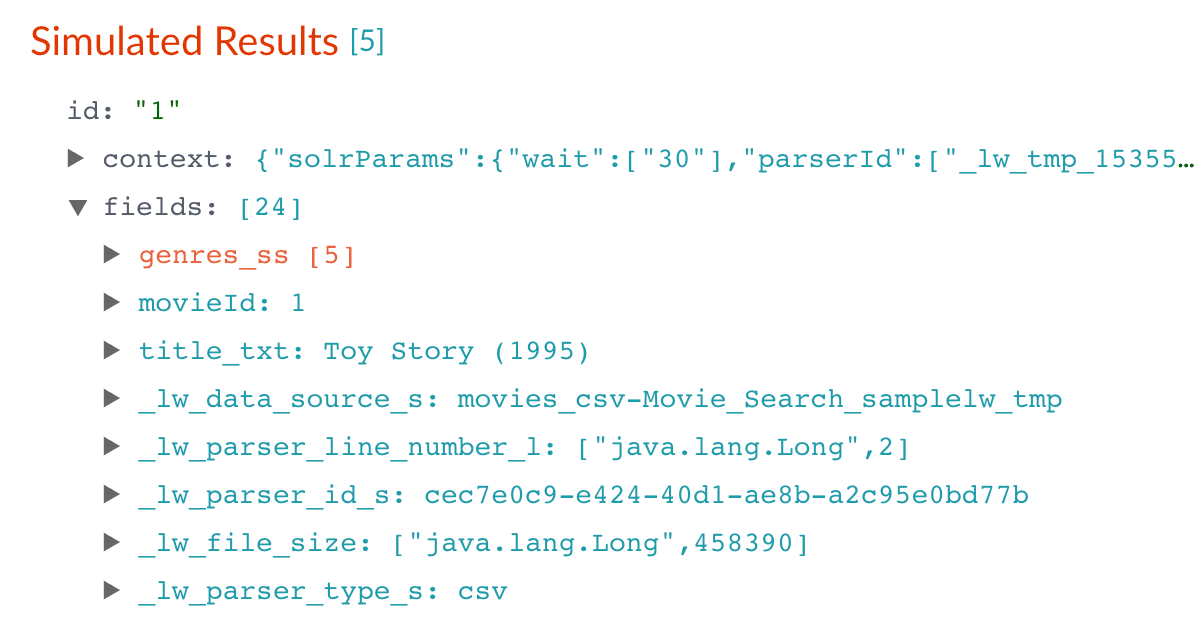
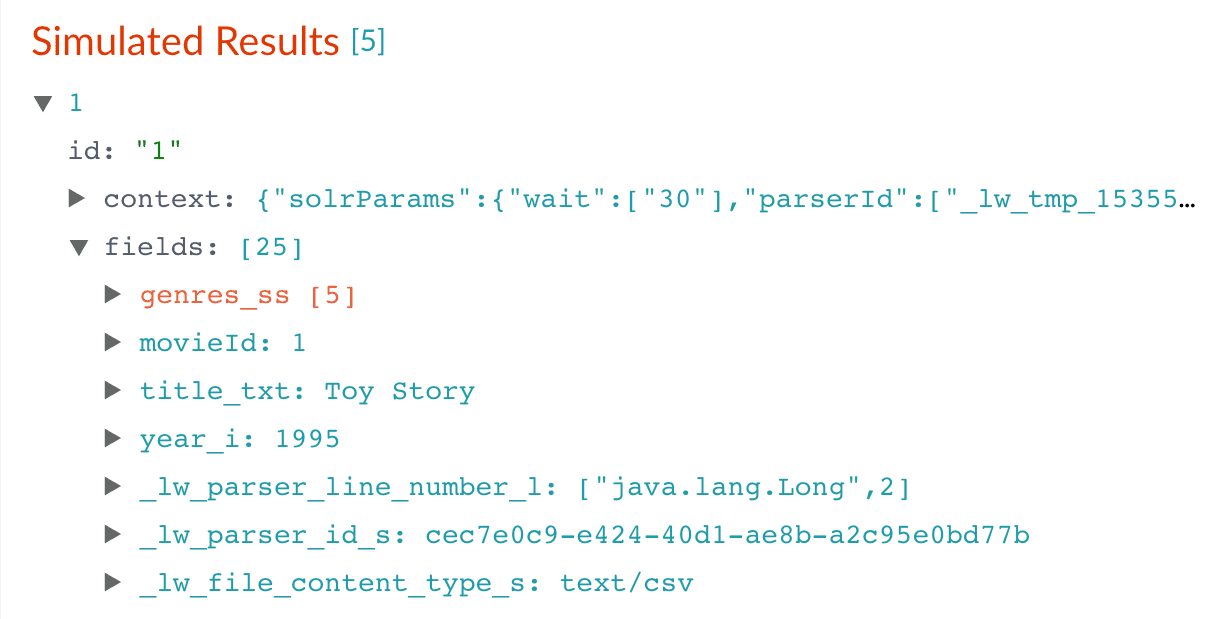
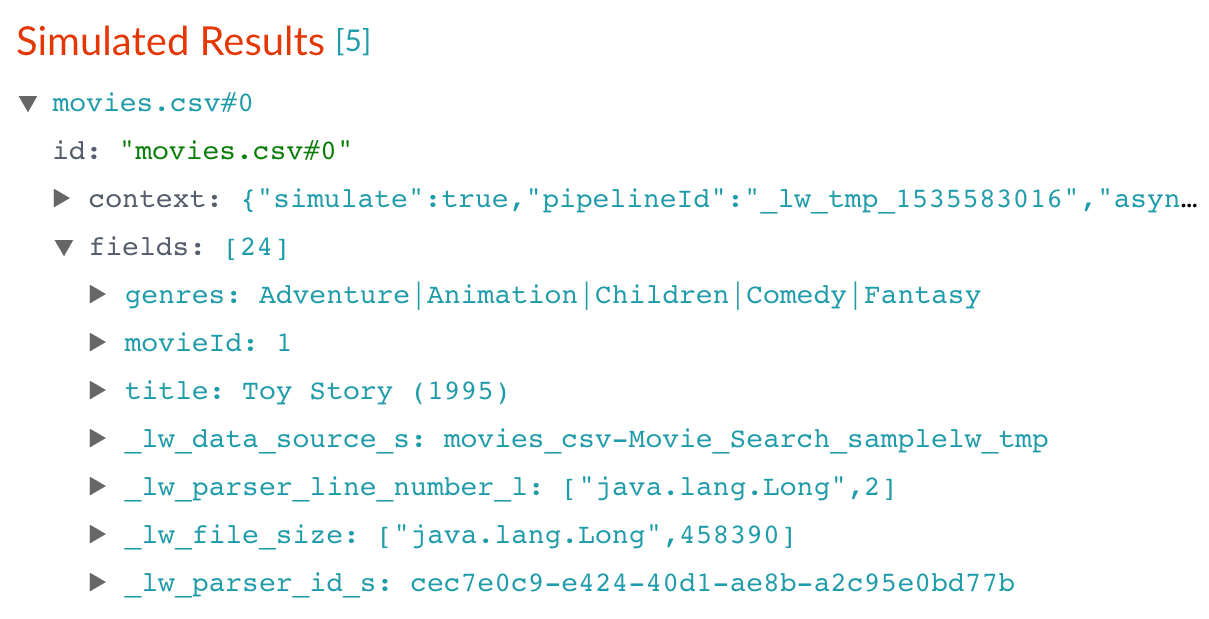
       Applying the new configuration re-runs the simulation and updates the contents of the preview panel. Notice the change in the field name from `genres` to `genres_ss`:

       |                                                                                                                                                                                                                                                                                                                                                                                                                                                                                                                                                                                                                                                                                                                                                                                                                                                                                                                                                                                                                                                                                                                                                                                                                                                                                                                                                                                                                                                                                                                                   |                                                                                                                                                                                                                                                                                                                                                                                                                                                                                                                                                                                                                                                                                                                                                                                                                                                                                                                                                                                                                                                                                                                                                                                                                                                                                                                                                                                                                                                                                                                                   |
       | --------------------------------------------------------------------------------------------------------------------------------------------------------------------------------------------------------------------------------------------------------------------------------------------------------------------------------------------------------------------------------------------------------------------------------------------------------------------------------------------------------------------------------------------------------------------------------------------------------------------------------------------------------------------------------------------------------------------------------------------------------------------------------------------------------------------------------------------------------------------------------------------------------------------------------------------------------------------------------------------------------------------------------------------------------------------------------------------------------------------------------------------------------------------------------------------------------------------------------------------------------------------------------------------------------------------------------------------------------------------------------------------------------------------------------------------------------------------------------------------------------------------------------- | --------------------------------------------------------------------------------------------------------------------------------------------------------------------------------------------------------------------------------------------------------------------------------------------------------------------------------------------------------------------------------------------------------------------------------------------------------------------------------------------------------------------------------------------------------------------------------------------------------------------------------------------------------------------------------------------------------------------------------------------------------------------------------------------------------------------------------------------------------------------------------------------------------------------------------------------------------------------------------------------------------------------------------------------------------------------------------------------------------------------------------------------------------------------------------------------------------------------------------------------------------------------------------------------------------------------------------------------------------------------------------------------------------------------------------------------------------------------------------------------------------------------------------- |
       | Before                                                                                                                                                                                                                                                                                                                                                                                                                                                                                                                                                                                                                                                                                                                                                                                                                                                                                                                                                                                                                                                                                                                                                                                                                                                                                                                                                                                                                                                                                                                            | After                                                                                                                                                                                                                                                                                                                                                                                                                                                                                                                                                                                                                                                                                                                                                                                                                                                                                                                                                                                                                                                                                                                                                                                                                                                                                                                                                                                                                                                                                                                             |
       | <img src="https://mintcdn.com/lucidworks/TTnHmbCCHl-1HFoG/assets/images/5.0/simulation-results-1.png?fit=max&auto=format&n=TTnHmbCCHl-1HFoG&q=85&s=32e4ac87aa5f5206777d34e5fbd47690" alt="Simulation results 1" width="1209" height="619" data-path="assets/images/5.0/simulation-results-1.png" /> | <img src="https://mintcdn.com/lucidworks/TTnHmbCCHl-1HFoG/assets/images/5.0/simulation-results-2.png?fit=max&auto=format&n=TTnHmbCCHl-1HFoG&q=85&s=56c67b96403f06c3adf384de0a304f8b" alt="Simulation results 2" width="1210" height="619" data-path="assets/images/5.0/simulation-results-2.png" /> |
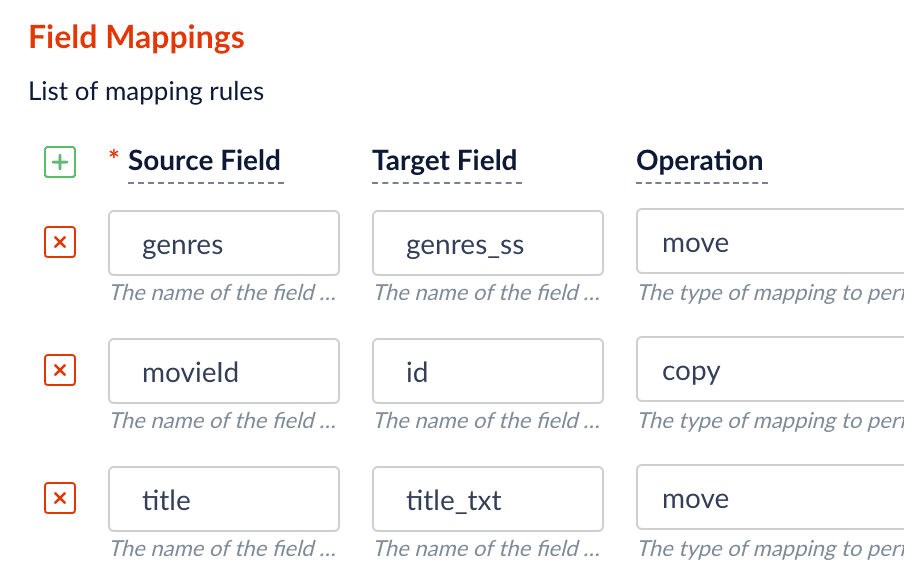
    7. Click Add <InlineImage src="/assets/images/4.0/icons/add-icon.png" alt="Add" /> to add more field mapping rules as follows:

       * The `movieId` field is a unique document identifier. It should be *copied* into the document’s `id` field.
       * The `title` should be searchable as a text field, so you *move* it to the field `title_txt`.

       Your field mappings should look like this:

           <img src="https://mintcdn.com/lucidworks/de_1M1m_4TTyJqw0/assets/images/5.0/all-field-mappings.png?fit=max&auto=format&n=de_1M1m_4TTyJqw0&q=85&s=fda6b9fd6e3dc41d64170392ee05044a" alt="All field mappings" style={{ width: "400px" }} width="914" height="584" data-path="assets/images/5.0/all-field-mappings.png" />

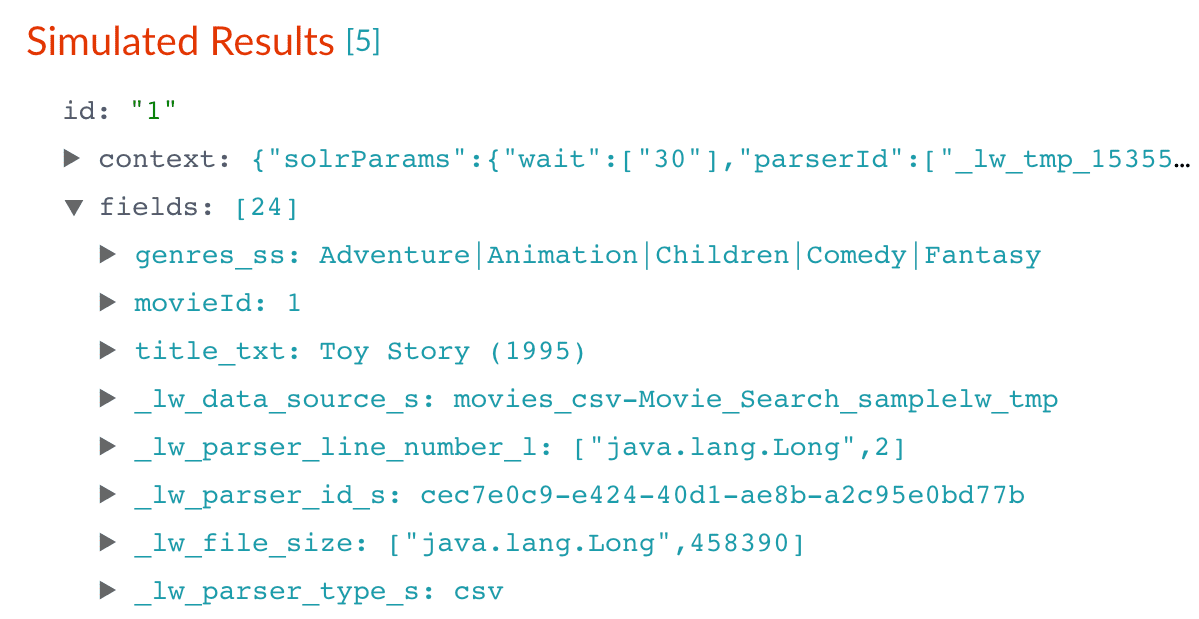
    8. Click **Apply**.

       After you have specified these explicit field mapping rules, you can browse the resulting documents
       in the preview panel to check your work.

       |                                                                                                                                                                                                                                                                                                                                                                                                                                                                                                                                                                                                                                                                                                                                                                                                                                                                                                                                                                                                                                                                                                                                                                                                                                                                                                                                                                                                                                                                                                                                   |                                                                                                                                                                                                                                                                                                                                                                                                                                                                                                                                                                                                                                                                                                                                                                                                                                                                                                                                                                                                                                                                                                                                                                                                                                                                                                                                                                                                                                                                                                                                   |
       | --------------------------------------------------------------------------------------------------------------------------------------------------------------------------------------------------------------------------------------------------------------------------------------------------------------------------------------------------------------------------------------------------------------------------------------------------------------------------------------------------------------------------------------------------------------------------------------------------------------------------------------------------------------------------------------------------------------------------------------------------------------------------------------------------------------------------------------------------------------------------------------------------------------------------------------------------------------------------------------------------------------------------------------------------------------------------------------------------------------------------------------------------------------------------------------------------------------------------------------------------------------------------------------------------------------------------------------------------------------------------------------------------------------------------------------------------------------------------------------------------------------------------------- | --------------------------------------------------------------------------------------------------------------------------------------------------------------------------------------------------------------------------------------------------------------------------------------------------------------------------------------------------------------------------------------------------------------------------------------------------------------------------------------------------------------------------------------------------------------------------------------------------------------------------------------------------------------------------------------------------------------------------------------------------------------------------------------------------------------------------------------------------------------------------------------------------------------------------------------------------------------------------------------------------------------------------------------------------------------------------------------------------------------------------------------------------------------------------------------------------------------------------------------------------------------------------------------------------------------------------------------------------------------------------------------------------------------------------------------------------------------------------------------------------------------------------------- |
       | Before                                                                                                                                                                                                                                                                                                                                                                                                                                                                                                                                                                                                                                                                                                                                                                                                                                                                                                                                                                                                                                                                                                                                                                                                                                                                                                                                                                                                                                                                                                                            | After                                                                                                                                                                                                                                                                                                                                                                                                                                                                                                                                                                                                                                                                                                                                                                                                                                                                                                                                                                                                                                                                                                                                                                                                                                                                                                                                                                                                                                                                                                                             |
       | <img src="https://mintcdn.com/lucidworks/TTnHmbCCHl-1HFoG/assets/images/5.0/simulation-results-2.png?fit=max&auto=format&n=TTnHmbCCHl-1HFoG&q=85&s=56c67b96403f06c3adf384de0a304f8b" alt="Simulation results 2" width="1210" height="619" data-path="assets/images/5.0/simulation-results-2.png" /> | <img src="https://mintcdn.com/lucidworks/TTnHmbCCHl-1HFoG/assets/images/5.0/simulation-results-3.png?fit=max&auto=format&n=TTnHmbCCHl-1HFoG&q=85&s=6562bfdefbc1ca15fe5a21ff221d956e" alt="Simulation results 3" width="1199" height="619" data-path="assets/images/5.0/simulation-results-3.png" /> |

    9. In the upper right, click **Save**. This saves your modified index pipeline. Get in the habit of saving your work as you work.

    Now your document ID is more useful, and your movie titles are full-text searchable.
    <Tip>Because the input documents in this tutorial are simple documents with a fixed number of known fields, it is easy to configure the Field Mapping stage to ensure the correct document structure for Fusion. When documents have large numbers of fields, the [Solr Dynamic Field Mapping stage](/docs/4/fusion-server/reference/pipeline-stages/indexing/solr-dynamic-field-name-mapping-index-stage) can reduce the work required to configure the index pipeline.</Tip>

    ### Split a multi-value field

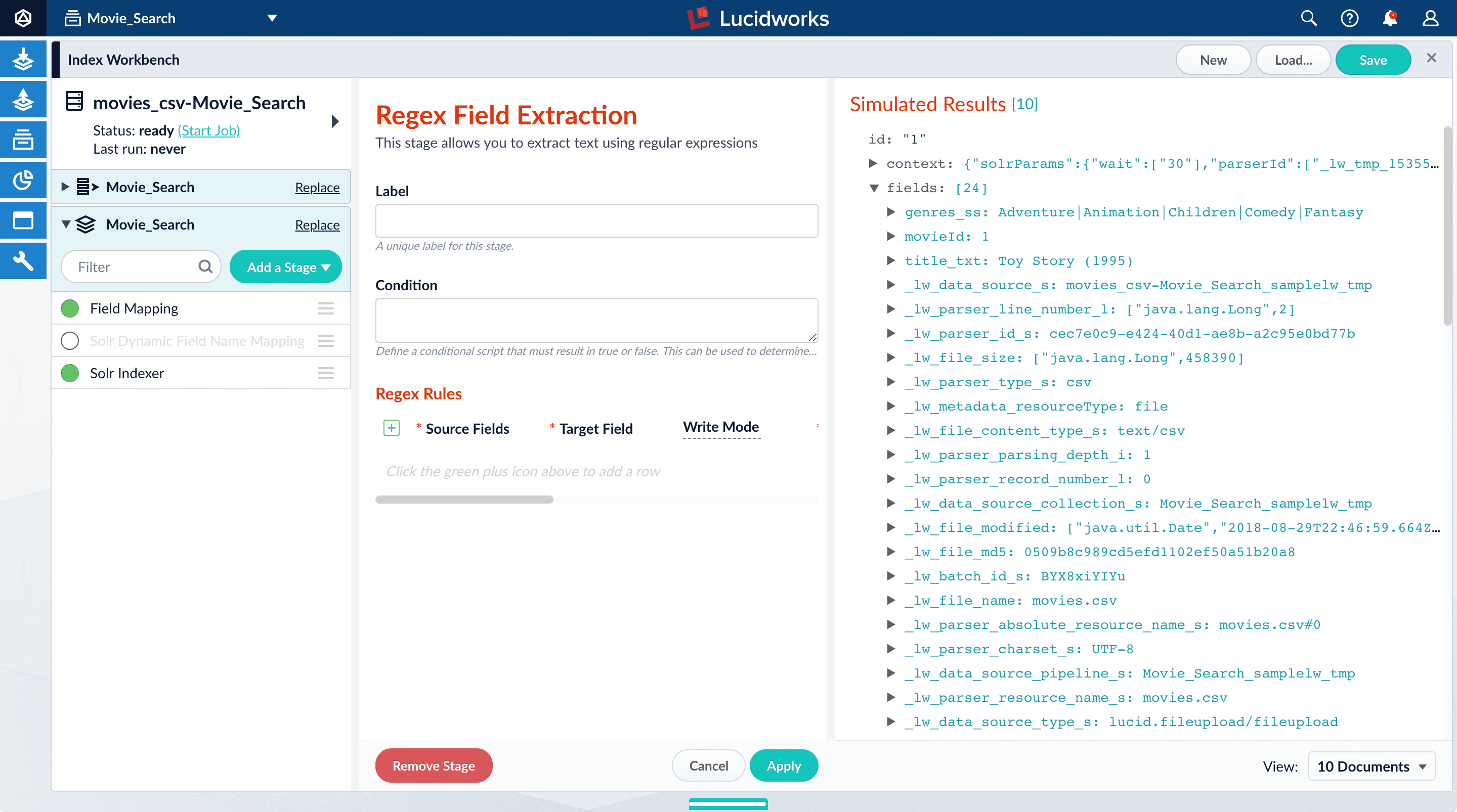
    The `genres_ss` field has been parsed as a single-value field, but you can see that it is really a pipe-delimited array of values. To split this field into its constituent values, you will add a [Regex Field Extraction stage](/docs/4/fusion-server/reference/pipeline-stages/indexing/regular-expression-extractor-index-stage) to your index pipeline. This stage uses regular expressions to extract data from specific fields.  It can append or overwrite existing fields with the extracted data, or use the data to populate new fields.

    1. Click **Add a stage**.
    2. Scroll down and select **Regex Field Extraction** (under Field Transformation).

       The Regex Field Extraction stage configuration panel appears.

           <img src="https://mintcdn.com/lucidworks/zH_ln2rWO5G9pvTA/assets/images/5.0/regex-field-extraction-stage.png?fit=max&auto=format&n=zH_ln2rWO5G9pvTA&q=85&s=e43c9fb7139228c229454d3dbd65c455" alt="Regex Field Extraction stage" width="2880" height="1606" data-path="assets/images/5.0/regex-field-extraction-stage.png" />
    3. Under **Regex Rules**, click Add <InlineImage src="/assets/images/4.0/icons/add-icon.png" alt="Add" />.
    4. On the new line, hover over the `[...]` under **Source Fields**, and then click Edit <InlineImage src="/assets/images/4.0/icons/edit-icon.png" alt="Edit" />.

       The Source Fields window opens.
    5. Click Add <InlineImage src="/assets/images/4.0/icons/add-icon.png" alt="Add" />.
    6. Enter `genres_ss`, and then click **Apply**.
    7. Under **Target Field**, enter `genres_ss`.
    8. In the **Write Mode** field, select **overwrite**.
    9. In the **Regex Pattern** field, enter this expression:

       ```
       [^|\s][^\|]*[^|\s]*
       ```

       <Tip>   You might need to scroll horizontally to see this field.</Tip>

       The first bracketed term in the regex matches any character that is not a vertical bar or a space.
       The second term matches any character that is not a vertical bar, zero or more times.
       The last term matches any character that is not a vertical bar, zero or more times.
    10. In the **Return If No Match** field, select `input_string`.
    11. Click **Apply**.

    Initially, your data does not change.
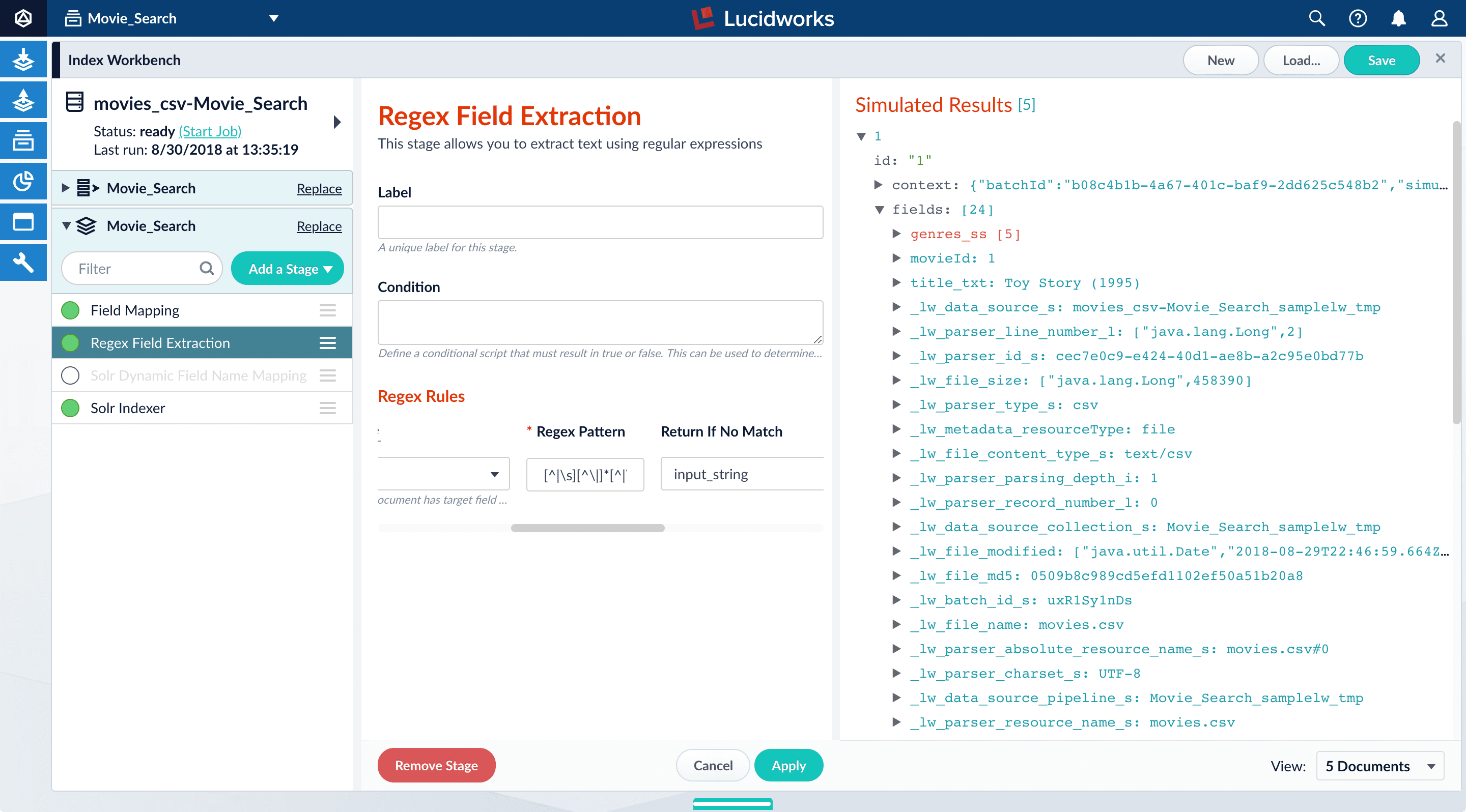
    12\. In the list of index pipeline stages, drag the **Regex Field Extraction** stage down so that it comes after the Field Mapping stage:

    <img src="https://mintcdn.com/lucidworks/de_1M1m_4TTyJqw0/assets/images/5.0/index-pipeline-reordering.png?fit=max&auto=format&n=de_1M1m_4TTyJqw0&q=85&s=04823b8400cae4e932d32ae0e8ea7e1b" alt="Index pipeline stage reordering" width="2880" height="1596" data-path="assets/images/5.0/index-pipeline-reordering.png" />

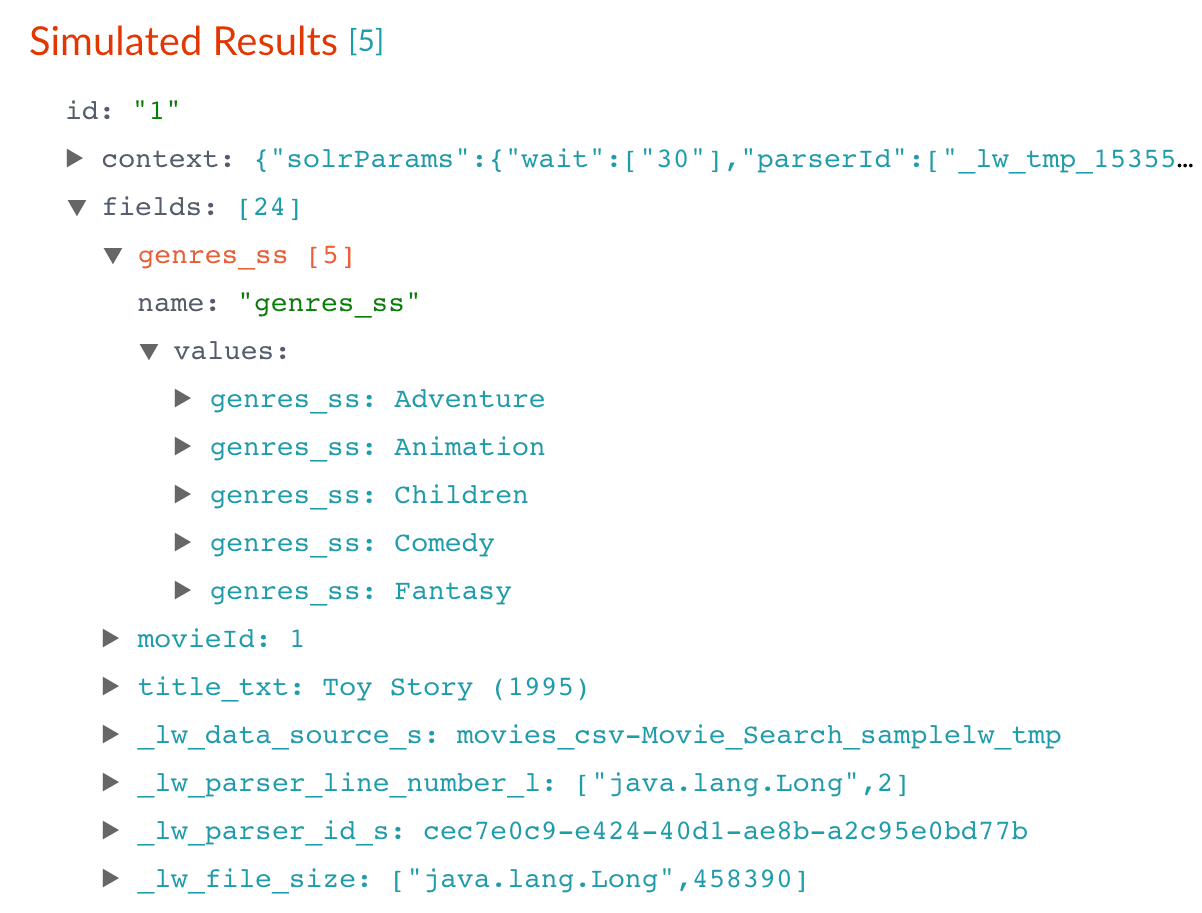
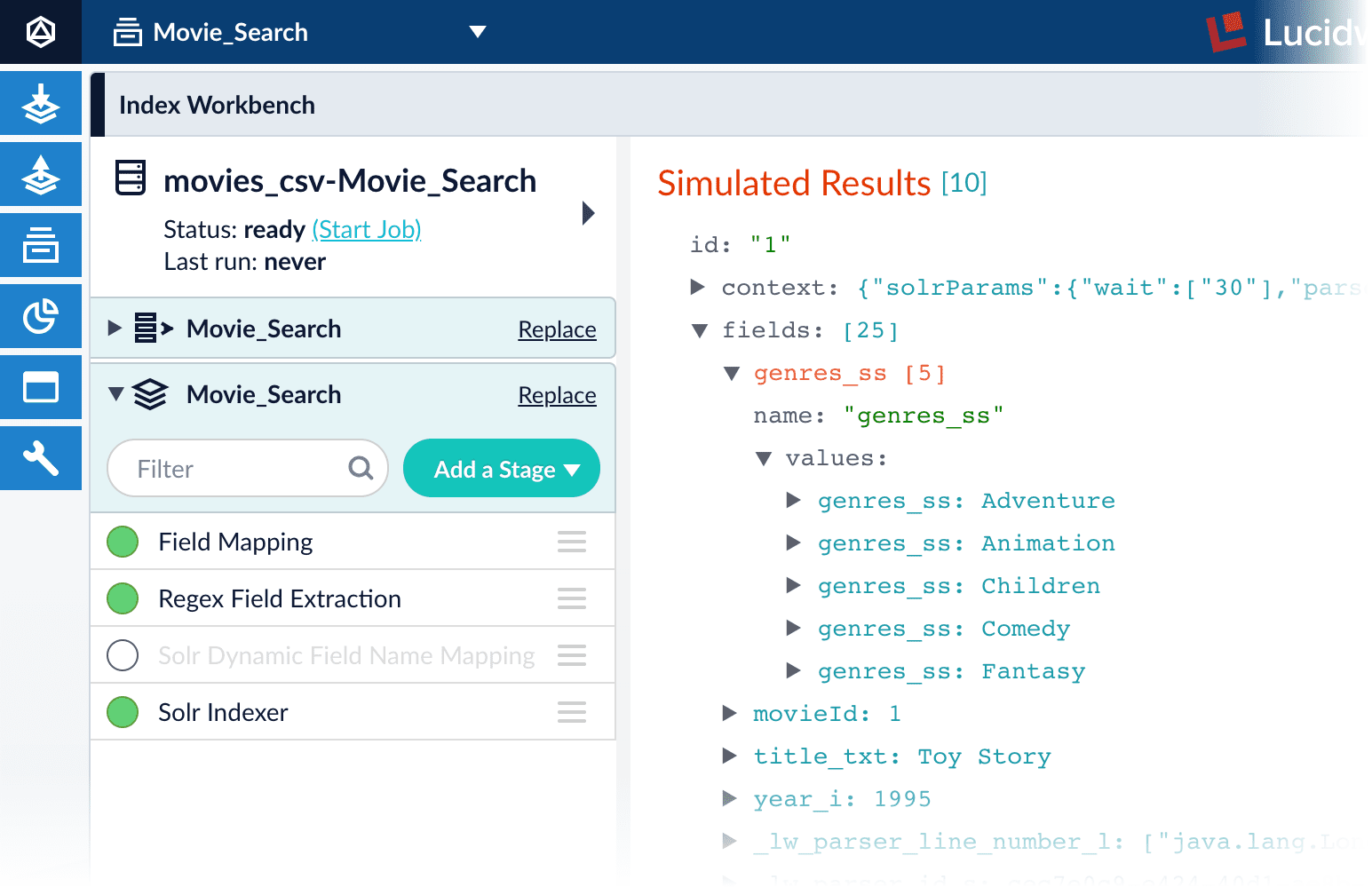
    Now the preview shows multiple values for the `genres_ss` field:

    |                                                                                                                                                                                                                                                                                                                                                                                                                                                                                                                                                                                                                                                                                                                                                                                                                                                                                                                                                                                                                                                                                                                                                                                                                                                                                                                                                                                                                                                                                                                                   |                                                                                                                                                                                                                                                                                                                                                                                                                                                                                                                                                                                                                                                                                                                                                                                                                                                                                                                                                                                                                                                                                                                                                                                                                                                                                                                                                                                                                                                                                                                                   |
    | --------------------------------------------------------------------------------------------------------------------------------------------------------------------------------------------------------------------------------------------------------------------------------------------------------------------------------------------------------------------------------------------------------------------------------------------------------------------------------------------------------------------------------------------------------------------------------------------------------------------------------------------------------------------------------------------------------------------------------------------------------------------------------------------------------------------------------------------------------------------------------------------------------------------------------------------------------------------------------------------------------------------------------------------------------------------------------------------------------------------------------------------------------------------------------------------------------------------------------------------------------------------------------------------------------------------------------------------------------------------------------------------------------------------------------------------------------------------------------------------------------------------------------- | --------------------------------------------------------------------------------------------------------------------------------------------------------------------------------------------------------------------------------------------------------------------------------------------------------------------------------------------------------------------------------------------------------------------------------------------------------------------------------------------------------------------------------------------------------------------------------------------------------------------------------------------------------------------------------------------------------------------------------------------------------------------------------------------------------------------------------------------------------------------------------------------------------------------------------------------------------------------------------------------------------------------------------------------------------------------------------------------------------------------------------------------------------------------------------------------------------------------------------------------------------------------------------------------------------------------------------------------------------------------------------------------------------------------------------------------------------------------------------------------------------------------------------- |
    | Before                                                                                                                                                                                                                                                                                                                                                                                                                                                                                                                                                                                                                                                                                                                                                                                                                                                                                                                                                                                                                                                                                                                                                                                                                                                                                                                                                                                                                                                                                                                            | After                                                                                                                                                                                                                                                                                                                                                                                                                                                                                                                                                                                                                                                                                                                                                                                                                                                                                                                                                                                                                                                                                                                                                                                                                                                                                                                                                                                                                                                                                                                             |
    | <img src="https://mintcdn.com/lucidworks/TTnHmbCCHl-1HFoG/assets/images/5.0/simulation-results-3.png?fit=max&auto=format&n=TTnHmbCCHl-1HFoG&q=85&s=6562bfdefbc1ca15fe5a21ff221d956e" alt="Simulation results 3" width="1199" height="619" data-path="assets/images/5.0/simulation-results-3.png" /> | <img src="https://mintcdn.com/lucidworks/TTnHmbCCHl-1HFoG/assets/images/5.0/simulation-results-4.png?fit=max&auto=format&n=TTnHmbCCHl-1HFoG&q=85&s=4337262e7a18f83ee3c54376bf4a7458" alt="Simulation results 4" width="1204" height="619" data-path="assets/images/5.0/simulation-results-4.png" /> |

    <Tip>   If the preview panel does not update automatically, select a different number of documents to view using the dropdown in the bottom right of the screen. This forces the preview to update.</Tip>
    13\. To view the values of the `genres_ss` field, expand it and `values` under it by clicking the right triangle <InlineImage src="/assets/images/4.0/icons/right-triangle.png" alt="triangles" />:

    <img src="https://mintcdn.com/lucidworks/TTnHmbCCHl-1HFoG/assets/images/5.0/simulation-results-4-expanded.png?fit=max&auto=format&n=TTnHmbCCHl-1HFoG&q=85&s=9e11e86fd51d40a4dedf3a69f8fbba83" alt="Simulation results 4 expanded" style={{ width: "500px" }} width="1202" height="913" data-path="assets/images/5.0/simulation-results-4-expanded.png" />

    These field values are useful for faceting, which you will explore in Part 3 of this tutorial.
    14\. In the upper right, click **Save**. This saves your modified index pipeline.

    ### Create a new field from part of an existing one

    Notice that the `title_txt` field also contains the year in which the movie was released. Instead of including the year in your full-text search field, it would be more useful as a separate field that you can use for faceting. This is another job for the [Regex Field Extraction stage](/docs/4/fusion-server/reference/pipeline-stages/indexing/regular-expression-extractor-index-stage).

    1. In the list of index pipeline stages, click **Regex Field Extraction**.
    2. In the Regex Field Extraction configuration panel, under Regex Rules, click Add <InlineImage src="/assets/images/4.0/icons/add-icon.png" alt="Add" />.
    3. On the new line, hover over the `[...]` under **Source Fields**, and then click Edit <InlineImage src="/assets/images/4.0/icons/edit-icon.png" alt="Edit" />.

       The Source Fields window appears.
    4. Click Add <InlineImage src="/assets/images/4.0/icons/add-icon.png" alt="Add" />.
    5. Enter `title_txt`, and then click **Apply**.
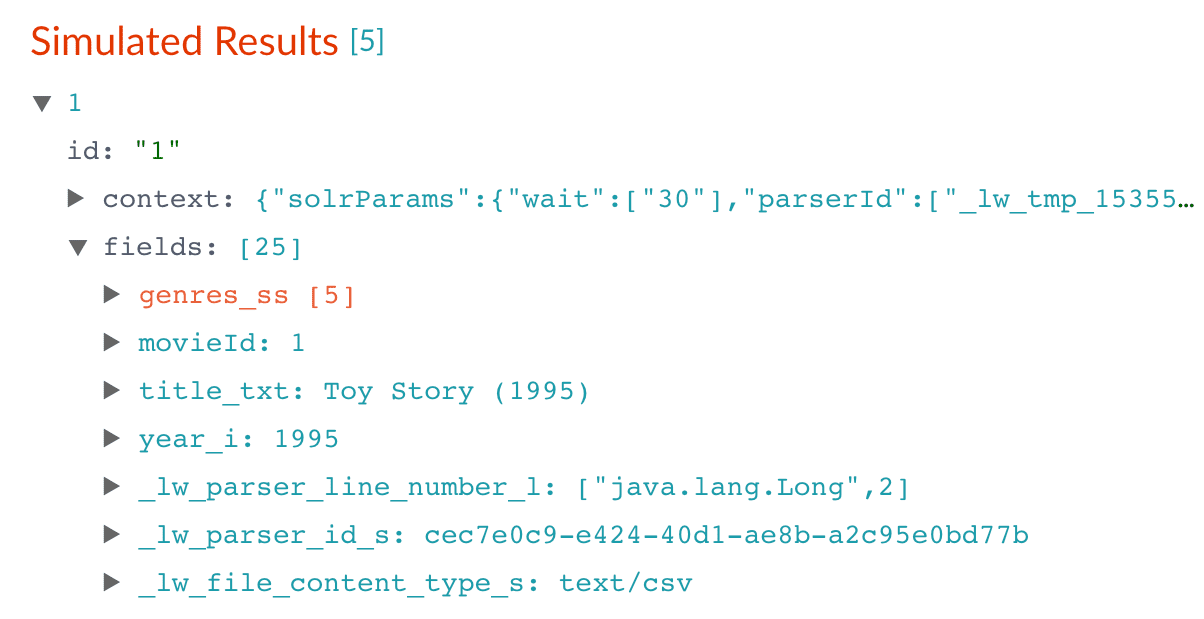
    6. Under Target Field, enter `year_i`.

       The `_i` suffix indicates an integer point field (specifically, that the field is a dynamic field with a `pint` field type). Fusion will create this new field whenever the regular expression matches the contents of the source field.

       <Tip>   When you use the Regex Field Extraction stage to create a new field, the value of **Write Mode** makes no difference.</Tip>
    7. In the **Regex Pattern** field, enter this expression to match the digits inside the parentheses at the end of the `title_txt` value:

       ```
       \(([0-9]+)\)$
       ```
    8. In the **Regex Capture Group** field, enter `1`. This lets the index pipeline stage transfer the year into the `year_i` field.

       <Tip>   Scroll all the way to the right to see this field.</Tip>
    9. Click **Apply**.

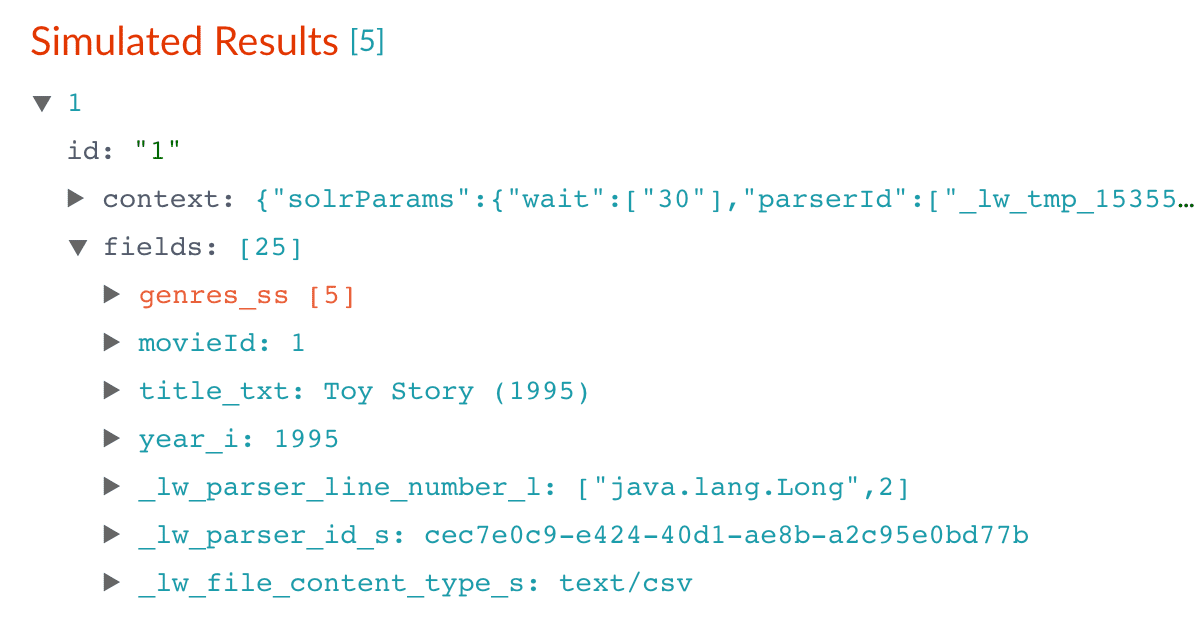
       Now the preview includes the new `year_i` field:

       |                                                                                                                                                                                                                                                                                                                                                                                                                                                                                                                                                                                                                                                                                                                                                                                                                                                                                                                                                                                                                                                                                                                                                                                                                                                                                                                                                                                                                                                                                                                                   |                                                                                                                                                                                                                                                                                                                                                                                                                                                                                                                                                                                                                                                                                                                                                                                                                                                                                                                                                                                                                                                                                                                                                                                                                                                                                                                                                                                                                                                                                                                                   |
       | --------------------------------------------------------------------------------------------------------------------------------------------------------------------------------------------------------------------------------------------------------------------------------------------------------------------------------------------------------------------------------------------------------------------------------------------------------------------------------------------------------------------------------------------------------------------------------------------------------------------------------------------------------------------------------------------------------------------------------------------------------------------------------------------------------------------------------------------------------------------------------------------------------------------------------------------------------------------------------------------------------------------------------------------------------------------------------------------------------------------------------------------------------------------------------------------------------------------------------------------------------------------------------------------------------------------------------------------------------------------------------------------------------------------------------------------------------------------------------------------------------------------------------- | --------------------------------------------------------------------------------------------------------------------------------------------------------------------------------------------------------------------------------------------------------------------------------------------------------------------------------------------------------------------------------------------------------------------------------------------------------------------------------------------------------------------------------------------------------------------------------------------------------------------------------------------------------------------------------------------------------------------------------------------------------------------------------------------------------------------------------------------------------------------------------------------------------------------------------------------------------------------------------------------------------------------------------------------------------------------------------------------------------------------------------------------------------------------------------------------------------------------------------------------------------------------------------------------------------------------------------------------------------------------------------------------------------------------------------------------------------------------------------------------------------------------------------- |
       | Before                                                                                                                                                                                                                                                                                                                                                                                                                                                                                                                                                                                                                                                                                                                                                                                                                                                                                                                                                                                                                                                                                                                                                                                                                                                                                                                                                                                                                                                                                                                            | After                                                                                                                                                                                                                                                                                                                                                                                                                                                                                                                                                                                                                                                                                                                                                                                                                                                                                                                                                                                                                                                                                                                                                                                                                                                                                                                                                                                                                                                                                                                             |
       | <img src="https://mintcdn.com/lucidworks/TTnHmbCCHl-1HFoG/assets/images/5.0/simulation-results-4.png?fit=max&auto=format&n=TTnHmbCCHl-1HFoG&q=85&s=4337262e7a18f83ee3c54376bf4a7458" alt="Simulation results 4" width="1204" height="619" data-path="assets/images/5.0/simulation-results-4.png" /> | <img src="https://mintcdn.com/lucidworks/TTnHmbCCHl-1HFoG/assets/images/5.0/simulation-results-5.png?fit=max&auto=format&n=TTnHmbCCHl-1HFoG&q=85&s=e20cc1b661a0f2bc9331b727e2048f3b" alt="Simulation results 5" width="1204" height="619" data-path="assets/images/5.0/simulation-results-5.png" /> |
    10. In the upper right, click **Save**. This saves your modified index pipeline.

    ### Trim a field's value

    The `title_txt` field still includes the year of the film’s release, which you have extracted into its own field, `year_i`. Let us trim that information from the `title_txt` values so that only the title text remains.

    1. In the list of index pipeline stages, click **Regex Field Extraction**.
    2. In the Regex Field Extraction configuration panel, under Regex Rules, click Add <InlineImage src="/assets/images/4.0/icons/add-icon.png" alt="Add" />.
    3. On the new line, hover over **Source Fields**, and then click Edit <InlineImage src="/assets/images/4.0/icons/edit-icon.png" alt="Edit" />.

       The Source Fields window appears.
    4. Click Add <InlineImage src="/assets/images/4.0/icons/add-icon.png" alt="Add" />.
    5. Enter `title_txt`, and then click **Apply**.
    6. Under Target Field, enter `title_txt`.
    7. In the **Write Mode** field, select `overwrite`.
    8. In the **Regex Pattern** field, enter this expression to match the digits inside the parentheses at the end of the `title_txt` value:

       ```
       ^(.+)\s\(([0-9]+)\)$
       ```
    9. In the **Regex Capture Group** field, enter `1`.
    10. Click **Apply**.

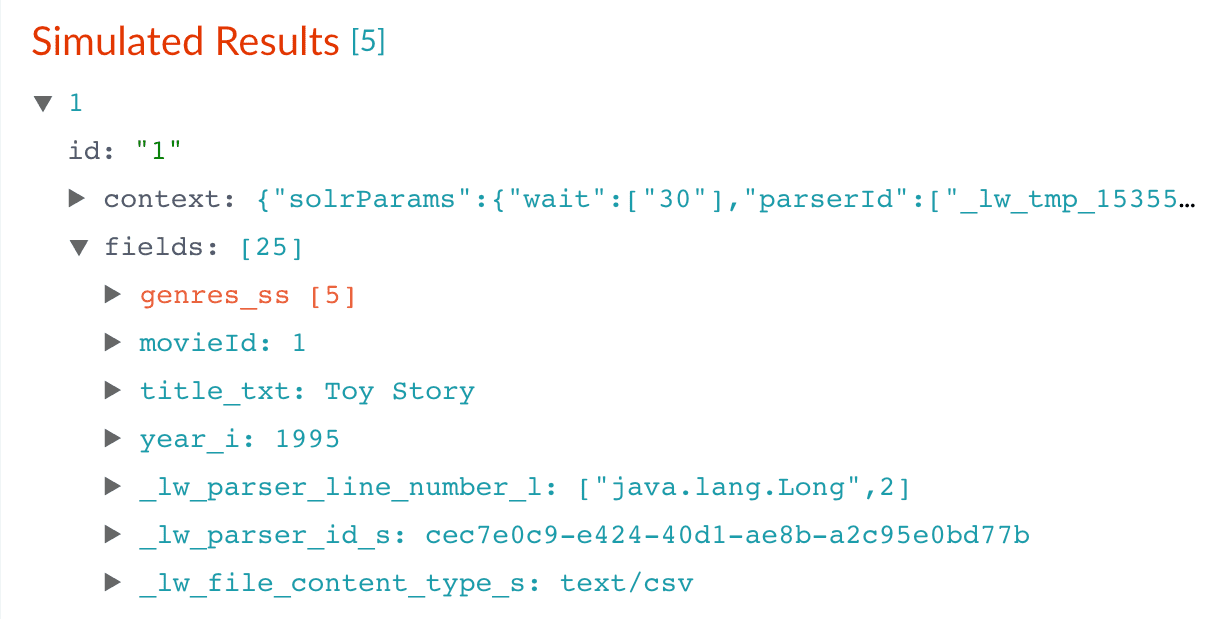
    Now the preview pane shows the `title_txt` field with only the title string:

    |                                                                                                                                                                                                                                                                                                                                                                                                                                                                                                                                                                                                                                                                                                                                                                                                                                                                                                                                                                                                                                                                                                                                                                                                                                                                                                                                                                                                                                                                                                                                   |                                                                                                                                                                                                                                                                                                                                                                                                                                                                                                                                                                                                                                                                                                                                                                                                                                                                                                                                                                                                                                                                                                                                                                                                                                                                                                                                                                                                                                                                                                                                   |
    | --------------------------------------------------------------------------------------------------------------------------------------------------------------------------------------------------------------------------------------------------------------------------------------------------------------------------------------------------------------------------------------------------------------------------------------------------------------------------------------------------------------------------------------------------------------------------------------------------------------------------------------------------------------------------------------------------------------------------------------------------------------------------------------------------------------------------------------------------------------------------------------------------------------------------------------------------------------------------------------------------------------------------------------------------------------------------------------------------------------------------------------------------------------------------------------------------------------------------------------------------------------------------------------------------------------------------------------------------------------------------------------------------------------------------------------------------------------------------------------------------------------------------------- | --------------------------------------------------------------------------------------------------------------------------------------------------------------------------------------------------------------------------------------------------------------------------------------------------------------------------------------------------------------------------------------------------------------------------------------------------------------------------------------------------------------------------------------------------------------------------------------------------------------------------------------------------------------------------------------------------------------------------------------------------------------------------------------------------------------------------------------------------------------------------------------------------------------------------------------------------------------------------------------------------------------------------------------------------------------------------------------------------------------------------------------------------------------------------------------------------------------------------------------------------------------------------------------------------------------------------------------------------------------------------------------------------------------------------------------------------------------------------------------------------------------------------------- |
    | Before                                                                                                                                                                                                                                                                                                                                                                                                                                                                                                                                                                                                                                                                                                                                                                                                                                                                                                                                                                                                                                                                                                                                                                                                                                                                                                                                                                                                                                                                                                                            | After                                                                                                                                                                                                                                                                                                                                                                                                                                                                                                                                                                                                                                                                                                                                                                                                                                                                                                                                                                                                                                                                                                                                                                                                                                                                                                                                                                                                                                                                                                                             |
    | <img src="https://mintcdn.com/lucidworks/vupE2UCZdg04NdXx/assets/images/4.2/simulation-results-5.png?fit=max&auto=format&n=vupE2UCZdg04NdXx&q=85&s=774d58d5d275cad2317f9dbec6d2c485" alt="Simulation results 5" width="1204" height="619" data-path="assets/images/4.2/simulation-results-5.png" /> | <img src="https://mintcdn.com/lucidworks/vupE2UCZdg04NdXx/assets/images/4.2/simulation-results-6.png?fit=max&auto=format&n=vupE2UCZdg04NdXx&q=85&s=dd573535c89aac59ecff1d0123be8e82" alt="Simulation results 6" width="1205" height="619" data-path="assets/images/4.2/simulation-results-6.png" /> |

    11. In the upper right, click **Save**. This saves your modified index pipeline.

    ## Run the datasource job

    Now you have a correctly-configured index pipeline appropriate to your data. You are ready to index the data.

    1. In the upper left, click **Start job**.
           <img src="https://mintcdn.com/lucidworks/de_1M1m_4TTyJqw0/assets/images/4.2/start-job.png?fit=max&auto=format&n=de_1M1m_4TTyJqw0&q=85&s=489e02a8bd3f969c8b403dbd5af915b5" alt="Start job" width="1545" height="999" data-path="assets/images/4.2/start-job.png" />

       This launches a datasource job that imports and indexes the complete contents of your `movies.csv` file, using the configuration you just saved.

       Your datasource job is finished when the Index Workbench displays `Status: success` in the upper left. If the status does not change, go back to the launcher and relaunch your app.

    ## Close panels you no longer need open

    Fusion opens panels beside already open panels. Close all of the panels that are open by clicking Close <InlineImage src="/assets/images/4.0/icons/close-workspace-panel.png" alt="Close" />.

    ## Reindexing

    Documents are associated with a collection through the name of the datasource. The datasource name is stored as a value in the `_lw_data_source_s` field. For various reasons, you may wish to remove all documents associated with a datasource from a collection before using CrawlDB to add relevant documents back to the collection. This process is known as **reindexing**.

    To accomplish this, navigate to **Indexing** <InlineImage src="/assets/images/4.0/icons/workspace-menu-indexing.png" alt="Indexing" /> > **Datasources**, select the datasource name, and then click **Clear Datasource**. This will remove all documents with the selected datasource name in the `_lw_data_source_s` field. After the documents are removed from the collection, you can repeat \[the steps above"/> to reindex the data.

    <Warning>Use caution when creating or changing a datasource name. If you create a new datasource name that is identical to an existing datasource name, all document associations will be shared between the datasource names. Changing the name to match an existing name will have the same result.</Warning>

    {/* // Commented out the sentence below. Meaning is unclear and it does not seem crucial to this section. -- Dustin Guericke */}

    {/* // Fusion only reindexes documents that are not found in the index history. In other words, Fusion will not overwrite indexed documents; it will only rewrite existing documents after you clear the datasource. */}

    ## What is next

    Now you have 9,125 movie listings from the MovieLens database in Fusion’s index, customized to indicate the data type for each field. You also split a multi-valued field so that its values can be treated individually, created a new field to contain partial contents of a different field, and trimmed that content from the original field.

    Let us compare the initial indexing of your data with the indexing after field mappings and extractions:

    | Before                                                                                                                                                                                                                                                                                                                                                                                                                                                                                                                                                                                                                                                                                                                                                                                                                                                                                                                                                                                                                                                                                                                                                                                                                                                                                                                                                                                                                                                                                                                            | After                                                                                                                                                                                                                                                                                                                                                                                                                                                                                                                                                                                                                                                                                                                                                                                                                                                                                                                                                                                                                                                                                                                                                                                                                                                                                                                                                                                                                                                                                                                             |
    | --------------------------------------------------------------------------------------------------------------------------------------------------------------------------------------------------------------------------------------------------------------------------------------------------------------------------------------------------------------------------------------------------------------------------------------------------------------------------------------------------------------------------------------------------------------------------------------------------------------------------------------------------------------------------------------------------------------------------------------------------------------------------------------------------------------------------------------------------------------------------------------------------------------------------------------------------------------------------------------------------------------------------------------------------------------------------------------------------------------------------------------------------------------------------------------------------------------------------------------------------------------------------------------------------------------------------------------------------------------------------------------------------------------------------------------------------------------------------------------------------------------------------------- | --------------------------------------------------------------------------------------------------------------------------------------------------------------------------------------------------------------------------------------------------------------------------------------------------------------------------------------------------------------------------------------------------------------------------------------------------------------------------------------------------------------------------------------------------------------------------------------------------------------------------------------------------------------------------------------------------------------------------------------------------------------------------------------------------------------------------------------------------------------------------------------------------------------------------------------------------------------------------------------------------------------------------------------------------------------------------------------------------------------------------------------------------------------------------------------------------------------------------------------------------------------------------------------------------------------------------------------------------------------------------------------------------------------------------------------------------------------------------------------------------------------------------------- |
    | <img src="https://mintcdn.com/lucidworks/TTnHmbCCHl-1HFoG/assets/images/5.0/simulation-results-1.png?fit=max&auto=format&n=TTnHmbCCHl-1HFoG&q=85&s=32e4ac87aa5f5206777d34e5fbd47690" alt="Simulation results 1" width="1209" height="619" data-path="assets/images/5.0/simulation-results-1.png" /> | <img src="https://mintcdn.com/lucidworks/TTnHmbCCHl-1HFoG/assets/images/5.0/simulation-results-6.png?fit=max&auto=format&n=TTnHmbCCHl-1HFoG&q=85&s=fb1fd237c4bd1f0c082027b82cf21576" alt="Simulation results 6" width="1205" height="619" data-path="assets/images/5.0/simulation-results-6.png" /> |

    In Part 3, you will use Query Workbench to get search results from your collection and configure the query pipeline that customizes those results. You will add faceting using the `genres_ss` and `year_i` fields so that users can easily filter their search results.

    ## Learn more

    * [Index Workbench](/docs/4/fusion-server/concepts/indexing/datasources/index-workbench)
    * [File Upload Connector and Datasource Configuration](/docs/fusion-connectors/connectors/fileupload-v2)
    * [Field Mapping Index Stage](/docs/4/fusion-server/reference/pipeline-stages/indexing/field-mapper-index-stage)
    * [Solr Dynamic Field Mapping Index Stage](/docs/4/fusion-server/reference/pipeline-stages/indexing/solr-dynamic-field-name-mapping-index-stage)
  </Accordion>

  <Accordion title="Getting Started with Fusion Server">
    This tutorial takes you from installation to application-ready search data in four easy parts, using a [MovieLens](https://grouplens.org/datasets/movielens/) dataset.

    * Part 1: Run Fusion and Create an App

      {/* // tag::get-started-1[] */}

      Download, install Fusion, and run Fusion, then create a Movie Search app.

      {/* // end::get-started-1[] */}
    * Part 2: Get Data In

      {/* // tag::get-started-2[] */}

      Use the Index Workbench to configure an index pipeline, preview the results, and get data into the Movie Search app in a format that is useful for search.

      {/* // end::get-started-2[] */}
    * Part 3: Get Data Out

      {/* // tag::get-started-3[] */}

      Use Query Workbench to get data out of the Movie Search app, explore the role of query pipeline stages, configure faceting, and preview search results.

      {/* // end::get-started-3[] */}
    * Part 4: Improve Relevancy

      {/* // tag::get-started-4[] */}

      Use signals and boosting to make search results more relevant.

      {/* // end::get-started-4[] */}
  </Accordion>
</AccordionGroup>

## Example Stage Specification

*Define a regex-field-extraction stage to apply a regular expression that looks for storage capabilities of products when it appears in the product 'name' field, and store it in a special field:*

```json wrap  theme={"dark"}
{
  "type" : "regex-field-extraction",
  "id" : "storagesize-regex-extraction",
  "rules" : [ {
    "source" : [ "name" ],
    "target" : "storage_size_ss",
    "pattern" : "(\\d{1,20}\\s{0,3}(GB|MB|TB|KB|mb|gb|tb|kb))",
    "annotateAs" : "storage_size"
  } ],
  "skip" : false
}
```

## Configuration

<Tip>
  When entering configuration values in the UI, use *unescaped* characters, such as `\t` for the tab character. When entering configuration values in the API, use *escaped* characters, such as `\\t` for the tab character.
</Tip>

<SchemaParamFields schema={schema} />