> ## Documentation Index
> Fetch the complete documentation index at: https://doc.lucidworks.com/llms.txt
> Use this file to discover all available pages before exploring further.
# Enable Tika Asynchronous Parsing
export const LwTemplate = ({title = "Key questions to get you started", icon = "sparkles", cta = "Powered by Agent Studio", linkHref = "https://lucidworks.com/demo/?utm_source=docs&utm_medium=referral&utm_campaign=docs_cta_ai"}) => {
const [isLoaded, setIsLoaded] = useState(false);
useEffect(() => {
const timer = setTimeout(() => {
setIsLoaded(true);
}, 500);
return () => clearTimeout(timer);
}, []);
return
{isLoaded && `
}} />}
Powered by Lucidworks Agent Studio
;
};
[localhost link]: http://localhost:3000/docs/4/fusion-server/reference/parser-stages/enable-tika-async-parsing
[mintlify link]: https://doc.lucidworks.com/docs/4/fusion-server/reference/parser-stages/enable-tika-async-parsing
[old doc.lw link]: https://doc.lucidworks.com/fusion-server/4.2/1wdwkx
When you use the Tika Asynchronous Parser, the connector fetches and indexes a document containing only metadata. It does not index the Tika parsed metadata and Tika parsed body.
A separate Tika Asynchronous parsing job will fetch the raw file content, parse it with Tika and do a partial update on the document with both the Tika parsed metadata and Tika parsed body.
See [Fusion 4.x V1 Connector Downloads](/docs/fusion-connectors/downloads/fusion-4-x-connector-downloads) to access the latest versions of the connectors.
## Configure the index pipelines
When you use asynchronous parsing, you will need to establish two index pipelines.
## Pre-parse pipeline
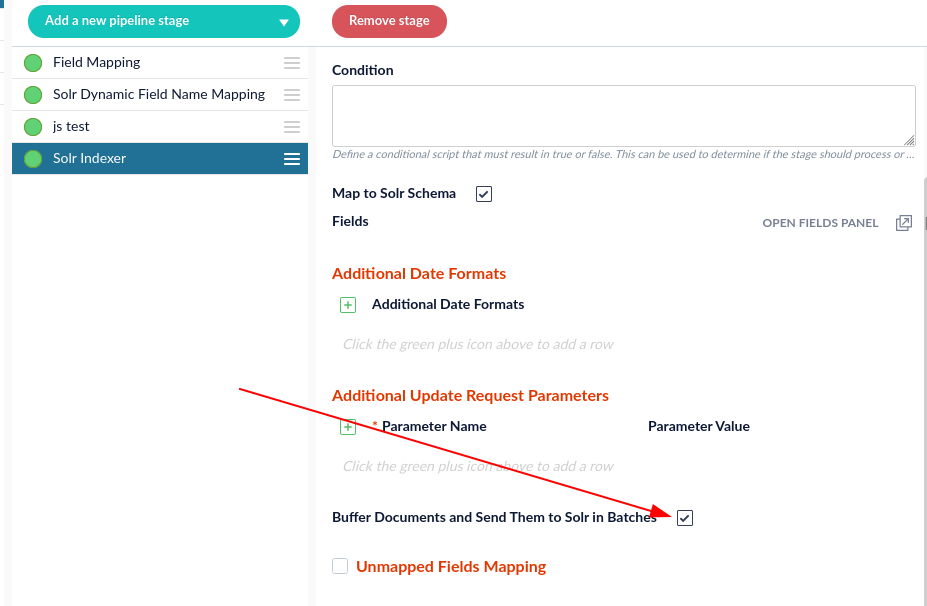
The pre-parse pipeline will only fetch and index metadata since it does not have the Tika parsed body or Tika parsed metadata. Within this index pipeline, you will want to make sure you are buffering requests to Solr:
This is the default setting. If this option is not selected, select the box. Doing so will increase the indexing speed.
## Post-parse pipeline
The Tika Asynchronous job will download, parse, and send the parsed document to a second Fusion index pipeline. This pipeline is responsible for updating the Tika body and metadata to the document created in the pre-parse pipeline.
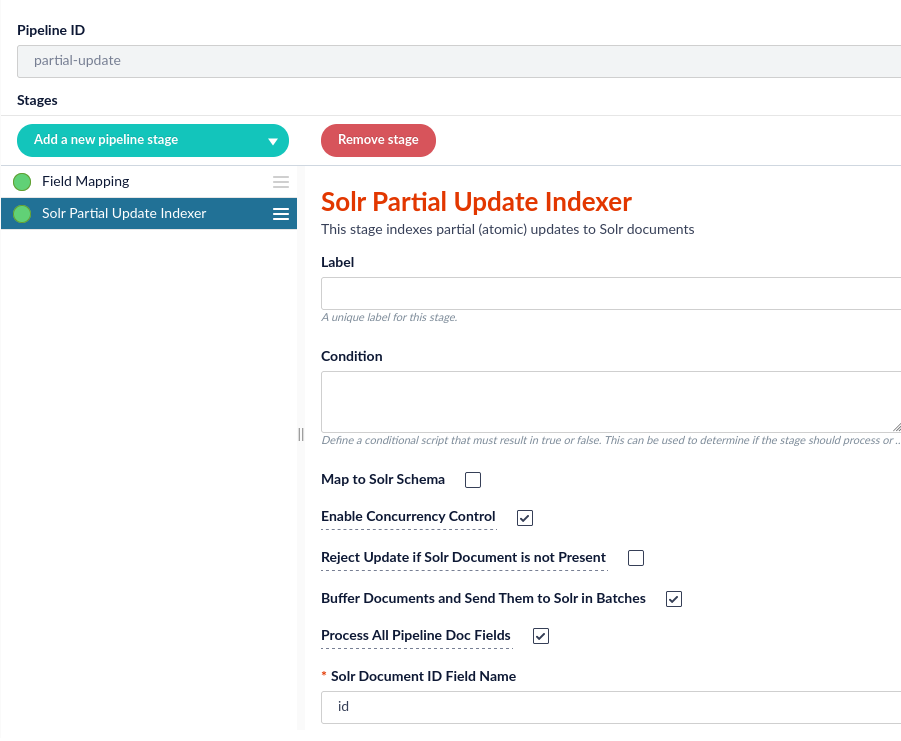
The index pipeline **MUST** contain a Solr Partial Update stage with the following selected parameters:
The Solr Partial Update Indexer pipeline will add the Tika fields into the existing document that was added by the connector.
If you do not select the `Process All Pipeline Doc Fields` option, you will receive results similar to the following:
`"body_t":"[{\"field\":\"I’m the content from JSON!\"}]"`
## Configure the Asynchronous Parser
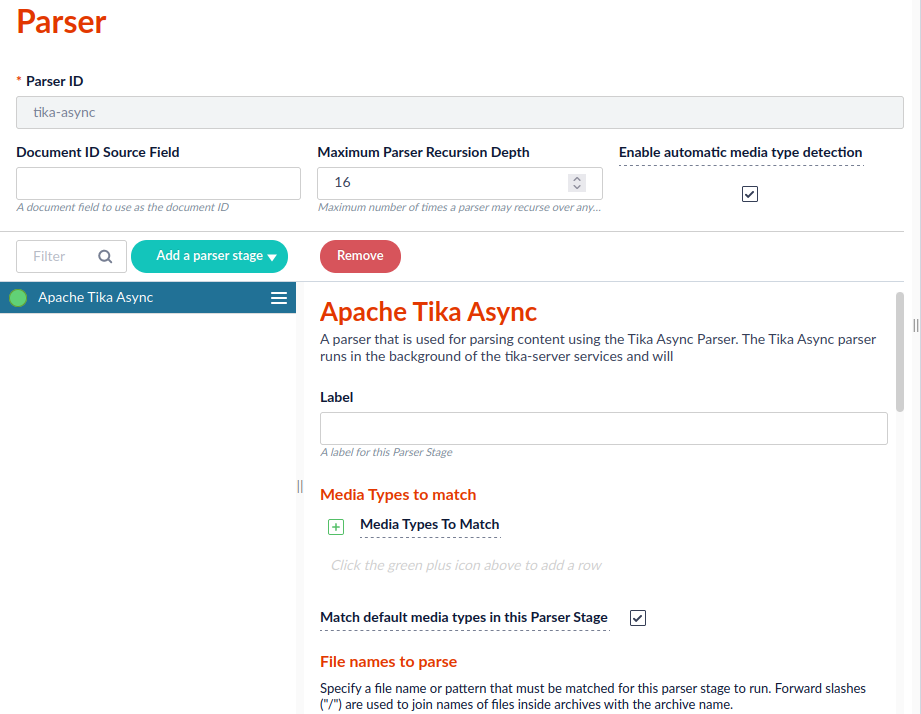
Next, we will create the new parser. All settings can be left on the default selections.
## Configure the datasource
Configure the datasource to use the asynchronous parser.
When you run the datasource job, it will display the documents indexed and will have a special async parsing metadata.
* `_lw_async_parsing_id_i`
* `_lw_async_parsing_fail_count_i`
If the connectors have an async parser, they will not download or parse the documents when running the connector job. This will be performed asynchronously by the Tika Asynchronous Parsing job.
## Configure the Tika Async Parsing job
1. Select **Jobs** under the Collections header.
2. Click Jobs, and select **Add +**. Search for Tika to select the option for Tika Async Job.
3. Configure fields according to your desired specifications.
Field options for the Tika Async parsing job include:
| Field | Notes |
| -------------------------- | ------------------------------------------------------------------------------------------------------------------------------------------------------- |
| **Tika Endpoints** | List of Tika server endpoints that are in the cluster. The endpoints will be automatically updated. You do **not** need to specify the endpoints. |
| **Pipeline ID** | The Pipeline ID is determined by the partial-update index pipeline you created earlier. |
| **Find Filter Queries** | This is an optional filter to limit the documents fetched by the Tika Async parser. |
| **Finder batch size** | This is the Solr `rows` batch size of the requests. |
| **Max bytes returned** | The maximum number of characters indexed. |
| **Max embedded documents** | This determines the amount of embedded documents that should be parsed until additional embedded documents are ignored. Use -1 for unlimited documents. |
| **Parse timeout** | This configures the length of time for parsing in milliseconds. |
| **Max Parse Failure** | If a document fails to parse, you can configure the reattempts up to your designated amount of times. |
| **Insert Batch Max Docs** | This controls the batch size in number of documents before submitting to the index pipeline. |
| **Insert Batch Max Bytes** | This controls the batch size number of bytes contained in the documents before submitting to the index pipeline. |
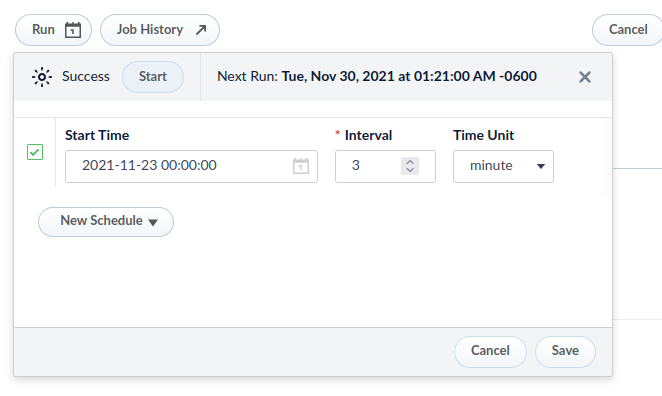
4. Finally, configure a schedule for the job to run according to your designated specifications.
The logs for the job will be in `$FUSION_HOME/var/log/tika-server/tika-async.log`
 The Solr Partial Update Indexer pipeline will add the Tika fields into the existing document that was added by the connector.
 ## Configure the datasource
Configure the datasource to use the asynchronous parser.
## Configure the datasource
Configure the datasource to use the asynchronous parser.
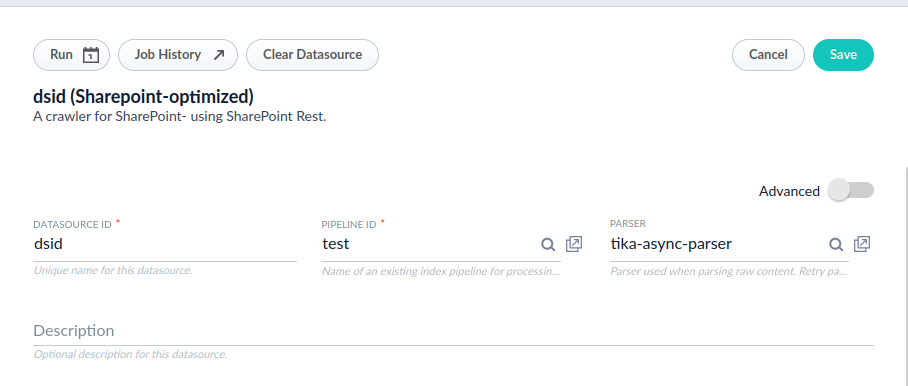 When you run the datasource job, it will display the documents indexed and will have a special async parsing metadata.
* `_lw_async_parsing_id_i`
* `_lw_async_parsing_fail_count_i`
If the connectors have an async parser, they will not download or parse the documents when running the connector job. This will be performed asynchronously by the Tika Asynchronous Parsing job.
## Configure the Tika Async Parsing job
1. Select **Jobs** under the Collections header.
When you run the datasource job, it will display the documents indexed and will have a special async parsing metadata.
* `_lw_async_parsing_id_i`
* `_lw_async_parsing_fail_count_i`
If the connectors have an async parser, they will not download or parse the documents when running the connector job. This will be performed asynchronously by the Tika Asynchronous Parsing job.
## Configure the Tika Async Parsing job
1. Select **Jobs** under the Collections header.
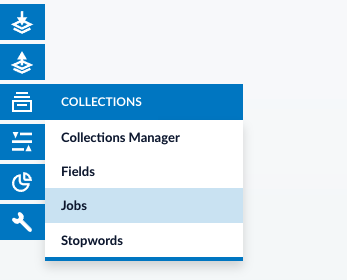 2. Click Jobs, and select **Add +**. Search for Tika to select the option for Tika Async Job.
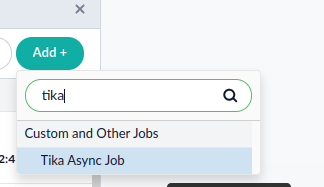 3. Configure fields according to your desired specifications.
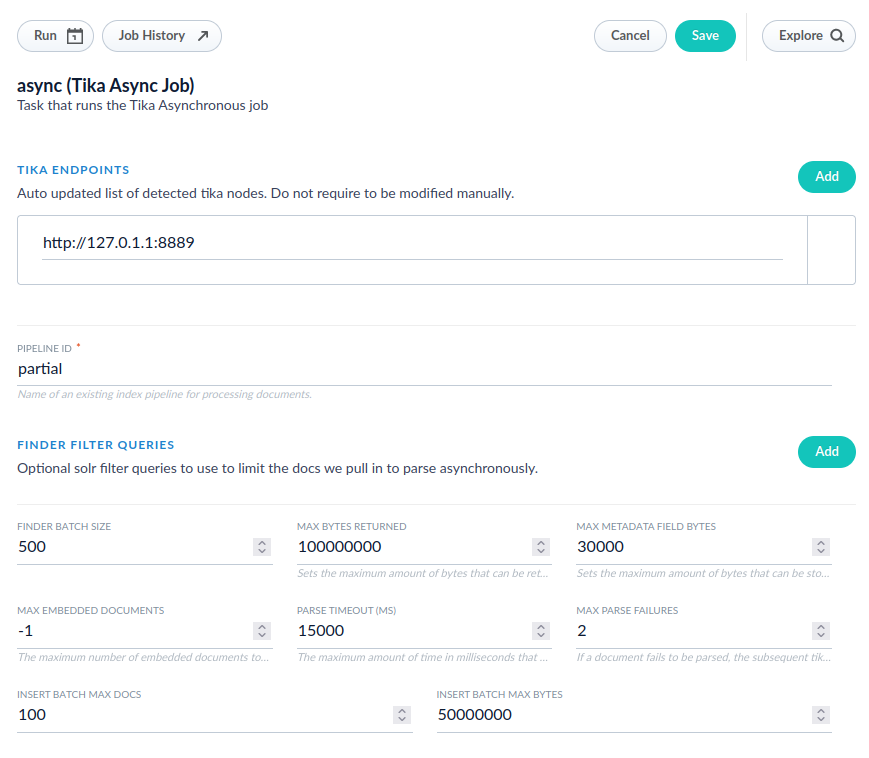 Field options for the Tika Async parsing job include:
| Field | Notes |
| -------------------------- | ------------------------------------------------------------------------------------------------------------------------------------------------------- |
| **Tika Endpoints** | List of Tika server endpoints that are in the cluster. The endpoints will be automatically updated. You do **not** need to specify the endpoints. |
| **Pipeline ID** | The Pipeline ID is determined by the partial-update index pipeline you created earlier. |
| **Find Filter Queries** | This is an optional filter to limit the documents fetched by the Tika Async parser. |
| **Finder batch size** | This is the Solr `rows` batch size of the requests. |
| **Max bytes returned** | The maximum number of characters indexed. |
| **Max embedded documents** | This determines the amount of embedded documents that should be parsed until additional embedded documents are ignored. Use -1 for unlimited documents. |
| **Parse timeout** | This configures the length of time for parsing in milliseconds. |
| **Max Parse Failure** | If a document fails to parse, you can configure the reattempts up to your designated amount of times. |
| **Insert Batch Max Docs** | This controls the batch size in number of documents before submitting to the index pipeline. |
| **Insert Batch Max Bytes** | This controls the batch size number of bytes contained in the documents before submitting to the index pipeline. |
4. Finally, configure a schedule for the job to run according to your designated specifications.
Field options for the Tika Async parsing job include:
| Field | Notes |
| -------------------------- | ------------------------------------------------------------------------------------------------------------------------------------------------------- |
| **Tika Endpoints** | List of Tika server endpoints that are in the cluster. The endpoints will be automatically updated. You do **not** need to specify the endpoints. |
| **Pipeline ID** | The Pipeline ID is determined by the partial-update index pipeline you created earlier. |
| **Find Filter Queries** | This is an optional filter to limit the documents fetched by the Tika Async parser. |
| **Finder batch size** | This is the Solr `rows` batch size of the requests. |
| **Max bytes returned** | The maximum number of characters indexed. |
| **Max embedded documents** | This determines the amount of embedded documents that should be parsed until additional embedded documents are ignored. Use -1 for unlimited documents. |
| **Parse timeout** | This configures the length of time for parsing in milliseconds. |
| **Max Parse Failure** | If a document fails to parse, you can configure the reattempts up to your designated amount of times. |
| **Insert Batch Max Docs** | This controls the batch size in number of documents before submitting to the index pipeline. |
| **Insert Batch Max Bytes** | This controls the batch size number of bytes contained in the documents before submitting to the index pipeline. |
4. Finally, configure a schedule for the job to run according to your designated specifications.