> ## Documentation Index
> Fetch the complete documentation index at: https://doc.lucidworks.com/llms.txt
> Use this file to discover all available pages before exploring further.
# Roles API
export const LwTemplate = ({title = "Key questions to get you started", icon = "sparkles", cta = "Powered by Agent Studio", linkHref = "https://lucidworks.com/demo/?utm_source=docs&utm_medium=referral&utm_campaign=docs_cta_ai"}) => {
const [isLoaded, setIsLoaded] = useState(false);
useEffect(() => {
const timer = setTimeout(() => {
setIsLoaded(true);
}, 500);
return () => clearTimeout(timer);
}, []);
return
{isLoaded && `
}} />}
Powered by Lucidworks Agent Studio
;
};
[localhost link]: http://localhost:3000/docs/4/fusion-server/reference/api/authentication-and-authorization-apis/roles-api
[mintlify link]: https://doc.lucidworks.com/docs/4/fusion-server/reference/api/authentication-and-authorization-apis/roles-api
[old doc.lw link]: https://doc.lucidworks.com/fusion/5.9/338
Roles are groups of permissions that allow access to the UI and the REST APIs. See [Roles](/docs/4/fusion-server/concepts/security/access-control/roles) for details.
Security Realms can be configured to use LDAP group membership to assign Roles to users.
You can create security realms that use external LDAP servers for authentication. Optionally, Fusion can search in the LDAP for groups to which a user belongs, and then map those groups to Fusion roles. Fusion performs authorization using permissions stored in Fusion users and Fusion roles.
Fusion *does not* use permissions from the LDAP for authorization of UI access or API requests. It only obtains group names (optionally), which are mapped to role names. If an [Active Directory Security Query Trimming Stage](/docs/4/fusion-server/reference/pipeline-stages/query/active-directory-security-trimming-query-stage) is used, then directory-service permissions *are* used for trimming. If a connector supports security trimming, then connector permissions *are* used for trimming.
{/* // tag::ldap-body[] */}
To configure Fusion to use an external LDAP as an authentication provider, you’ll need to get information about the LDAP server(s) running on your system, either from your system or your sysadmin.
## Add an LDAP Security Realm
1. Log in to the Fusion UI as the user admin, or as a different user with corresponding permissions.
2. Navigate to **System** > **Access Control**.
3. Click **Security Realms**.
4. Click **Add Security Realm**.
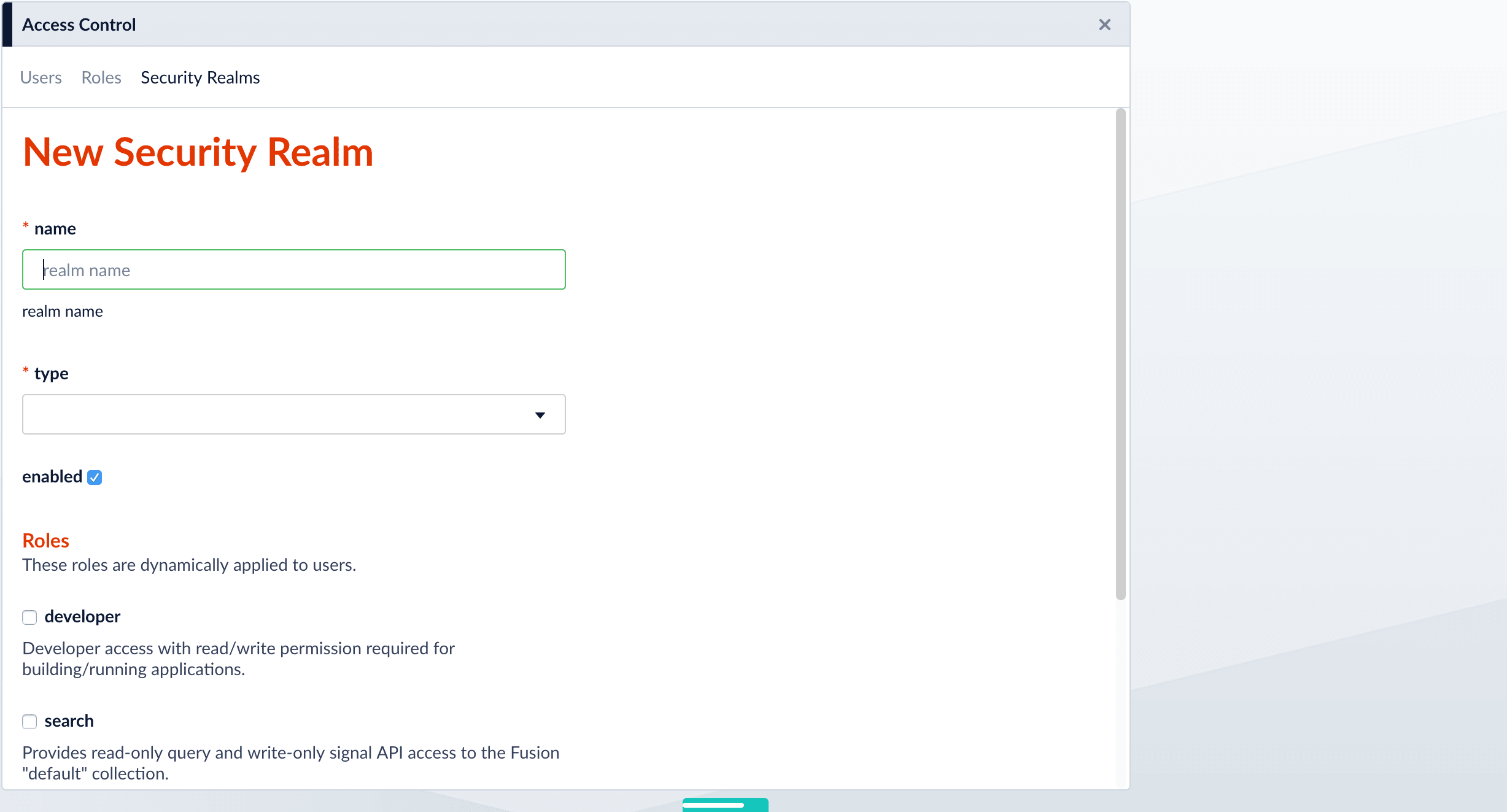
5. Specify info for the new realm:
* `name` – Name of the security realm. It must be unique. It should be descriptive but short.
* `type` – Select **ldap** from the pulldown menu.
When you select **ldap**, Fusion displays additional, LDAP-specific configuration options.
* `enabled` checkbox – Whether Fusion allows user logins for this security realm. The default is yes (checked).
* `auto-create users` checkbox – Whether a user account is created automatically upon initial authentication. The default is yes (checked). If the checkbox is unchecked, then a Fusion user with admin permissions must create Fusion users.
6. Scroll down and specify additional options as explained in detail below.
## Specify Static Roles (Optional)
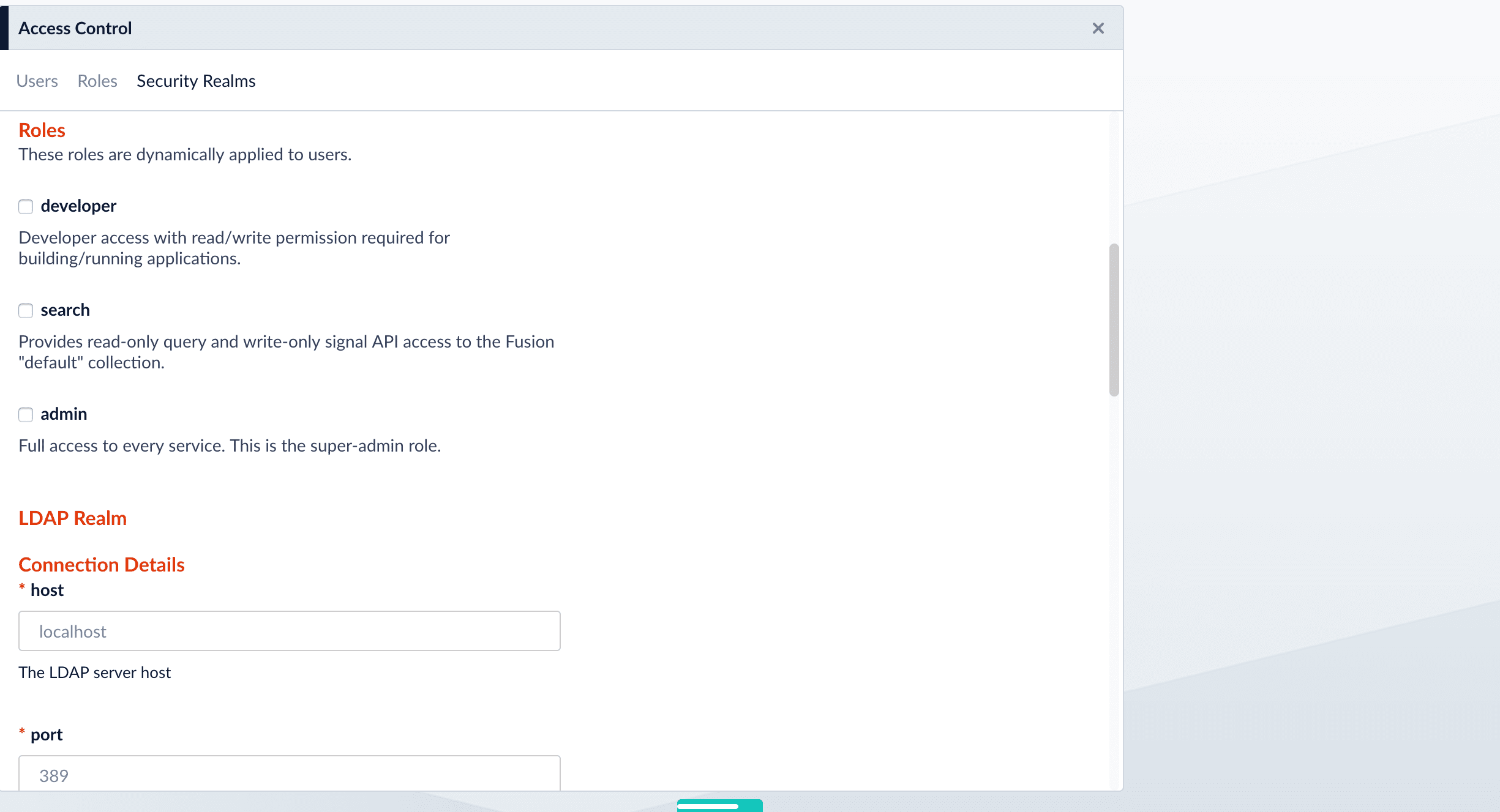
Specify one or more Fusion roles for the security realm. These roles are always considered. They do not depend on searching for LDAP groups and mapping group names to Fusion role names.
In a security realm, you can specify these static roles, add to the list of roles dynamically through an LDAP search, or both. If you do neither, Fusion uses only the role(s) and permissions defined for the user.
## Specify LDAP Connection Details
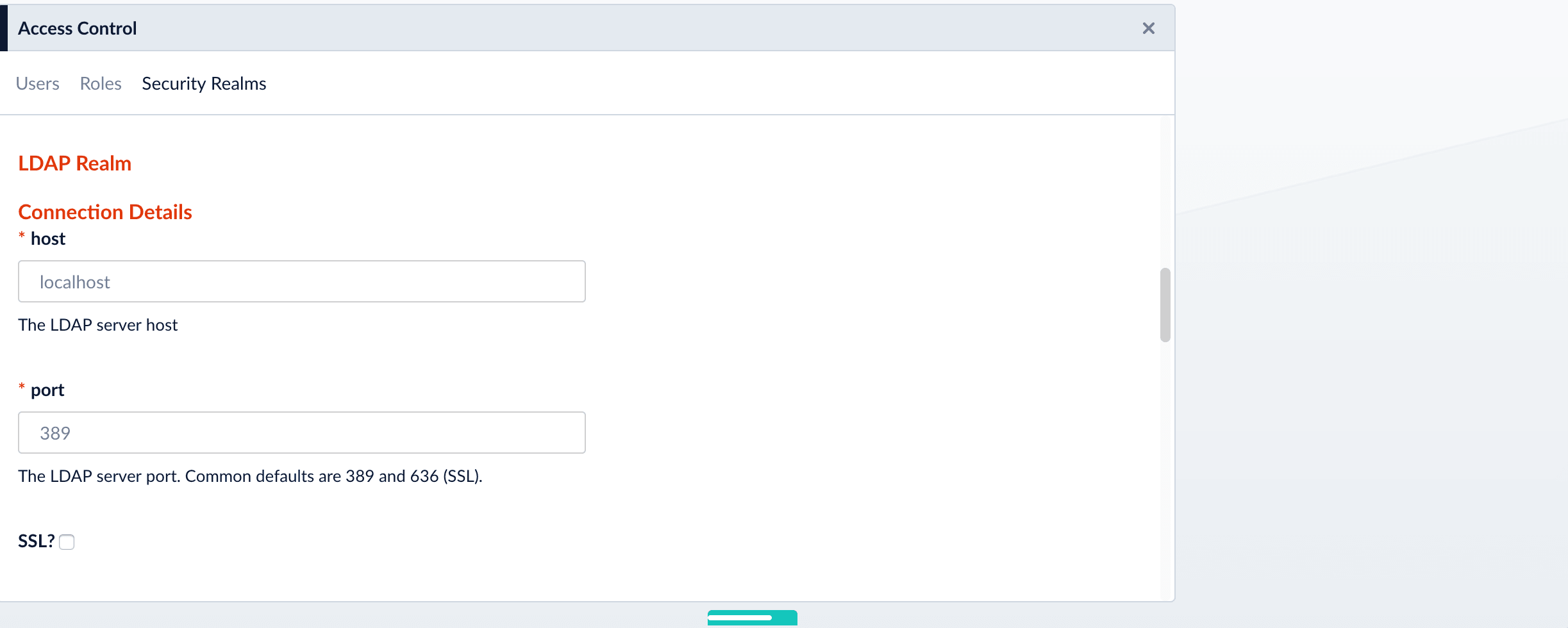
Specify the hostname and port of the LDAP server. Check the checkbox if the server is running over SSL.
## Specify the Authentication Method
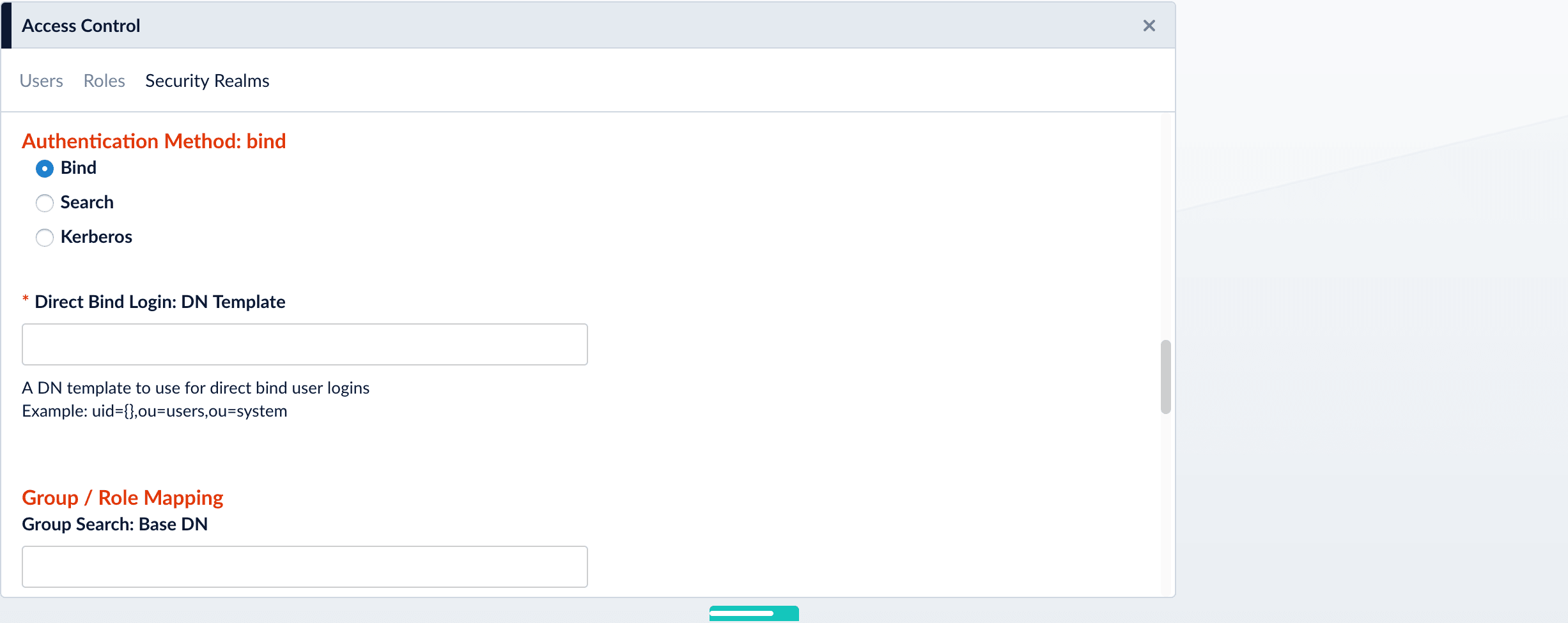
Specify the authentication method:
* **Bind.** LDAP authentication is carried out via a single "Bind" operation. See [Bind](#bind) below.
* **Search.** LDAP authentication is carried out indirectly via a Search operation followed by a Bind operation. See [Search](#search) below.
* **Kerberos.** Kerberos authenticates Fusion and an LDAP Search operation is carried out to find group-level authorizations. See [Kerberos](#kerberos) below.
### Bind
Use the Bind authentication method when the Fusion login username matches a part of the LDAP distinguished name (DN). Specify the remainder of the LDAP DN in the "DN Template" configuration entry, which uses a single pair of curly braces (`{}`) as a placeholder for the value of the Fusion username.
### Search
Use the Search authentication method when the username used for Fusion login *doesn’t* match a part of the LDAP DN. The search request returns a valid user DN, which is then used together with the user password for authentication via a Bind request.
1. Construct a search request.
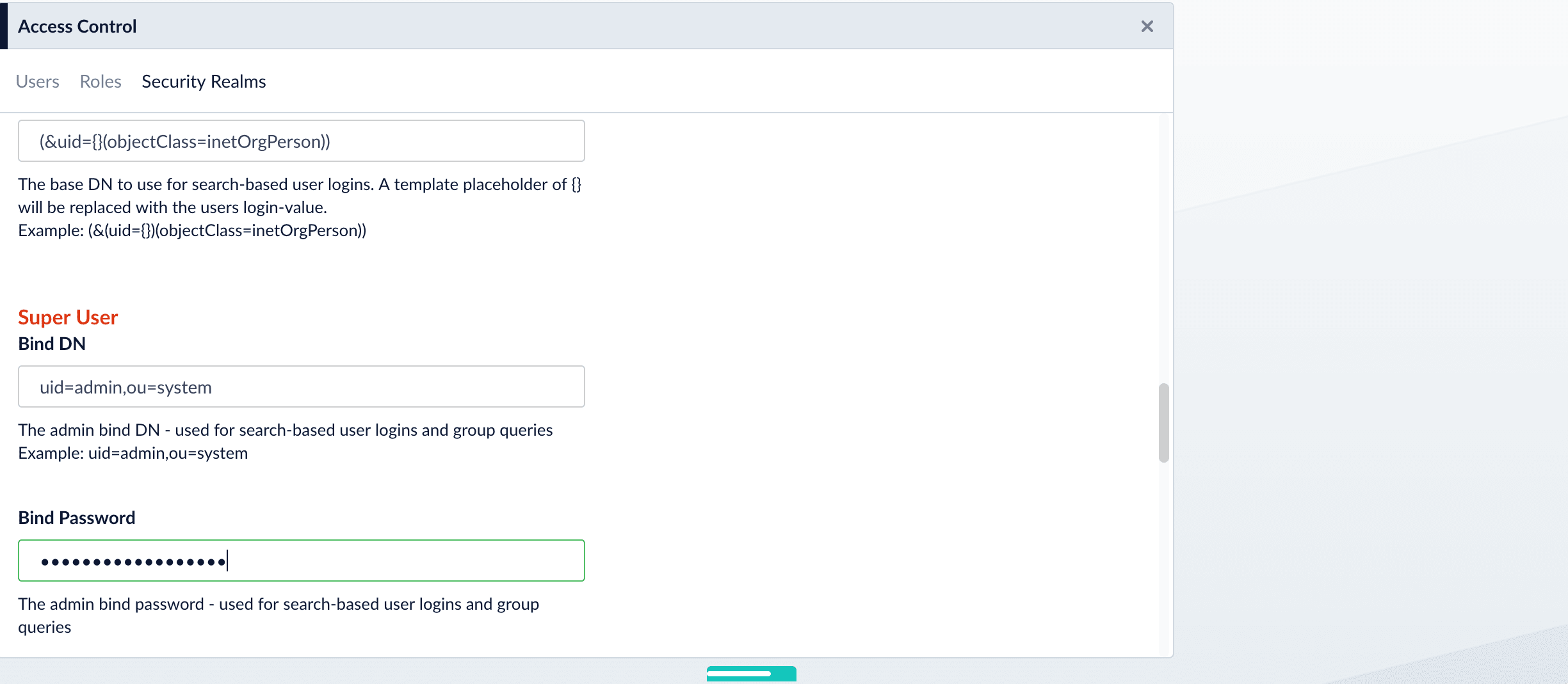
The Search authentication method is generally required when working with Microsoft Active Directory servers. In this case, you need to know the username and password of *some* user who has sufficient privileges to query the LDAP server for user and group memberships; this user doesn’t have to be the superuser.
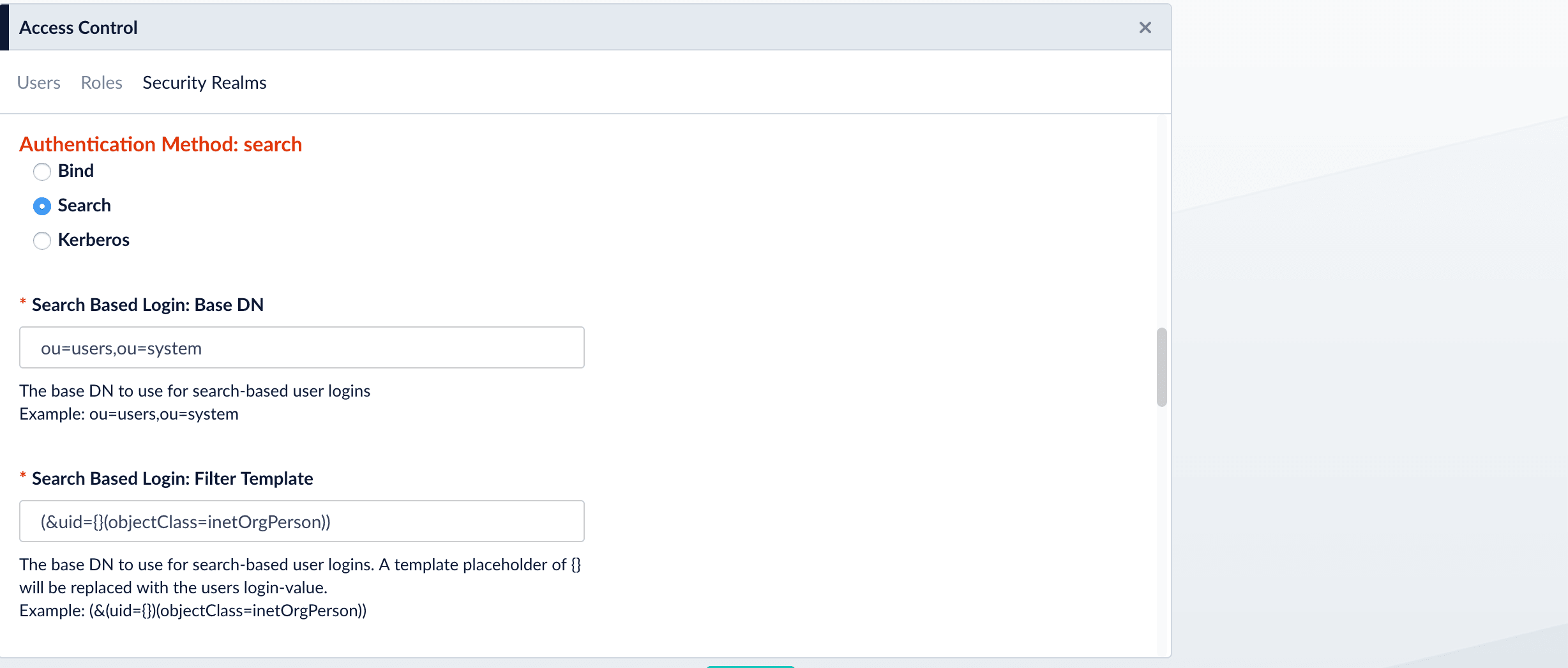
In addition to a privileged user DN and password, the Search authentication method requires constructing a search request. There are two parts to the request. The first part is the base DN of the LDAP directory tree that contains user account objects. The second part of the request is a Search Filter object that restricts the results to a matching subset of the information.
2. Provide the administrator bind DN:
### Kerberos
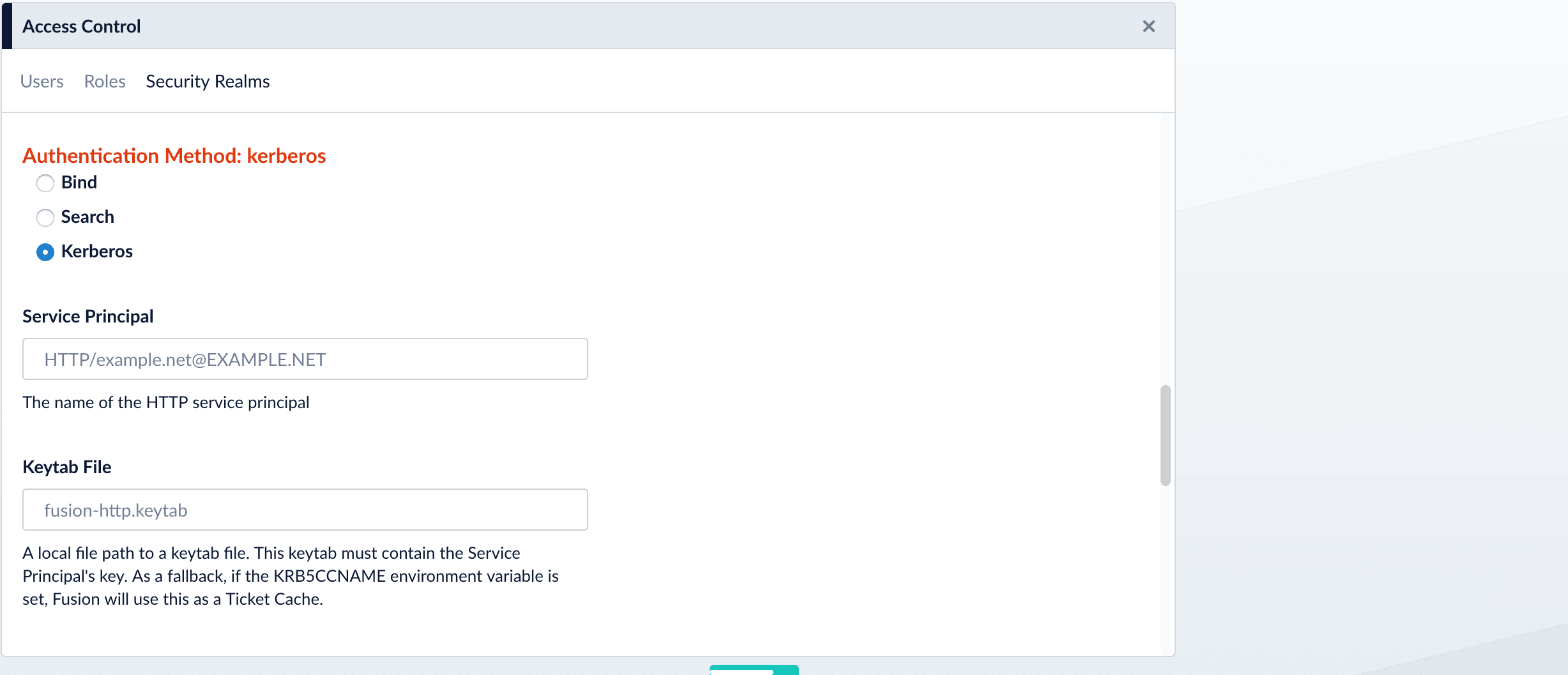
Use the Kerberos authentication method when Kerberos is the authentication provider.
## Search for LDAP Groups (Optional)
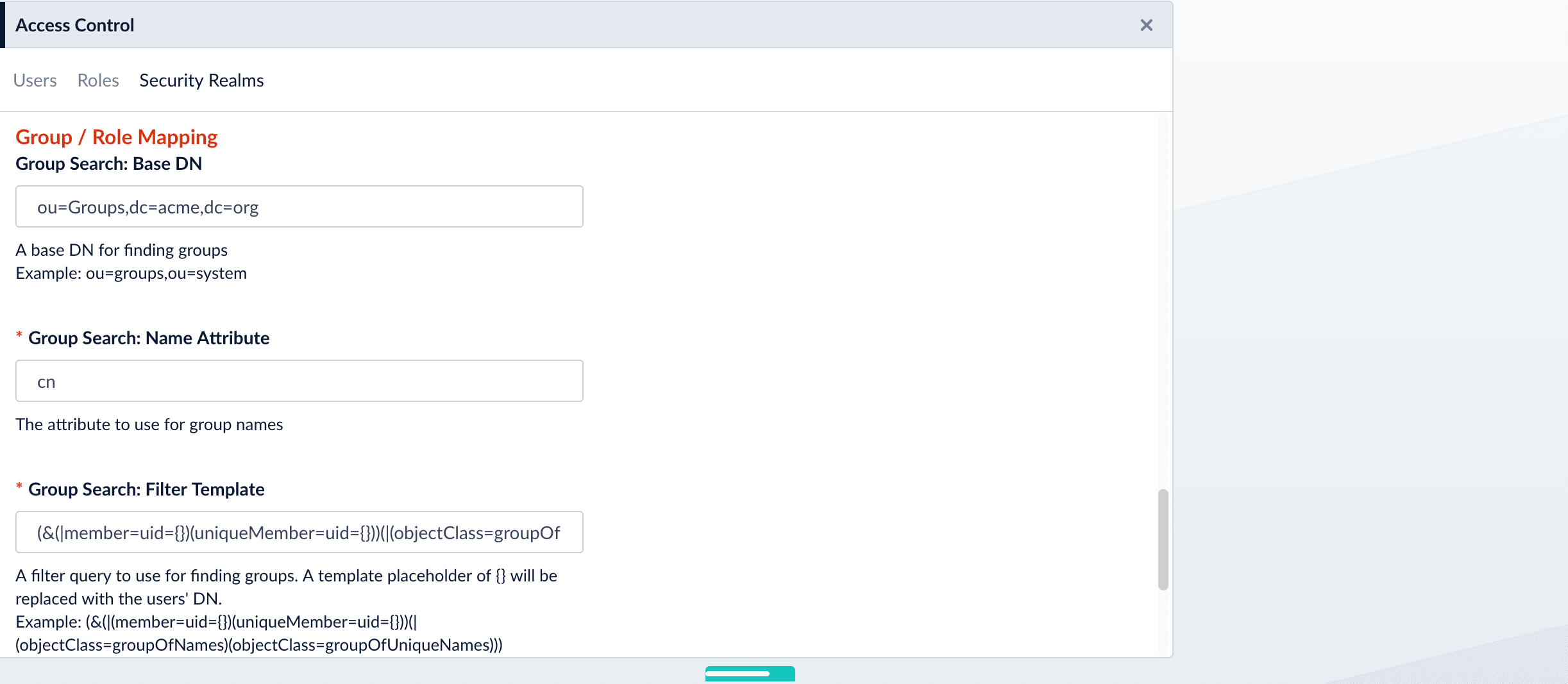
A Fusion role is a bundle of permissions tailored to the access needs of different kinds of users. Access to services and data for LDAP-managed users is controlled by mappings from LDAP users and groups to Fusion roles.
Roles can be assigned globally or restricted to specific LDAP groups. The security realm configuration panel contains a list of all Fusion roles with a checkbox for each, used to assign that role to all users in that realm. LDAP group names can be mapped directly to specific Fusion roles and LDAP group search and filter queries can also be used to map kinds of LDAP users to specific Fusion roles.
## Map LDAP Groups to Fusion Roles (Optional)
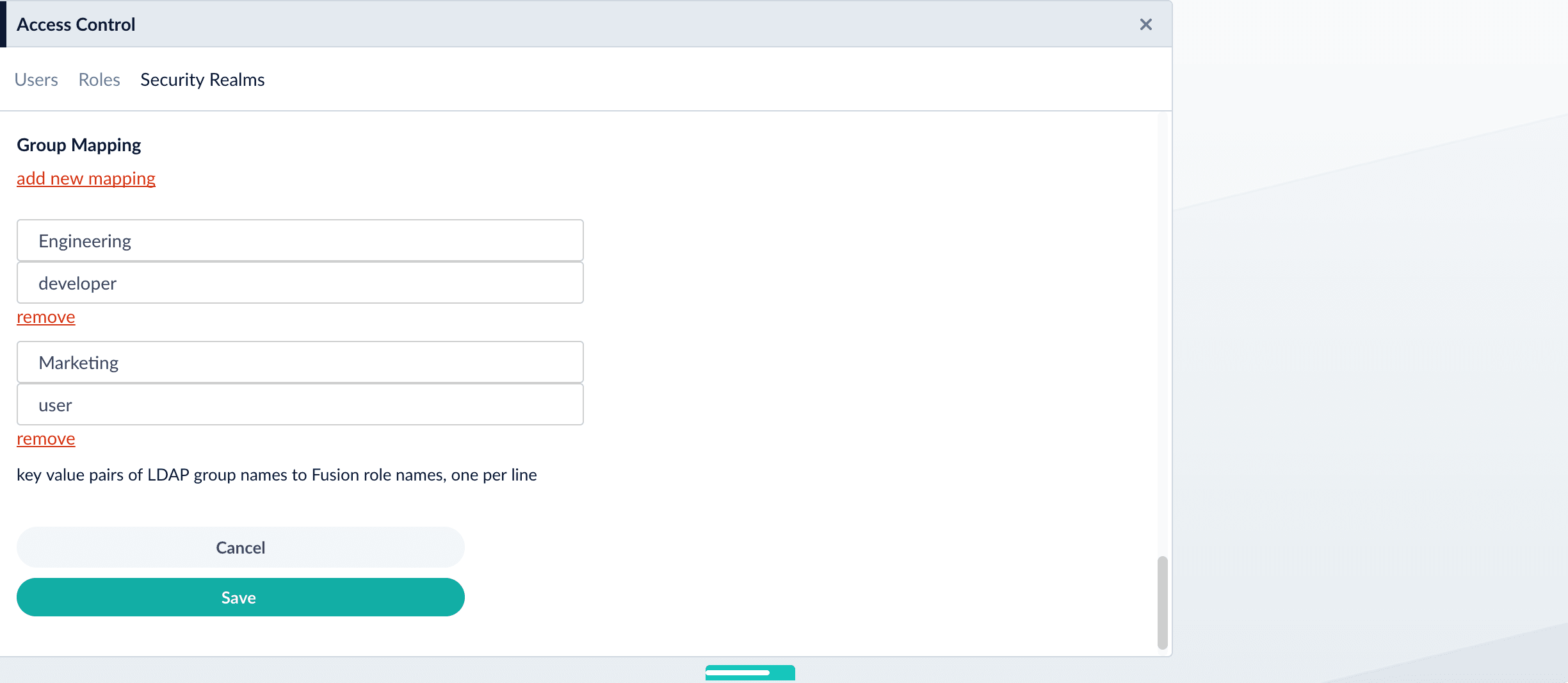
If LDAP group names returned by the search for groups match Fusion role names, you do not need to map the group names to role names. You must map any LDAP group names that do not match to Fusion role names (if you do not, they will not be used).
{/* // The bit about testing the connection is not in the new 4.0 UI -- Laurel */}
## Save the Security Realm Configuration
{/* // The last part of the form allows you to test the LDAP realm configuration using a valid LDAP username and password: */}
{/* // When the "Update and test settings" button is clicked, the username from the form is turned into a DN according to the DN template, and a Bind operation request is sent to the configured LDAP server. */}
{/* //  */}
Click **Save**.
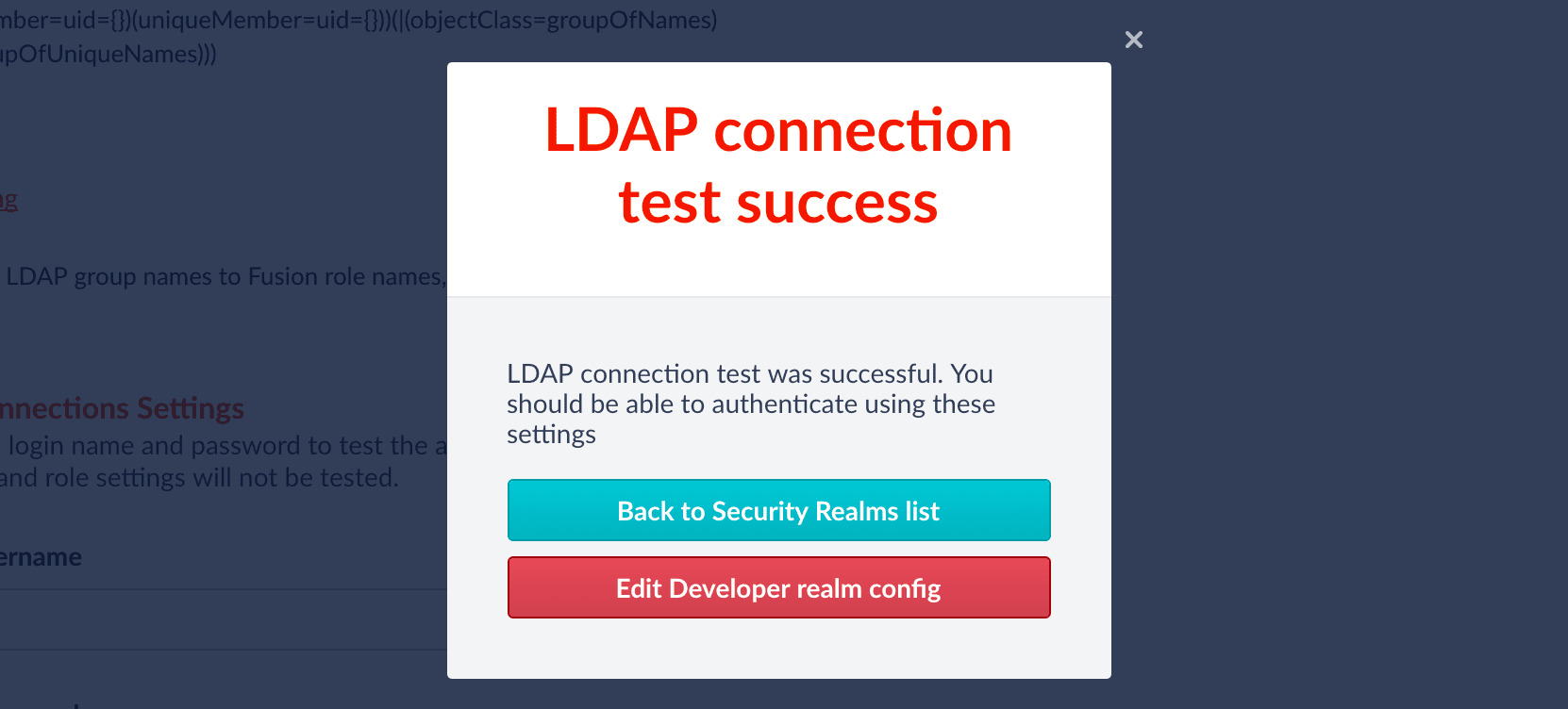
Fusion reports whether or not authentication was successful:
## Basic LDAP Concepts and Terminology
The [LDAP](https://en.wikipedia.org/wiki/Lightweight_Directory_Access_Protocol) protocol is used to share information about users, systems, networks, and services between servers on the internet. LDAP servers are used as a central store for usernames, passwords, and user and group permissions. Applications and services use the LDAP protocol to send user login and password information to the LDAP server. The server performs name lookup and password validation. LDAP servers also store Access Control Lists (ACLs) for file and directory objects which specify the users and groups and kinds of access allowed for those objects.
LDAP is an open standard protocol and there are many commercial and open source LDAP servers available. Microsoft environments generally use Active Directory. Unix servers use AD or other LDAP systems such as OpenLDAP, although many Unix systems do not use LDAP at all. To configure Fusion for LDAP, you’ll need to get information about the LDAP server(s) running on your system either from your sysadmin or via system utilities.
### Directories and Distinguished Names
An LDAP information store is a Directory Information Tree (DIT). The tree is composed of entry nodes; each node has a single parent and zero or more child nodes. Every node must have at least one attribute which uniquely distinguishes it from its siblings which is used as the node’s Relative Distinguished Name (RDN). A node’s Distinguished Name (DN) is a globally unique identifier.
The string representation of a DN is specified in [RFC 4514](https://tools.ietf.org/html/rfc4514). It consists of the node’s RDN followed by a comma, followed by the parent node’s DN. The string representation of the RDN is the attribute-value pair name, connected by an equals ("=") sign. This recursive definition means that the DN of a node is composed by working from the node back through its parent and ancestor nodes up to the root node.
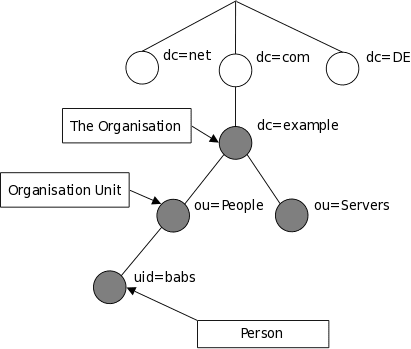
Here is a small example of a DIT:
The person entry in this tree has the DN: "uid=babs, ou=people, dc=example, dc=com".
Attribute names include many short strings based on English words and abbreviations, e.g.:
| Name | Description |
| ---- | ---------------------- |
| cn | commonName |
| dc | domainComponent |
| mail | email address |
| ou | organizationalUnitName |
| sn | surname |
| uid | userId |
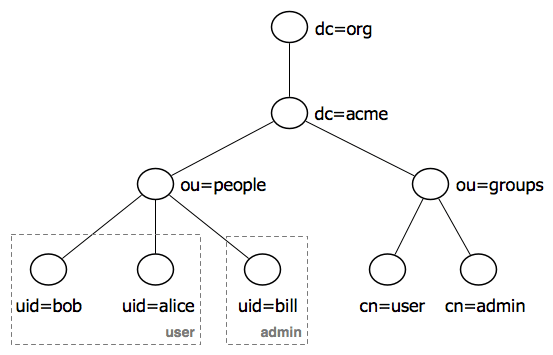
LDAP entry attributes can refer to other LDAP entries by using the DN of the entry as value of that attribute. The following example of a directory which contains user and groups information shows how this works:
This tree contains two organizational units: "ou=people" and "ou=groups". The children of the "group" organizational unit are specific named groups, just as the child nodes of organization unit "people" are specific users. There are three user entries with RDNs "uid=bob", "uid=alice", "uid=bill" and two groups with RDNs "cn=user" and "cn=admin". The dotted lines and group labels around the person nodes indicate group membership. This relationship is declared on the groups nodes by adding an attribute named "member" whose value is a users DN. In the [LDAP data interchange format (LDIF)](https://en.wikipedia.org/wiki/LDAP_Data_Interchange_Format), this is written:
```
cn=user,ou=groups,dc=acme,dc=org
member: uid=bob,ou=people,dc=acme,dc=org
member: uid=alice,ou=people,dc=acme,dc=org
cn=admin,ou=groups,dc=acme,dc=org
member: uid=bill,ou=people,dc=acme,dc=org
```
See the [Wikipedia’s LDAP entry](https://en.wikipedia.org/wiki/Lightweight_Directory_Access_Protocol#Directory_structure) for details.
### LDAP Protocol Operations
For authentication purposes, Fusion sends Bind operation requests to the LDAP server. The Bind operation authenticates clients (and the users or applications behind them) to the directory server, establishes authorization identity used for subsequent operations on that connection, and specifies the LDAP protocol version that the client will use.
Depending on the way that the host system uses LDAP to store login information about users and groups, it may be necessary to send Search operation requests to the LDAP server as well. The Search operation retrieves partial or complete copies of entries matching a given set of criteria.
[LDAP filters](https://www.ldap.com/ldap-filters) specify which entries should be returned. These are specified using prefix notation. Boolean operators are "&" for logical AND, "|" for logical OR, e.g., "A AND B" is written "(&(A)(B))". To tune and test search filters for a Unix-based LDAP system, see the [ldapsearch command line utility](http://docs.oracle.com/cd/E19450-01/820-6169/ldapsearch-examples.html) documentation. For Active Directory systems, see [AD Syntax Filters](http://social.technet.microsoft.com/wiki/contents/articles/5392.active-directory-ldap-syntax-filters.aspx).
{/* // end::ldap-body[] */}
## Create, Update or Delete Roles
The endpoint for this request can take the role ID as a request parameter:
`/api/roles/`
The role ID string is generated by Fusion when the role is created.
A GET request returns the configured roles for a specific ID. If the ID is omitted from the path, all roles will be returned.
A POST request creates a new role. When creating a new role, the request path is `/api/roles`. If the role is created, the request returns the role ID.
In order to see this object within the [Fusion UI](/docs/4/fusion-server/concepts/object-explorer), it **must** be associated with an app. To do this, create the object using the `/apps` endpoint.
A PUT request updates an existing role.
A DELETE request will remove the role configuration.
## Role Specification
To create or update a Role via a POST or PUT request, the request body is a JSON object with the following attributes:
| Property | Description |
| ------------------------------- | ------------------------------------------------------------------------------------------------------------------------------------------------------------- |
| name *Required* | A string containing the role name. |
| desc *Optional* | A string containing a brief text description, for display on the Access Control "ROLES" panel. |
| permissions *Optional* | A list of permissions, specified in JSON notation. See section [Permissions](/docs/4/fusion-server/concepts/security/access-control/permissions) for details. |
| uiPermissions *Optional* | A list of names of UI components. |
The following example describes a role with permissions to access Fusion Dashboards for collection "mdb1":
```json wrap theme={"dark"}
{
"name":"view-dashboard-mdb1",
"desc":"can access/use analytics dashboard \"mdb1\" but not allowed to change dashboard controls.",
"permissions":[
{"methods":["GET"],"path":"/solr/system_banana/*"},
{"methods":["GET"],"path":"/solr/{id}/*","params":{"id":["mdb1"]}},
{"methods":["GET"],"path":"/solr/{id}/admin/luke","params":{"id":["mdb1"]}},
{"methods":["GET"],"path":"/collections/system_banana"}
],
"uiPermissions":[
"dashboards",
"fields"
]
}
```
## Examples
*Get the details for the role with id '3416c03a-31df-4103-b446-358f6790af3e':*
**REQUEST**
```bash wrap theme={"dark"}
curl -u USERNAME:PASSWORD https://FUSION_HOST:8764/api/roles/3416c03a-31df-4103-b446-358f6790af3e
```
**RESPONSE**
```json wrap theme={"dark"}
{
"id":"3416c03a-31df-4103-b446-358f6790af3e",
"name":"search",
"createdAt":"2016-03-09T20:01:48Z",
"permissions":[
{"methods":["GET"],"path":"/query-pipelines/*/collections/*/select"},
{"methods":["GET"],"path":"/query-pipelines"},
{"methods":["GET"],"path":"/solr/*/schema"},
{"methods":["GET"],"path":"/prefs/apps/search/*"},
{"methods":["GET"],"path":"/collections/**"},
{"methods":["GET"],"path":"/solr/*/admin/luke"}
],
"uiPermissions":[
"search",
"collections"
],
"desc":"Provides read-only/required permissions for the Fusion Search UI."
}
```
 5. Specify info for the new realm:
* `name` – Name of the security realm. It must be unique. It should be descriptive but short.
* `type` – Select **ldap** from the pulldown menu.
When you select **ldap**, Fusion displays additional, LDAP-specific configuration options.
* `enabled` checkbox – Whether Fusion allows user logins for this security realm. The default is yes (checked).
* `auto-create users` checkbox – Whether a user account is created automatically upon initial authentication. The default is yes (checked). If the checkbox is unchecked, then a Fusion user with admin permissions must create Fusion users.
6. Scroll down and specify additional options as explained in detail below.
## Specify Static Roles (Optional)
Specify one or more Fusion roles for the security realm. These roles are always considered. They do not depend on searching for LDAP groups and mapping group names to Fusion role names.
In a security realm, you can specify these static roles, add to the list of roles dynamically through an LDAP search, or both. If you do neither, Fusion uses only the role(s) and permissions defined for the user.
5. Specify info for the new realm:
* `name` – Name of the security realm. It must be unique. It should be descriptive but short.
* `type` – Select **ldap** from the pulldown menu.
When you select **ldap**, Fusion displays additional, LDAP-specific configuration options.
* `enabled` checkbox – Whether Fusion allows user logins for this security realm. The default is yes (checked).
* `auto-create users` checkbox – Whether a user account is created automatically upon initial authentication. The default is yes (checked). If the checkbox is unchecked, then a Fusion user with admin permissions must create Fusion users.
6. Scroll down and specify additional options as explained in detail below.
## Specify Static Roles (Optional)
Specify one or more Fusion roles for the security realm. These roles are always considered. They do not depend on searching for LDAP groups and mapping group names to Fusion role names.
In a security realm, you can specify these static roles, add to the list of roles dynamically through an LDAP search, or both. If you do neither, Fusion uses only the role(s) and permissions defined for the user.
 ## Specify LDAP Connection Details
Specify the hostname and port of the LDAP server. Check the checkbox if the server is running over SSL.
## Specify LDAP Connection Details
Specify the hostname and port of the LDAP server. Check the checkbox if the server is running over SSL.
 ## Specify the Authentication Method
Specify the authentication method:
* **Bind.** LDAP authentication is carried out via a single "Bind" operation. See [Bind](#bind) below.
* **Search.** LDAP authentication is carried out indirectly via a Search operation followed by a Bind operation. See [Search](#search) below.
* **Kerberos.** Kerberos authenticates Fusion and an LDAP Search operation is carried out to find group-level authorizations. See [Kerberos](#kerberos) below.
### Bind
Use the Bind authentication method when the Fusion login username matches a part of the LDAP distinguished name (DN). Specify the remainder of the LDAP DN in the "DN Template" configuration entry, which uses a single pair of curly braces (`{}`) as a placeholder for the value of the Fusion username.
## Specify the Authentication Method
Specify the authentication method:
* **Bind.** LDAP authentication is carried out via a single "Bind" operation. See [Bind](#bind) below.
* **Search.** LDAP authentication is carried out indirectly via a Search operation followed by a Bind operation. See [Search](#search) below.
* **Kerberos.** Kerberos authenticates Fusion and an LDAP Search operation is carried out to find group-level authorizations. See [Kerberos](#kerberos) below.
### Bind
Use the Bind authentication method when the Fusion login username matches a part of the LDAP distinguished name (DN). Specify the remainder of the LDAP DN in the "DN Template" configuration entry, which uses a single pair of curly braces (`{}`) as a placeholder for the value of the Fusion username.
 ### Search
Use the Search authentication method when the username used for Fusion login *doesn’t* match a part of the LDAP DN. The search request returns a valid user DN, which is then used together with the user password for authentication via a Bind request.
1. Construct a search request.
The Search authentication method is generally required when working with Microsoft Active Directory servers. In this case, you need to know the username and password of *some* user who has sufficient privileges to query the LDAP server for user and group memberships; this user doesn’t have to be the superuser.
In addition to a privileged user DN and password, the Search authentication method requires constructing a search request. There are two parts to the request. The first part is the base DN of the LDAP directory tree that contains user account objects. The second part of the request is a Search Filter object that restricts the results to a matching subset of the information.
### Search
Use the Search authentication method when the username used for Fusion login *doesn’t* match a part of the LDAP DN. The search request returns a valid user DN, which is then used together with the user password for authentication via a Bind request.
1. Construct a search request.
The Search authentication method is generally required when working with Microsoft Active Directory servers. In this case, you need to know the username and password of *some* user who has sufficient privileges to query the LDAP server for user and group memberships; this user doesn’t have to be the superuser.
In addition to a privileged user DN and password, the Search authentication method requires constructing a search request. There are two parts to the request. The first part is the base DN of the LDAP directory tree that contains user account objects. The second part of the request is a Search Filter object that restricts the results to a matching subset of the information.
 2. Provide the administrator bind DN:
 ### Kerberos
Use the Kerberos authentication method when Kerberos is the authentication provider.
### Kerberos
Use the Kerberos authentication method when Kerberos is the authentication provider.
 ## Search for LDAP Groups (Optional)
A Fusion role is a bundle of permissions tailored to the access needs of different kinds of users. Access to services and data for LDAP-managed users is controlled by mappings from LDAP users and groups to Fusion roles.
Roles can be assigned globally or restricted to specific LDAP groups. The security realm configuration panel contains a list of all Fusion roles with a checkbox for each, used to assign that role to all users in that realm. LDAP group names can be mapped directly to specific Fusion roles and LDAP group search and filter queries can also be used to map kinds of LDAP users to specific Fusion roles.
## Search for LDAP Groups (Optional)
A Fusion role is a bundle of permissions tailored to the access needs of different kinds of users. Access to services and data for LDAP-managed users is controlled by mappings from LDAP users and groups to Fusion roles.
Roles can be assigned globally or restricted to specific LDAP groups. The security realm configuration panel contains a list of all Fusion roles with a checkbox for each, used to assign that role to all users in that realm. LDAP group names can be mapped directly to specific Fusion roles and LDAP group search and filter queries can also be used to map kinds of LDAP users to specific Fusion roles.
 ## Map LDAP Groups to Fusion Roles (Optional)
If LDAP group names returned by the search for groups match Fusion role names, you do not need to map the group names to role names. You must map any LDAP group names that do not match to Fusion role names (if you do not, they will not be used).
## Map LDAP Groups to Fusion Roles (Optional)
If LDAP group names returned by the search for groups match Fusion role names, you do not need to map the group names to role names. You must map any LDAP group names that do not match to Fusion role names (if you do not, they will not be used).
 {/* // The bit about testing the connection is not in the new 4.0 UI -- Laurel */}
## Save the Security Realm Configuration
{/* // The last part of the form allows you to test the LDAP realm configuration using a valid LDAP username and password: */}
{/* // When the "Update and test settings" button is clicked, the username from the form is turned into a DN according to the DN template, and a Bind operation request is sent to the configured LDAP server. */}
{/* //  */}
Click **Save**.
Fusion reports whether or not authentication was successful:
{/* // The bit about testing the connection is not in the new 4.0 UI -- Laurel */}
## Save the Security Realm Configuration
{/* // The last part of the form allows you to test the LDAP realm configuration using a valid LDAP username and password: */}
{/* // When the "Update and test settings" button is clicked, the username from the form is turned into a DN according to the DN template, and a Bind operation request is sent to the configured LDAP server. */}
{/* //  */}
Click **Save**.
Fusion reports whether or not authentication was successful:
 ## Basic LDAP Concepts and Terminology
The [LDAP](https://en.wikipedia.org/wiki/Lightweight_Directory_Access_Protocol) protocol is used to share information about users, systems, networks, and services between servers on the internet. LDAP servers are used as a central store for usernames, passwords, and user and group permissions. Applications and services use the LDAP protocol to send user login and password information to the LDAP server. The server performs name lookup and password validation. LDAP servers also store Access Control Lists (ACLs) for file and directory objects which specify the users and groups and kinds of access allowed for those objects.
LDAP is an open standard protocol and there are many commercial and open source LDAP servers available. Microsoft environments generally use Active Directory. Unix servers use AD or other LDAP systems such as OpenLDAP, although many Unix systems do not use LDAP at all. To configure Fusion for LDAP, you’ll need to get information about the LDAP server(s) running on your system either from your sysadmin or via system utilities.
### Directories and Distinguished Names
An LDAP information store is a Directory Information Tree (DIT). The tree is composed of entry nodes; each node has a single parent and zero or more child nodes. Every node must have at least one attribute which uniquely distinguishes it from its siblings which is used as the node’s Relative Distinguished Name (RDN). A node’s Distinguished Name (DN) is a globally unique identifier.
The string representation of a DN is specified in [RFC 4514](https://tools.ietf.org/html/rfc4514). It consists of the node’s RDN followed by a comma, followed by the parent node’s DN. The string representation of the RDN is the attribute-value pair name, connected by an equals ("=") sign. This recursive definition means that the DN of a node is composed by working from the node back through its parent and ancestor nodes up to the root node.
Here is a small example of a DIT:
## Basic LDAP Concepts and Terminology
The [LDAP](https://en.wikipedia.org/wiki/Lightweight_Directory_Access_Protocol) protocol is used to share information about users, systems, networks, and services between servers on the internet. LDAP servers are used as a central store for usernames, passwords, and user and group permissions. Applications and services use the LDAP protocol to send user login and password information to the LDAP server. The server performs name lookup and password validation. LDAP servers also store Access Control Lists (ACLs) for file and directory objects which specify the users and groups and kinds of access allowed for those objects.
LDAP is an open standard protocol and there are many commercial and open source LDAP servers available. Microsoft environments generally use Active Directory. Unix servers use AD or other LDAP systems such as OpenLDAP, although many Unix systems do not use LDAP at all. To configure Fusion for LDAP, you’ll need to get information about the LDAP server(s) running on your system either from your sysadmin or via system utilities.
### Directories and Distinguished Names
An LDAP information store is a Directory Information Tree (DIT). The tree is composed of entry nodes; each node has a single parent and zero or more child nodes. Every node must have at least one attribute which uniquely distinguishes it from its siblings which is used as the node’s Relative Distinguished Name (RDN). A node’s Distinguished Name (DN) is a globally unique identifier.
The string representation of a DN is specified in [RFC 4514](https://tools.ietf.org/html/rfc4514). It consists of the node’s RDN followed by a comma, followed by the parent node’s DN. The string representation of the RDN is the attribute-value pair name, connected by an equals ("=") sign. This recursive definition means that the DN of a node is composed by working from the node back through its parent and ancestor nodes up to the root node.
Here is a small example of a DIT:
 The person entry in this tree has the DN: "uid=babs, ou=people, dc=example, dc=com".
Attribute names include many short strings based on English words and abbreviations, e.g.:
| Name | Description |
| ---- | ---------------------- |
| cn | commonName |
| dc | domainComponent |
| mail | email address |
| ou | organizationalUnitName |
| sn | surname |
| uid | userId |
LDAP entry attributes can refer to other LDAP entries by using the DN of the entry as value of that attribute. The following example of a directory which contains user and groups information shows how this works:
The person entry in this tree has the DN: "uid=babs, ou=people, dc=example, dc=com".
Attribute names include many short strings based on English words and abbreviations, e.g.:
| Name | Description |
| ---- | ---------------------- |
| cn | commonName |
| dc | domainComponent |
| mail | email address |
| ou | organizationalUnitName |
| sn | surname |
| uid | userId |
LDAP entry attributes can refer to other LDAP entries by using the DN of the entry as value of that attribute. The following example of a directory which contains user and groups information shows how this works:
 This tree contains two organizational units: "ou=people" and "ou=groups". The children of the "group" organizational unit are specific named groups, just as the child nodes of organization unit "people" are specific users. There are three user entries with RDNs "uid=bob", "uid=alice", "uid=bill" and two groups with RDNs "cn=user" and "cn=admin". The dotted lines and group labels around the person nodes indicate group membership. This relationship is declared on the groups nodes by adding an attribute named "member" whose value is a users DN. In the [LDAP data interchange format (LDIF)](https://en.wikipedia.org/wiki/LDAP_Data_Interchange_Format), this is written:
```
cn=user,ou=groups,dc=acme,dc=org
member: uid=bob,ou=people,dc=acme,dc=org
member: uid=alice,ou=people,dc=acme,dc=org
cn=admin,ou=groups,dc=acme,dc=org
member: uid=bill,ou=people,dc=acme,dc=org
```
See the [Wikipedia’s LDAP entry](https://en.wikipedia.org/wiki/Lightweight_Directory_Access_Protocol#Directory_structure) for details.
### LDAP Protocol Operations
For authentication purposes, Fusion sends Bind operation requests to the LDAP server. The Bind operation authenticates clients (and the users or applications behind them) to the directory server, establishes authorization identity used for subsequent operations on that connection, and specifies the LDAP protocol version that the client will use.
Depending on the way that the host system uses LDAP to store login information about users and groups, it may be necessary to send Search operation requests to the LDAP server as well. The Search operation retrieves partial or complete copies of entries matching a given set of criteria.
[LDAP filters](https://www.ldap.com/ldap-filters) specify which entries should be returned. These are specified using prefix notation. Boolean operators are "&" for logical AND, "|" for logical OR, e.g., "A AND B" is written "(&(A)(B))". To tune and test search filters for a Unix-based LDAP system, see the [ldapsearch command line utility](http://docs.oracle.com/cd/E19450-01/820-6169/ldapsearch-examples.html) documentation. For Active Directory systems, see [AD Syntax Filters](http://social.technet.microsoft.com/wiki/contents/articles/5392.active-directory-ldap-syntax-filters.aspx).
{/* // end::ldap-body[] */}
This tree contains two organizational units: "ou=people" and "ou=groups". The children of the "group" organizational unit are specific named groups, just as the child nodes of organization unit "people" are specific users. There are three user entries with RDNs "uid=bob", "uid=alice", "uid=bill" and two groups with RDNs "cn=user" and "cn=admin". The dotted lines and group labels around the person nodes indicate group membership. This relationship is declared on the groups nodes by adding an attribute named "member" whose value is a users DN. In the [LDAP data interchange format (LDIF)](https://en.wikipedia.org/wiki/LDAP_Data_Interchange_Format), this is written:
```
cn=user,ou=groups,dc=acme,dc=org
member: uid=bob,ou=people,dc=acme,dc=org
member: uid=alice,ou=people,dc=acme,dc=org
cn=admin,ou=groups,dc=acme,dc=org
member: uid=bill,ou=people,dc=acme,dc=org
```
See the [Wikipedia’s LDAP entry](https://en.wikipedia.org/wiki/Lightweight_Directory_Access_Protocol#Directory_structure) for details.
### LDAP Protocol Operations
For authentication purposes, Fusion sends Bind operation requests to the LDAP server. The Bind operation authenticates clients (and the users or applications behind them) to the directory server, establishes authorization identity used for subsequent operations on that connection, and specifies the LDAP protocol version that the client will use.
Depending on the way that the host system uses LDAP to store login information about users and groups, it may be necessary to send Search operation requests to the LDAP server as well. The Search operation retrieves partial or complete copies of entries matching a given set of criteria.
[LDAP filters](https://www.ldap.com/ldap-filters) specify which entries should be returned. These are specified using prefix notation. Boolean operators are "&" for logical AND, "|" for logical OR, e.g., "A AND B" is written "(&(A)(B))". To tune and test search filters for a Unix-based LDAP system, see the [ldapsearch command line utility](http://docs.oracle.com/cd/E19450-01/820-6169/ldapsearch-examples.html) documentation. For Active Directory systems, see [AD Syntax Filters](http://social.technet.microsoft.com/wiki/contents/articles/5392.active-directory-ldap-syntax-filters.aspx).
{/* // end::ldap-body[] */}