> ## Documentation Index
> Fetch the complete documentation index at: https://doc.lucidworks.com/llms.txt
> Use this file to discover all available pages before exploring further.
# Fusion Schedules
export const LwTemplate = ({title = "Key questions to get you started", icon = "sparkles", cta = "Powered by Agent Studio", linkHref = "https://lucidworks.com/demo/?utm_source=docs&utm_medium=referral&utm_campaign=docs_cta_ai"}) => {
const [isLoaded, setIsLoaded] = useState(false);
useEffect(() => {
const timer = setTimeout(() => {
setIsLoaded(true);
}, 500);
return () => clearTimeout(timer);
}, []);
return
{isLoaded && `
}} />}
Powered by Lucidworks Agent Studio
;
};
[localhost link]: http://localhost:3000/docs/4/fusion-server/concepts/jobs/schedules
[mintlify link]: https://doc.lucidworks.com/docs/4/fusion-server/concepts/jobs/schedules
[old doc.lw link]: https://doc.lucidworks.com/fusion/5.9/185
A *schedule* defines when Fusion will perform a job.
You can schedule a job using `cron` notation, ISO-8601 interval definitions, or triggers that depend on the results of other jobs.
You can also run jobs on demand.
The [Jobs API](/docs/4/fusion-server/reference/api/jobs-api) lets you view jobs and their run histories, configure their schedules, and control them directly.
## The Scheduler
The Scheduler, available in the Fusion workspace at **System** > **Scheduler**, provides an interface for scheduling jobs.
You cannot create jobs in the Scheduler. To create new jobs, use the [Jobs manager](/docs/4/fusion-server/concepts/jobs/overview) or the REST API for each [job type](/docs/4/fusion-server/concepts/jobs/overview).
## Learn more
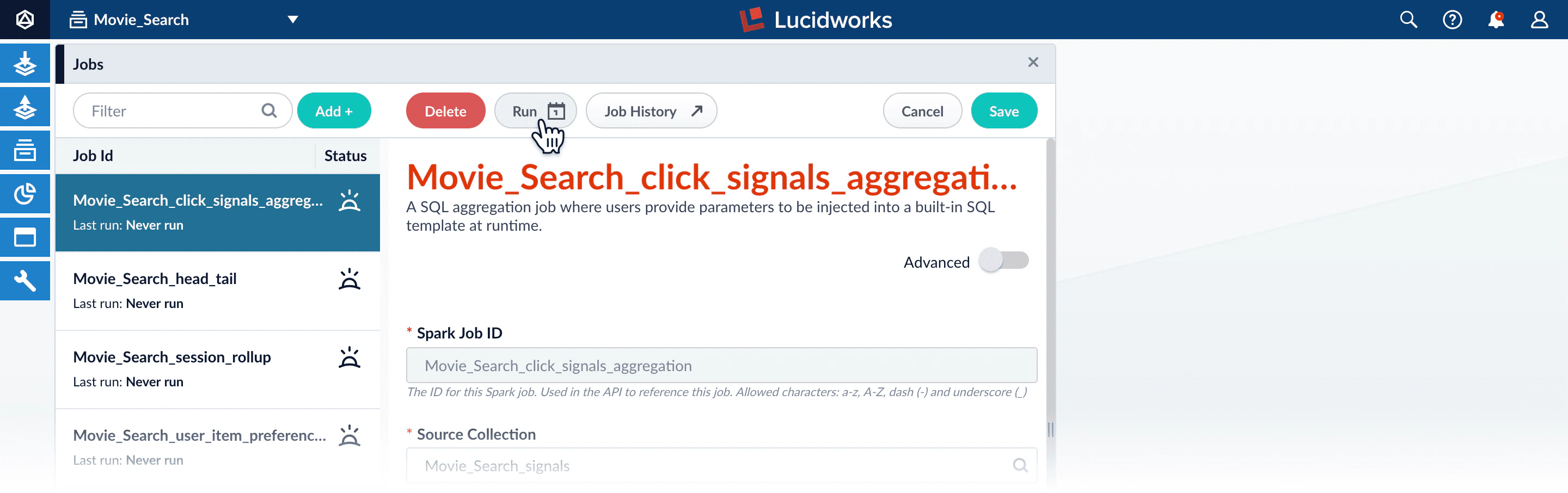
**How to run a job once**
1. In the Fusion workspace, navigate to > **Jobs**.
2. Select the job from the job list.
3. Click **Run**.\\
4. Click **Start**.
 > **Jobs**.
2. Select the job from the job list.
3. Click **Run**.\\
> **Jobs**.
2. Select the job from the job list.
3. Click **Run**.\\
 4. Click **Start**.