> ## Documentation Index
> Fetch the complete documentation index at: https://doc.lucidworks.com/llms.txt
> Use this file to discover all available pages before exploring further.

# Head/Tail Analysis Jobs

export const schema = {
  "type": "object",
  "title": "Head/Tail Analysis",
  "description": "Use this job when you want to compare the head and tail of your queries to find common misspellings and rewritings. See the insights analytics pane for a review of the results of the job.",
  "required": ["id", "trainingCollection", "fieldToVectorize", "countField", "mainType", "signalTypeField", "type"],
  "properties": {
    "id": {
      "type": "string",
      "title": "Spark Job ID",
      "description": "The ID for this Spark job. Used in the API to reference this job. Allowed characters: a-z, A-Z, dash (-) and underscore (_)",
      "maxLength": 128,
      "pattern": "^[A-Za-z0-9_\\-]+$"
    },
    "trainingCollection": {
      "type": "string",
      "title": "Input Collection",
      "description": "Signals collection containing queries and event counts. Raw signals or aggregation collection can be used. If aggregation collection is being used, update the filter query in advanced options",
      "minLength": 1
    },
    "fieldToVectorize": {
      "type": "string",
      "title": "Query Field Name",
      "description": "Field containing the queries",
      "default": "query",
      "minLength": 1
    },
    "dataFormat": {
      "type": "string",
      "title": "Data format",
      "description": "Spark-compatible format which training data comes in (like 'solr', 'hdfs', 'file', 'parquet' etc)",
      "enum": ["solr", "hdfs", "file", "parquet"],
      "default": "solr",
      "hints": ["advanced"]
    },
    "trainingDataFrameConfigOptions": {
      "type": "object",
      "title": "Dataframe Config Options",
      "description": "Additional spark dataframe loading configuration options",
      "properties": {},
      "additionalProperties": {
        "type": "string"
      },
      "hints": ["advanced"]
    },
    "trainingDataFilterQuery": {
      "type": "string",
      "title": "Signals data filter query",
      "description": "Solr query to use when loading click signals data",
      "default": "type:click OR type:response",
      "hints": ["dummy"],
      "minLength": 3
    },
    "trainingDataSamplingFraction": {
      "type": "number",
      "title": "Training data sampling fraction",
      "description": "Fraction of the training data to use",
      "default": 1,
      "hints": ["advanced"],
      "maximum": 1,
      "exclusiveMaximum": false
    },
    "randomSeed": {
      "type": "integer",
      "title": "Random seed",
      "description": "For any deterministic pseudorandom number generation",
      "default": 1234,
      "hints": ["advanced"]
    },
    "outputCollection": {
      "type": "string",
      "title": "Output Collection",
      "description": "Solr collection to store head tail analytics results. Defaults to job_reports collection. It is recommended to use the default output collection for best schema compatibility."
    },
    "overwriteOutput": {
      "type": "boolean",
      "title": "Overwrite Output",
      "description": "Overwrite output collection",
      "default": true,
      "hints": ["hidden", "advanced"]
    },
    "sourceFields": {
      "type": "string",
      "title": "Fields to Load",
      "description": "Solr fields to load (comma-delimited). Leave empty to allow the job to select the required fields to load at runtime.",
      "hints": ["hidden"]
    },
    "tailRewriteCollection": {
      "type": "string",
      "title": "Tail Rewrite Collection",
      "description": "Collection where tail rewrites are stored. Defaults to app's query rewrite staging collection"
    },
    "analyzerConfigQuery": {
      "type": "string",
      "title": "Lucene Analyzer Schema",
      "description": "LuceneTextAnalyzer schema for tokenization (JSON-encoded)",
      "default": "{ \"analyzers\": [ { \"name\": \"StdTokLowerStem\",\"charFilters\": [ { \"type\": \"htmlstrip\" } ],\"tokenizer\": { \"type\": \"standard\" },\"filters\": [{ \"type\": \"lowercase\" },{ \"type\": \"englishminimalstem\" }] }],\"fields\": [{ \"regex\": \".+\", \"analyzer\": \"StdTokLowerStem\" } ]}",
      "hints": ["lengthy", "advanced", "code/json"],
      "minLength": 1
    },
    "countField": {
      "type": "string",
      "title": "Event Count Field Name",
      "description": "Field containing the number of times an event (like a click) occurs for a particular query; count_i in the raw signal collection or aggr_count_i in the aggregated signal collection.",
      "default": "count_i",
      "minLength": 1
    },
    "mainType": {
      "type": "string",
      "title": "Main Event Type",
      "description": "The main signal event type (e.g. click) that head tail analysis is based on. E.g., if main type is click, then head and tail queries are defined by the number of clicks.",
      "default": "click",
      "minLength": 1
    },
    "filterType": {
      "type": "string",
      "title": "Filtering Event Type",
      "description": "The secondary event type (e.g. response) that can be used for filtering out rare searches. Note: In order to use the `response` default value, please make sure you have type:response in the input collection. If there is no need to filter on number of searches, please leave this parameter blank.",
      "default": "response"
    },
    "signalTypeField": {
      "type": "string",
      "title": "Field Name of Signal Type",
      "description": "The field name of signal type in the input collection.",
      "default": "type"
    },
    "minCountMain": {
      "type": "integer",
      "title": "Minimum Main Event Count",
      "description": "Minimum number of main events (e.g. clicks after aggregation) necessary for the query to be considered. The job will only analyze queries with clicks greater or equal to this number.",
      "default": 1
    },
    "minCountFilter": {
      "type": "integer",
      "title": "Minimum Filtering Event Count",
      "description": "Minimum number of filtering events (e.g. searches after aggregation) necessary for the query to be considered. The job will only analyze queries that were issued greater or equal to this number of times.",
      "default": 20
    },
    "queryLenThreshold": {
      "type": "integer",
      "title": "Minimum Query Length ",
      "description": "Minimum length of a query to be included for analysis. The job will only analyze queries with length greater than or equal to this value.",
      "default": 2
    },
    "userHead": {
      "type": "number",
      "title": "Head Count Threshold",
      "description": "User defined threshold for head definition. value=-1.0 will allow the program to pick the number automatically. value<1.0 denotes a percentage (e.g 0.1 means put the top 10% of queries into the head), value=1.0 denotes 100% (e.g 1 means put all queries into the head), value>1.0 denotes the exact number of queries to put in the head (e.g 100 means the top 100 queries constitute the head)",
      "default": -1,
      "hints": ["advanced"]
    },
    "userTail": {
      "type": "number",
      "title": "Tail Count Threshold",
      "description": "User defined threshold for tail definition. value=-1.0 will allow the program to pick the number automatically. value<1.0 denotes a percentage, (e.g 0.1 means put the bottom 10% of queries into the tail) value=1.0 denotes 100% (e.g 1 means put all queries into the tail), value>1.0 denotes the exact number of queries to put into the tail (e.g 100 means the bottom 100 queries constitute the tail).",
      "default": -1,
      "hints": ["advanced"]
    },
    "topQ": {
      "type": "array",
      "title": "Top X% Head Query Event Count",
      "description": "Compute how many total events come from the top X head queries (Either a number greater than or equal to 1.0 or a percentage of the total number of unique queries)",
      "default": [100, 0.01],
      "hints": ["advanced"],
      "items": {
        "type": "number"
      }
    },
    "trafficPerc": {
      "type": "array",
      "title": "Number of Queries that Constitute X% of Total Events",
      "description": "Compute how many queries constitute each of the specified event portions(E.g., 0.25, 0.50)",
      "default": [0.25, 0.5, 0.75],
      "hints": ["advanced"],
      "items": {
        "type": "number"
      }
    },
    "lastTraffic": {
      "type": "array",
      "title": "Bottom X% Tail Query Event Count",
      "description": "Compute the total number of queries that are spread over each of the specified tail event portions (E.g., 0.01)",
      "default": [0.01],
      "hints": ["advanced"],
      "items": {
        "type": "number"
      }
    },
    "trafficCount": {
      "type": "array",
      "title": "Event Count Computation Threshold",
      "description": "Compute how many queries have events less than each value specified (E.g., a value of 5.0 would return the number of queries that have less than 5 associated events)",
      "default": [5],
      "hints": ["advanced"],
      "items": {
        "type": "number"
      }
    },
    "keywordsBlobName": {
      "type": "string",
      "title": "Keywords blob name",
      "description": "Name of the keywords blob resource. Typically, this should be a csv file uploaded to blob store in a specific format. Check documentation for more details on format and uploading to blob store ",
      "minLength": 1,
      "reference": "blob",
      "blobType": "file:spark"
    },
    "lenScale": {
      "type": "integer",
      "title": "Edit Distance vs String Length Scale",
      "description": "A scaling factor used to normalize the length of the query string. This filters head and tail string match based on if edit_dist <= string_length/length_scale. A large value for this factor leads to a shorter spelling list. A smaller value leads to a longer spelling list but may add lower quality corrections.",
      "default": 6,
      "hints": ["advanced"]
    },
    "overlapThreshold": {
      "type": "integer",
      "title": "Head and tail Overlap threshold",
      "description": "The threshold for the number of overlapping tokens between the head and tail. When a head string and tail string share more tokens than this threshold, they are considered a good match.",
      "default": 4,
      "hints": ["advanced"]
    },
    "overlapNumBoost": {
      "type": "number",
      "title": "Token Overlap Number Boost",
      "description": "When there are multiple possible head matches for a tail, we rank heads based on: overlapNumBoost * overlapNum + headQueryCountBoost * log(headQueryCount). A big number puts more weight on how many tokens match between the head and tail query strings instead of the number of times a head query appears.",
      "default": 10,
      "hints": ["hidden", "advanced"]
    },
    "headQueryCntBoost": {
      "type": "number",
      "title": "Head query count boost",
      "description": "When there are multiple possible head matches for tail, we rank heads based on: overlapNumBoost * overlapNum + headQueryCountBoost * log(headQueryCount). A big number puts more weight on the count head query instead of the number of tokens shared between the head and tail query strings",
      "default": 1,
      "hints": ["hidden", "advanced"]
    },
    "tailRewrite": {
      "type": "boolean",
      "title": "Generate tail rewrite table",
      "description": "If true, also generate tail rewrite table, o.w., only get distributions. May need to set it to false in the very first run to help customize head and tail positions.",
      "default": true,
      "hints": ["advanced"]
    },
    "stopwordsList": {
      "type": "array",
      "title": "List of stopwords",
      "description": "Stopwords defined in Lucene analyzer config",
      "hints": ["readonly", "hidden"],
      "items": {
        "type": "string",
        "minLength": 1,
        "reference": "blob",
        "blobType": "file:spark"
      }
    },
    "enableAutoPublish": {
      "type": "boolean",
      "title": "Enable auto-publishing",
      "description": "If true, automatically publishes rewrites for rules. Default is false to allow for initial human-aided reviewing",
      "default": false,
      "hints": ["advanced"]
    },
    "type": {
      "type": "string",
      "title": "Spark Job Type",
      "enum": ["headTailAnalysis"],
      "default": "headTailAnalysis",
      "hints": ["readonly"]
    }
  },
  "additionalProperties": true,
  "category": "Other",
  "categoryPriority": 1,
  "unsafe": false,
  "propertyGroups": [{
    "label": "Input/Output Parameters",
    "properties": ["trainingCollection", "outputCollection", "dataFormat", "trainingDataFilterQuery", "trainingDataFrameConfigOptions", "trainingDataSamplingFraction", "randomSeed"]
  }, {
    "label": "Field Parameters",
    "properties": ["fieldToVectorize", "sourceFields", "signalTypeField", "mainType", "filterType", "countField"]
  }, {
    "label": "Model Tuning Parameters",
    "properties": ["minCountMain", "minCountFilter", "tailRewrite", "userHead", "userTail", "lenScale", "overlapThreshold", "topQ", "trafficCount", "trafficPerc", "lastTraffic"]
  }, {
    "label": "Featurization Parameters",
    "properties": ["analyzerConfigQuery", "queryLenThreshold"]
  }, {
    "label": "Misc. Parameters",
    "properties": ["keywordsBlobName"]
  }]
};

export const SchemaParamFields = ({schema}) => {
  const sanitize = str => {
    if (typeof str !== "string") return str;
    return str.replace(/^"(.*)"$/s, "$1").replace(/\\/g, "").replace(/"/g, "'");
  };
  const formatDescription = str => {
    const s = sanitize(str);
    return (/[.!?]\)*$/).test(s) ? s : `${s}.`;
  };
  const {description, properties = {}, required: requiredProps = []} = schema;
  const visibleProps = useMemo(() => Object.entries(properties).filter(([, prop]) => !prop.hints?.includes("hidden")), [properties]);
  return <div>
      {description && <p>{formatDescription(description)}</p>}

      {visibleProps.map(([name, prop]) => {
    const isRequired = requiredProps.includes(name);
    const hasDefault = prop.default !== undefined;
    const rawDefault = prop.default;
    const isComplexDefault = hasDefault && (typeof rawDefault === "object" || typeof rawDefault === "string" && (rawDefault.length > 20 || rawDefault.includes('"')));
    const fieldProps = {
      key: name,
      body: prop.title || name,
      type: prop.type,
      ...prop.title && ({
        post: [<><span className="text-stone-400 dark:text-stone-500">API property: </span>{name}</>]
      }),
      ...isRequired && ({
        required: true
      }),
      ...!isComplexDefault && hasDefault ? {
        default: sanitize(String(rawDefault))
      } : {}
    };
    const isObject = prop.type === "object" && prop.properties;
    const isArrayOfObjects = prop.type === "array" && prop.items?.type === "object" && prop.items.properties;
    return <ParamField {...fieldProps}>
            {prop.description && <p>{formatDescription(prop.description)}</p>}

            {isComplexDefault && <div className="flex">
                <p>
                  <strong>Default:</strong>
                </p>
                <pre className="!my-0">
                  <code>
                    {JSON.stringify(rawDefault, null, 2)}
                  </code>
                </pre>
              </div>}

            {isArrayOfObjects && <div className="flex">
              <p>
                <strong>Object attributes:</strong>
              </p>
              <pre className="!my-0">
                <code>
                  {'{\n'}
                  {Object.entries(prop.items.properties).map(([iname, iprop]) => <>
                      {`  ${iname}`}
                      {prop.items?.required?.includes(iname) && <span style={{
      color: 'red'
    }}> required</span>}
                      {`: {\n    display name: ${sanitize(iprop.title || '')}\n    type: ${iprop.type}\n  }\n`}
                    </>)}
                  {'}'}
                </code>
              </pre>
              </div>}

            {isObject && <Expandable title="properties">
                <SchemaParamFields schema={{
      properties: prop.properties,
      required: prop.required
    }} />
              </Expandable>}
          </ParamField>;
  })}
    </div>;
};

export const LwTemplate = ({title = "Key questions to get you started", icon = "sparkles", cta = "Powered by Agent Studio", linkHref = "https://lucidworks.com/demo/?utm_source=docs&utm_medium=referral&utm_campaign=docs_cta_ai"}) => {
  const [isLoaded, setIsLoaded] = useState(false);
  useEffect(() => {
    const timer = setTimeout(() => {
      setIsLoaded(true);
    }, 500);
    return () => clearTimeout(timer);
  }, []);
  return <div className="lw-template-container">
      <Card title={title} icon={icon}>
        {isLoaded && <span dangerouslySetInnerHTML={{
    __html: `<lw-template id="a029c1a9-28be-427e-b0e1-5d918920246a"></lw-template
            >`
  }} />}
        <Link href={linkHref} className="agent-studio-link text-left text-gray-600 gap-2 dark:text-gray-400 text-sm font-medium flex flex-row items-center hover:text-primary dark:hover:text-primary-light group-hover:text-primary group-hover:dark:text-primary-light">Powered by Lucidworks Agent Studio</Link>
      </Card>
    </div>;
};

export const InlineImage = ({src, alt = '', height = '2em'}) => {
  return <img src={src} alt={alt} style={{
    display: 'inline',
    verticalAlign: 'start',
    height: height,
    margin: '0'
  }} />;
};

[localhost link]: http://localhost:3000/docs/4/fusion-ai/reference/jobs/head-tail-analysis

[mintlify link]: https://doc.lucidworks.com/docs/4/fusion-ai/reference/jobs/head-tail-analysis

[old doc.lw link]: https://doc.lucidworks.com/fusion/5.9/552

Perform head/tail analysis of queries from collections of raw or aggregated signals, to identify underperforming queries and the reasons. This information is valuable for improving overall conversions, Solr configurations, auto-suggest, product catalogs, and SEO/SEM strategies, in order to improve conversion rates.

<Note>
  A minimum of 10,000 signals is required to successfully run this job.
</Note>

You can review the output from this job using the [Query Rewriting UI](/docs/4/fusion-ai/concepts/query-rewriting/overview).

<LwTemplate />

## Head/tail analysis configuration

The job configuration must specify the following:

* The [signals](/docs/4/fusion-ai/concepts/signals-and-aggregations/signals/overview) collection (the **Input Collection** parameter)\
  Signals can be raw (the `_signals` collection) or [aggregated](/docs/4/fusion-ai/concepts/signals-and-aggregations/aggregations/overview) (the `_signals_aggr` collection).
* The query string field (the **Query Field Name** parameter)
* The event count field\
  For example, if signal data follows the default Fusion setup, then `count_i` is the field that records the count of raw signals and `aggr_count_i` is the field that records the count after aggregation.

The job allows you to analyze query performance based on two different events:

* The main event (the `mainType`/**Main Event Type** parameter)
* The filtering/secondary event (the `filterType`/**Filtering Event Type** parameter)\
  If you only have one event type, leave this parameter empty.

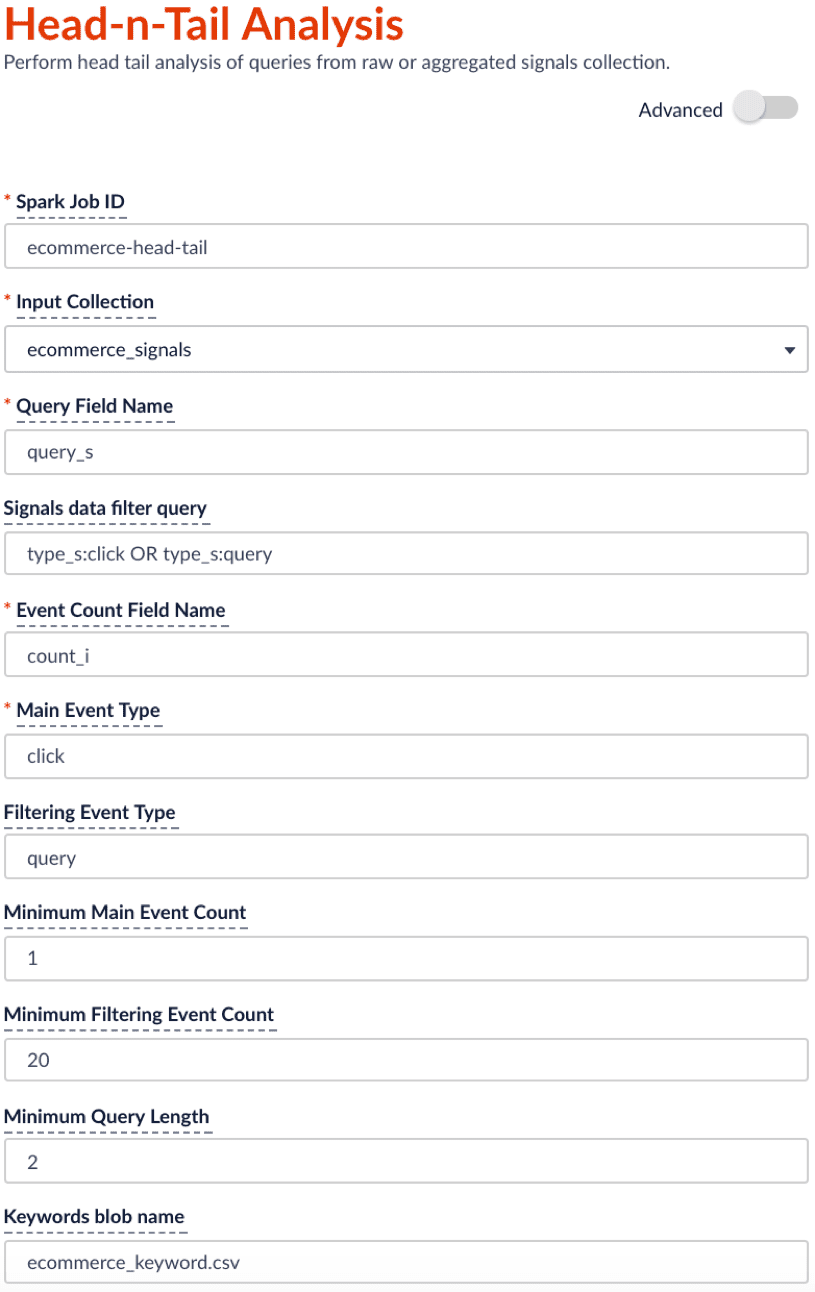
For example, if you specify the main event to be clicks with minimum count of 0 and the filtering event to be queries with minimum count of 20, then the job will filter on the queries that get searched at least 20 times and check among those popular searched queries to see which ones didn’t get clicked at all or only a few times.

An example configuration is shown below:

<img src="https://mintcdn.com/lucidworks/5yWZ-KtZuBe4Y_Fg/assets/images/4.0/head-tail-config.png?fit=max&auto=format&n=5yWZ-KtZuBe4Y_Fg&q=85&s=4ccc9a161b5e1ae98cdc825fcb5c90c2" alt="Head/Tail job config" width="815" height="1292" data-path="assets/images/4.0/head-tail-config.png" />

<Note>
  The suggested schedule for this head-n-tail analysis job is to run bi-weekly or monthly. You can change schedule under the run panel.
</Note>

## Job output

By default, the output collection is the `<input-collection>_job_reports` collection. The head/tail job adds a set of analytics results tables to the collection. You can find these table names in the `doc_type_s` field of each document:

* `overall_distribution`
* `summary_stat`
* `queries_ordered`
* `tokens_ordered`
* `queryLength`
* `tail_reasons`
* `tail_rewriting`

You can use [App Insights](/docs/4/fusion-ai/concepts/insights/overview) to visualize each of these tables:

1. In the Fusion workspace, navigate to **Analytics** > **App Insights**.\
   The App Insights dashboard appears.
2. On the left, click **Analytics** <InlineImage src="/assets/images/4.0/icons/insights-analytics.png" />.
3. Under **Standard Reports**, click **Head Tail analysis**.\
   The Head/Tail Analysis job output tables appear. These are described in more detail below.

### Head/Tail Plot (`overall_distribution`)

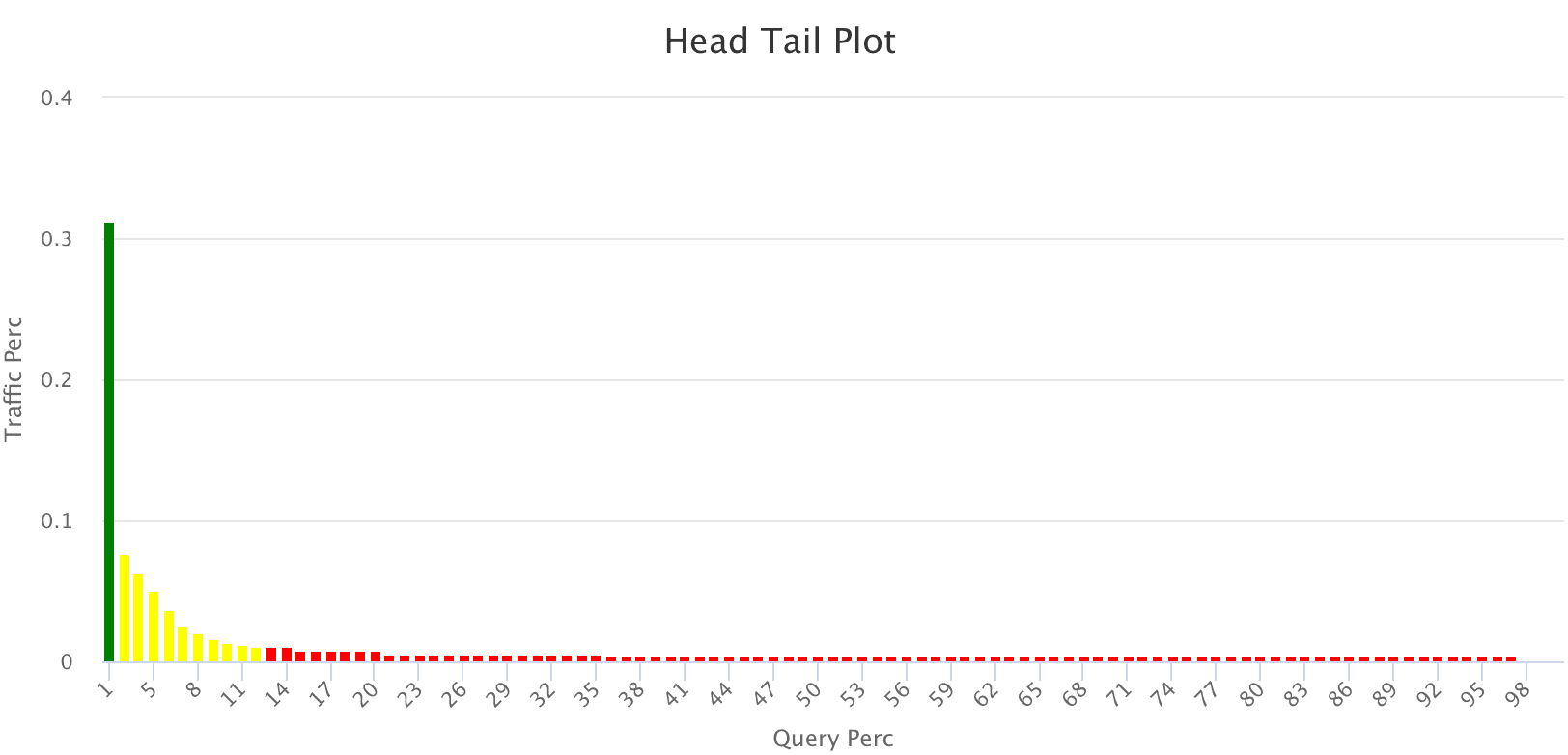
This head/tail distribution plot provides an overview of the query traffic distribution. In order to provide better visualization, the unique queries are in descending order based on traffic and put into bins of 100 queries on the x axis, with the sum of traffic coming from each bin on the y axis.

For example, the head/tail distribution plot below shows a long tail, indicating that the majority of queries produce very little traffic. The goal of analyzing this data is to shorten that tail, so that a higher proportion of your queries produce traffic.

<img src="https://mintcdn.com/lucidworks/NgNm7Bp5nEBDIA7H/assets/images/4.0/insights-head-tail-plot.png?fit=max&auto=format&n=NgNm7Bp5nEBDIA7H&q=85&s=961bc44e2c0dd1cf5720e6069066198d" alt="Head/Tail Plot" width="1624" height="782" data-path="assets/images/4.0/insights-head-tail-plot.png" />

* Green = head
* Yellow = torso
* Red = tail

### Summary Stats (`summary_stat`)

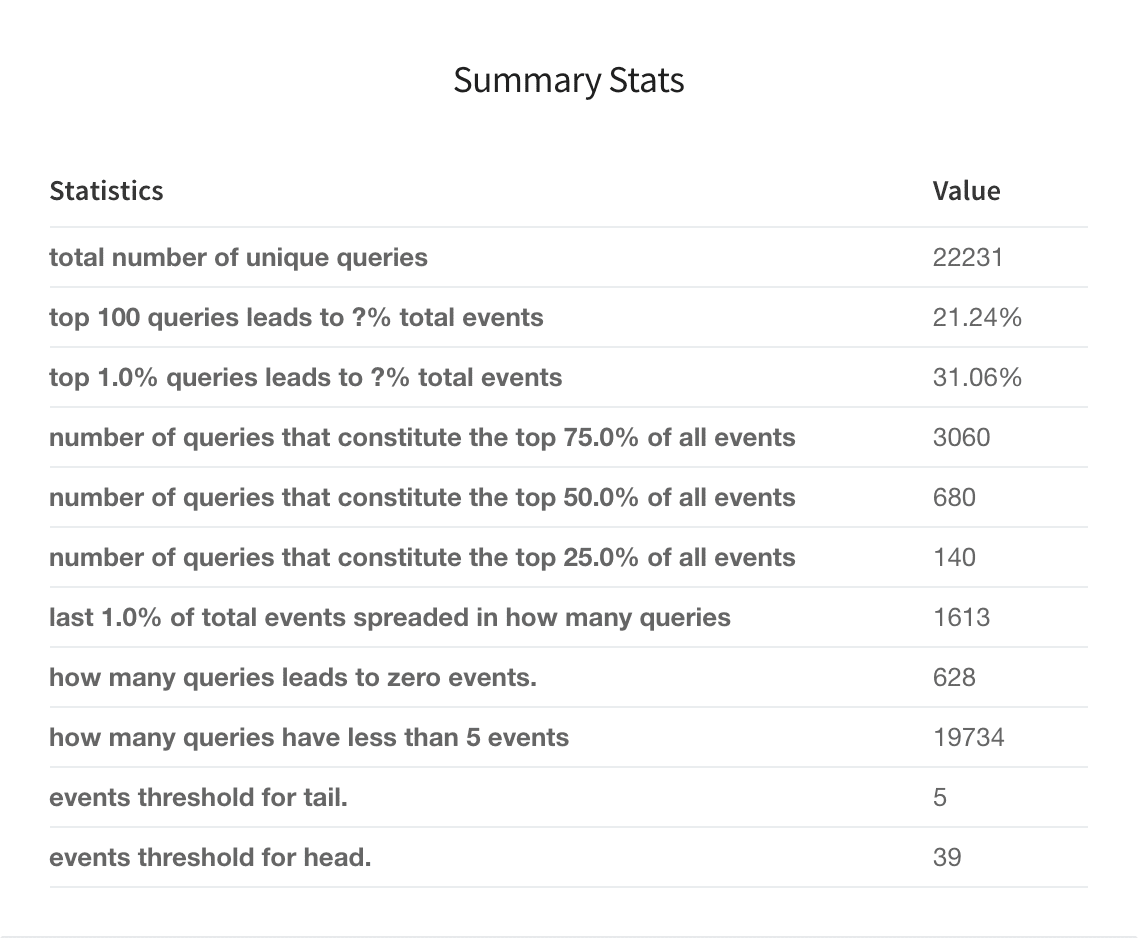
This user-configurable summary statistics table shows how much traffic is produced by various query groups, to help understand the head/tail distribution.
<img src="https://mintcdn.com/lucidworks/l9y7VqRhZkN9hmR0/assets/images/4.0/insights-head-tail-summary-stats.png?fit=max&auto=format&n=l9y7VqRhZkN9hmR0&q=85&s=fc64ed4ed10e00b5e84dac90c30cd66c" alt="Summary Stats table" width="1138" height="938" data-path="assets/images/4.0/insights-head-tail-summary-stats.png" />

You can configure this table before running the job. Click **Advanced** in the Head/Tail Analysis job configuration panel, then tune these parameters:

* Top X% Head Query Event Count (`topQ`)
* Number of Queries that Constitute X% of Total Events (`trafficPerc`)
* Bottom X% Tail Query Event Count (`lastTraffic`)
* Event Count Computation Threshold (`trafficCount`)

### Query Details (`queries_ordered`)

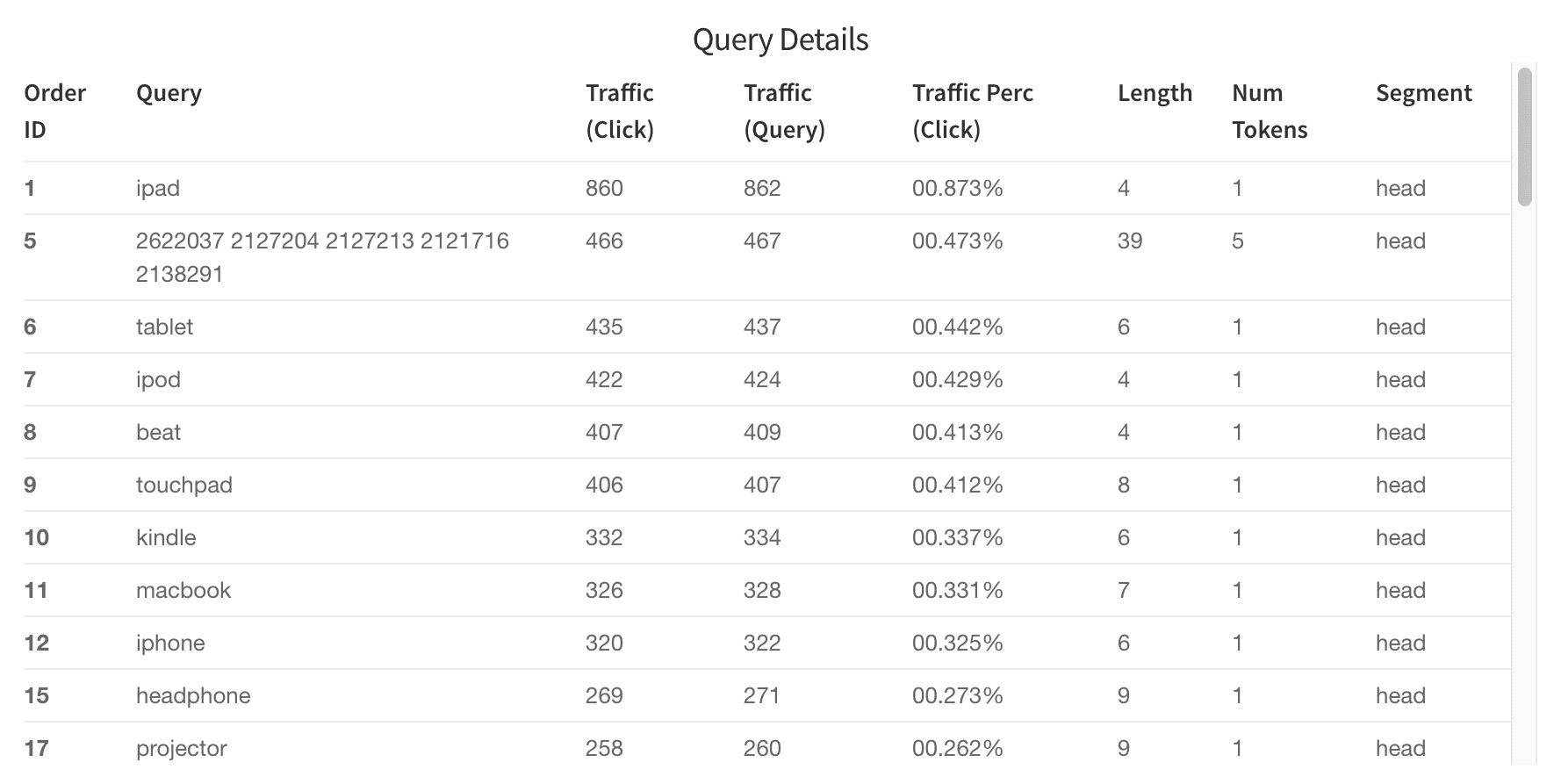
The Query Details table helps you discover which queries are the best performers and which are worst. You can filter results by issuing a search in the search bar. For example, search "segment\_s:tail" to get tail queries or search "num\_events\_l:0" to get zero results queries. (Note: field names are listed in the "what is this" toolkit).
<img src="https://mintcdn.com/lucidworks/l9y7VqRhZkN9hmR0/assets/images/4.0/insights-head-tail-query-details.png?fit=max&auto=format&n=l9y7VqRhZkN9hmR0&q=85&s=edd95a7c147acee780077db2a9031da5" alt="Query Details table" width="1778" height="893" data-path="assets/images/4.0/insights-head-tail-query-details.png" />

### Top Tokens (`tokens_ordered`)

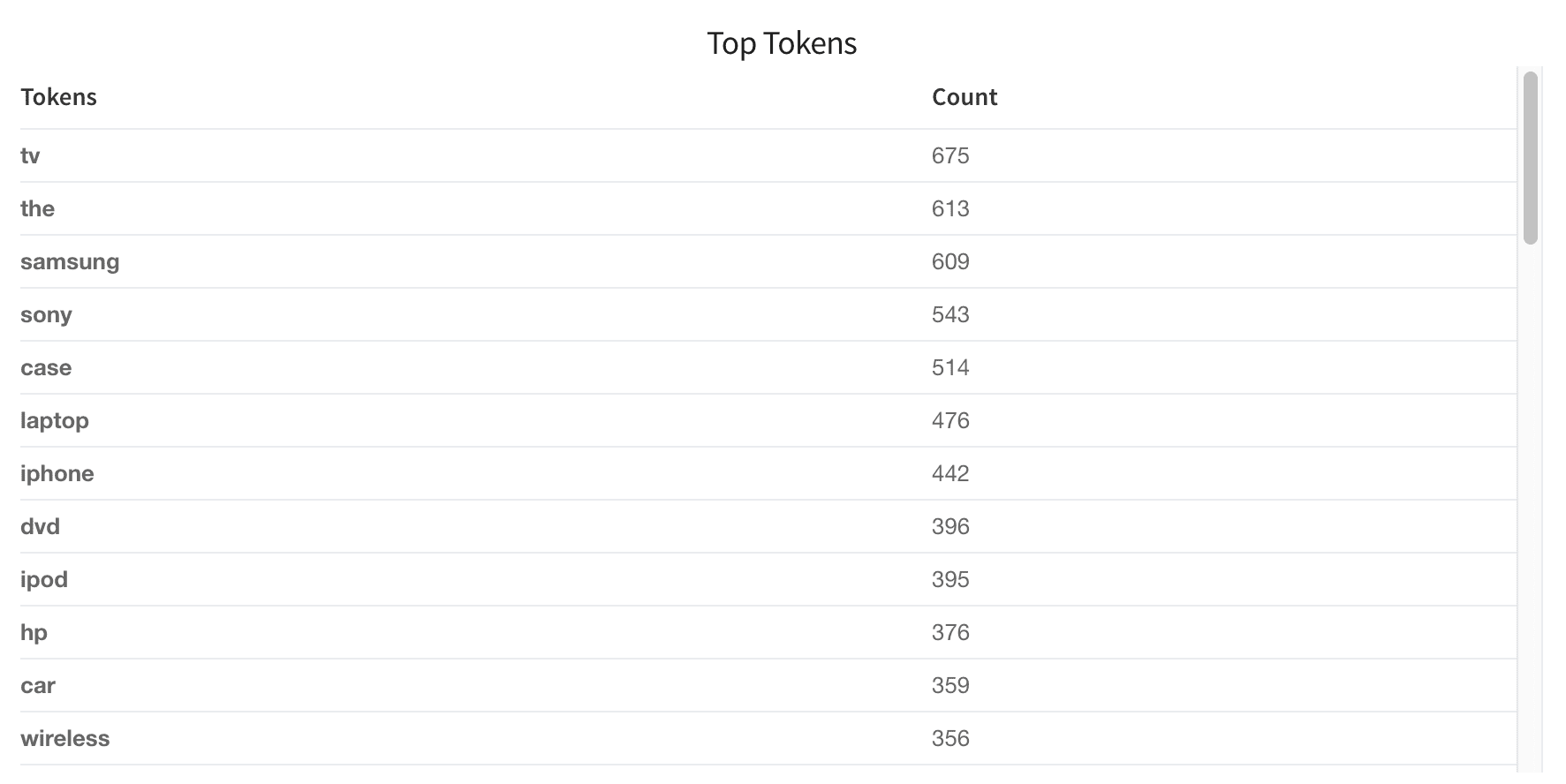
The "Top Tokens" table lists the number of times each token shown in the queries.
<img src="https://mintcdn.com/lucidworks/l9y7VqRhZkN9hmR0/assets/images/4.0/insights-head-tail-top-tokens.png?fit=max&auto=format&n=l9y7VqRhZkN9hmR0&q=85&s=1a7d3d02978361deb837f5a448b7eb79" alt="Query Details table" width="1773" height="888" data-path="assets/images/4.0/insights-head-tail-top-tokens.png" />

### Query Length (`queryLength`)

This table shows how users are querying your database. Are most people searching very long strings or very short strings? These distributions will give you insight into how to tune your search engine to be performant on the majority of queries.

<img src="https://mintcdn.com/lucidworks/l9y7VqRhZkN9hmR0/assets/images/4.0/insights-head-tail-query-length.png?fit=max&auto=format&n=l9y7VqRhZkN9hmR0&q=85&s=6984a888779280ae8305a9243f5f87d5" alt="Query Length table" width="1758" height="267" data-path="assets/images/4.0/insights-head-tail-query-length.png" />

### Tail Reasons table and pie chart (`tail_reasons`)

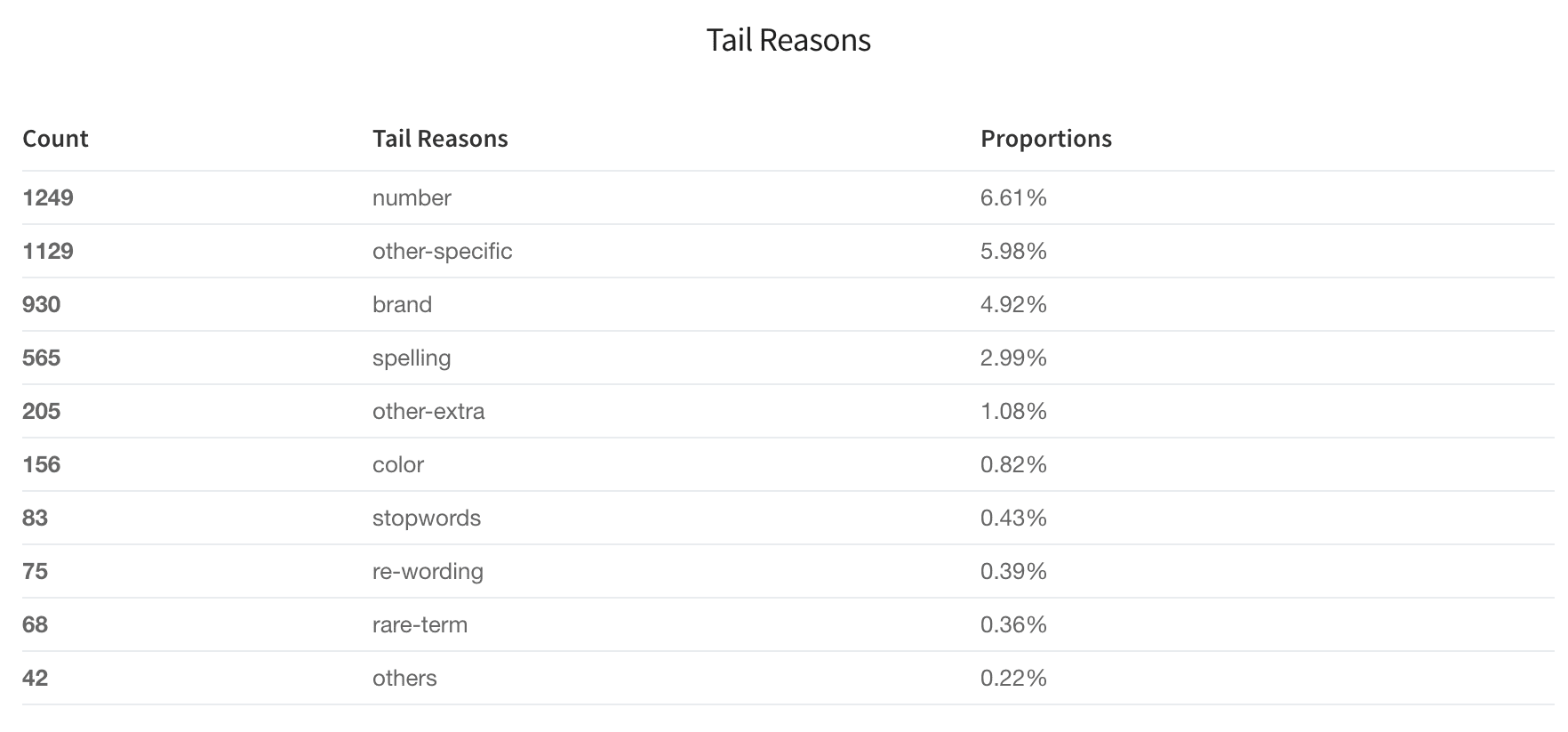
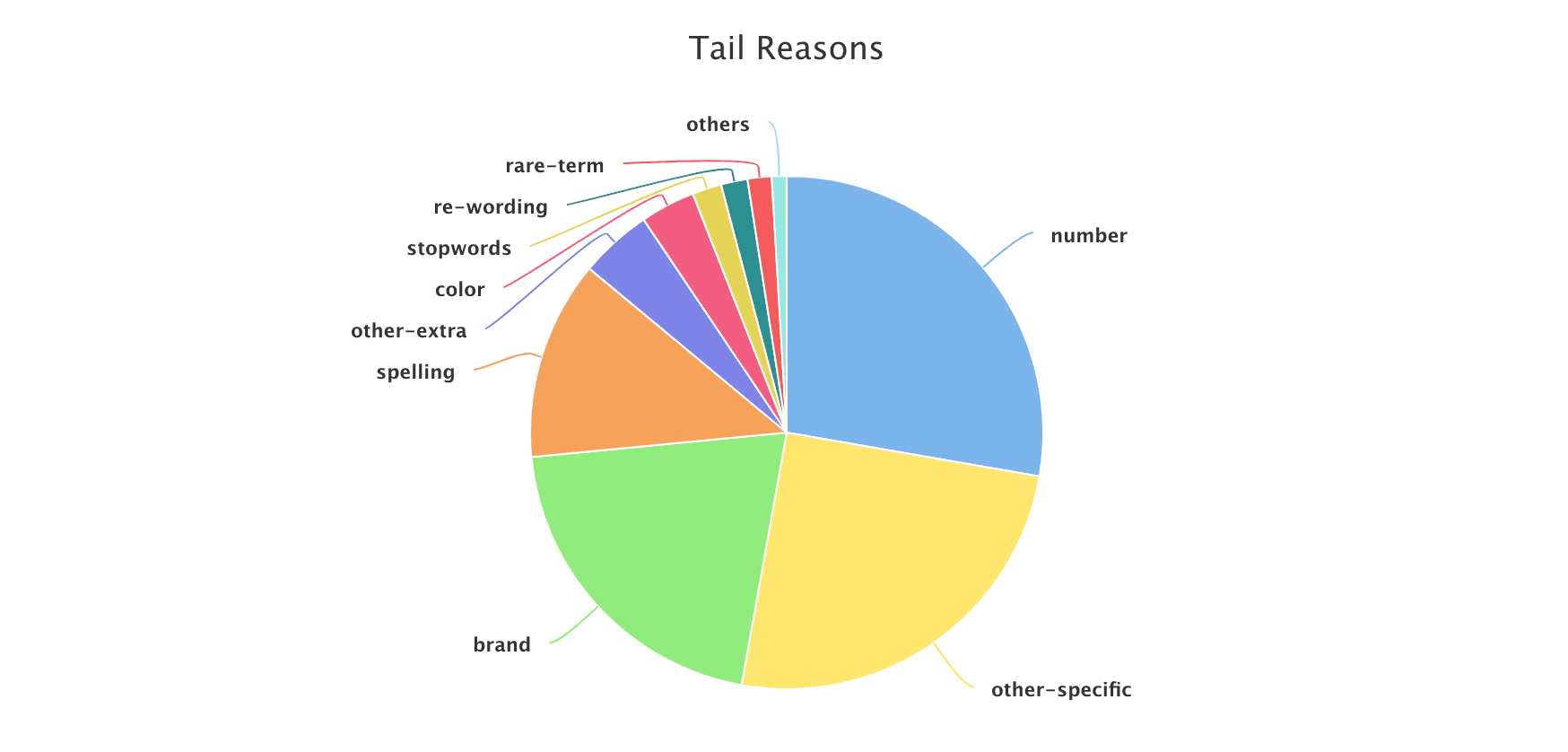
Based on the difference between the tail and head queries, the Head/Tail Analysis job assigns probable reasons for why any given query is a tail query. Tail reasons are displayed as both a table and a pie chart:
<img src="https://mintcdn.com/lucidworks/l9y7VqRhZkN9hmR0/assets/images/4.0/insights-head-tail-tail-reasons.png?fit=max&auto=format&n=l9y7VqRhZkN9hmR0&q=85&s=011c1049a1d8115cad787c7ca25daa8a" alt="Tail Reasons table" width="1764" height="823" data-path="assets/images/4.0/insights-head-tail-tail-reasons.png" />

<img src="https://mintcdn.com/lucidworks/l9y7VqRhZkN9hmR0/assets/images/4.0/insights-head-tail-tail-reasons-pie.png?fit=max&auto=format&n=l9y7VqRhZkN9hmR0&q=85&s=774467c1ec4f1e8571ddbddaa5486411" alt="Tail Reasons pie chart" width="1748" height="838" data-path="assets/images/4.0/insights-head-tail-tail-reasons-pie.png" />

#### Pre-defined tail reasons

Based on Lucidworks' observations on different signal datasets, we summarize tail reasons into several pre-defined categories:

|                |                                                                                                                                                                                                                                                                                                              |
| -------------- | ------------------------------------------------------------------------------------------------------------------------------------------------------------------------------------------------------------------------------------------------------------------------------------------------------------ |
| spelling       | The query contains one or more misspellings; we can apply spelling suggestions based on the matching head.                                                                                                                                                                                                   |
| number         | The query contains an attribute search on a specific dimension. To normalize these queries we can parse the number to deal with different formatting, and/or pay attention to unit synonyms or enrich the product catalog. For example, "3x5" should be converted to "3’ X 5’" to match the dimension field. |
| other-specific | The query contains specific descriptive words plus a head query, which means the user is searching for a very specific product or has a specific requirement. We can boost on the specific part for better relevancy.                                                                                        |
| other-extra    | This is similar to ‘other-specific’ but the descriptive part may lead to ambiguity, so it requires boosting the head query portion of the query instead of the specific or descriptive words.                                                                                                                |
| rare-term      | The user is searching for a rare item; use caution when boosting.                                                                                                                                                                                                                                            |
| re-wording     | The query contains a sequence of terms in a less-common order. Flipping the word order to a more common one can change a tail query to a head query, and allows for consistent boosting on the last term in many cases.                                                                                      |
| stopwords      | Query contains stopwords plus head query. We would need to drop stopwords.                                                                                                                                                                                                                                   |

#### Custom dictionary

You can also specify your own attributes through a keywords file in CSV format. The header of the CSV file must be called "keyword" and "type", and stopwords must be called "stopword" for the program to recognize them.

Below is an example dictionary that defines "color" and "brand" reason types. The job will parse the tail query, assign reasons such as "color" or "brand", and perform filtering or focused search on these fields. (Note: color and brand are also the field names in your catalog.)

```
keyword,type
a,stopword
an,stopword
and,stopword
blue,color
white,color
black,color
hp,brand
samsung,brand
sony,brand
```

**How to install a custom dictionary**

1. Construct the CSV file as described above.
2. [Upload the CSV file to the blob store](/docs/4/fusion-server/concepts/indexing/blob-storage).\
   Note the blob ID.
3. In the Head/Tail Analysis job configuration, enter the blob ID in the **Keywords blob name** (`keywordsBlobName`) field.

### Head Tail Similarity (`tail_rewriting`)

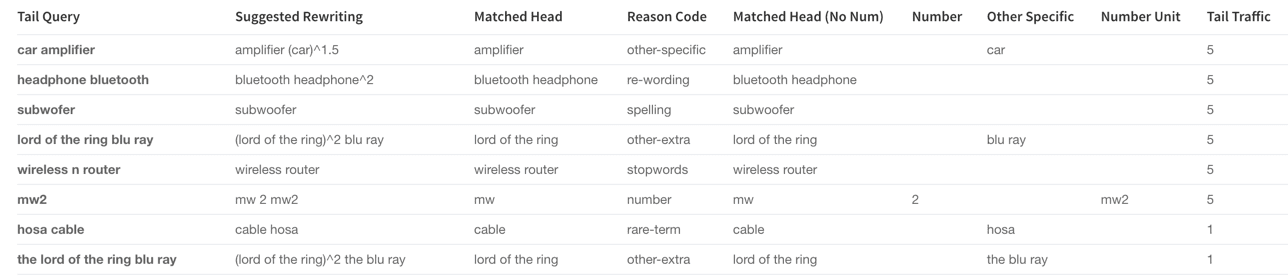
For each tail query (the `tailQuery_orig` field), Fusion tries to find its closest matching head queries (the `headQuery_orig` field), then suggests a query rewrite (the `suggested_query` field) which would improve the query. The rewrite suggestions in this table can be implemented in a variety of ways, including utilizing rules editor or configuring a query parser that rewrites tail queries.
<img src="https://mintcdn.com/lucidworks/l9y7VqRhZkN9hmR0/assets/images/4.0/insights-head-tail-similarity.png?fit=max&auto=format&n=l9y7VqRhZkN9hmR0&q=85&s=91323200a9589aab16808b4f58afbf0d" alt="Head Tail Similarity table" width="1288" height="279" data-path="assets/images/4.0/insights-head-tail-similarity.png" />

<SchemaParamFields schema={schema} />
