> ## Documentation Index
> Fetch the complete documentation index at: https://doc.lucidworks.com/llms.txt
> Use this file to discover all available pages before exploring further.
# Signals Types and Structures
export const LwTemplate = ({title = "Key questions to get you started", icon = "sparkles", cta = "Powered by Agent Studio", linkHref = "https://lucidworks.com/demo/?utm_source=docs&utm_medium=referral&utm_campaign=docs_cta_ai"}) => {
const [isLoaded, setIsLoaded] = useState(false);
useEffect(() => {
const timer = setTimeout(() => {
setIsLoaded(true);
}, 500);
return () => clearTimeout(timer);
}, []);
return
{isLoaded && `
}} />}
Powered by Lucidworks Agent Studio
;
};
[localhost link]: http://localhost:3000/docs/4/fusion-ai/concepts/signals-and-aggregations/signals/types-and-structures
[mintlify link]: https://doc.lucidworks.com/docs/4/fusion-ai/concepts/signals-and-aggregations/signals/types-and-structures
[old doc.lw link]: https://doc.lucidworks.com/fusion/5.9/466
## Signals types and structure
Signals can be broadly categorized as [implicit or explicit](#implicit-signals-vs-explicit-signals). When signals are enabled, Fusion produces several [built-in signal types](#built-in-signal-types) by default, all of which are implicit signals. You can also create [custom signal types](#custom-signal-types), including explicit signals. Be sure to verify that your signals include all of the [important fields](#important-fields-for-signals) for best results. It is also useful to [rank your signal types](#signal-type-ranking) in terms of how strongly each type indicates a user’s interest in an item.
### Implicit signals vs explicit signals
Signals can reveal a user’s level of interest in an item in two main ways:
* **Implicit**
The user shows interest by engaging with the item/document through clicks, searches, and so on. Since this type of interaction requires no additional effort on the user’s part, these types of signals tend to be plentiful. They can be used to infer a measurable value of interest in order to build an accurate recommender system.
* **Explicit**
An explicit signal is created when a user intentionally assigns a clear, measurable value to an item, such as by giving it a rating. This value can be used to rank items, for example. Since this requires the user to invest extra time to provide the information, the number of ratings tends to be small compared to the total number of users interacting with the item.
You can create [recommendations](/docs/4/fusion-ai/concepts/boosting/overview) based on implicit signals out of the box. For recommenders based on explicit signals, contact your Lucidworks Professional Services representative.
### Built-in signal types
There are five built-in signal types:
* [annotation](#annotation-signals)
* [login](#login-signals)
* [request](#request-signals)
* [response](#response-signals)
* [click](#click-signals)
#### Annotation signals
Annotation signals are generated when a user bookmarks, likes, or comments on a document. Annotation signals are likewise generated when the user removes a bookmark, like, or comment.
Annotation signals are generated by [App Studio](/docs/4/app-studio/overview). If you are not using App Studio, this type of signal is not relevant to your search application.
#### Login signals
Login signals record information about specific users when they log in to an application. This includes a time stamp and various session details.
#### Request signals
A request signal is generated by a front-end search app and captures the raw user query and other contextual information about a user and their journey through the search app. A request signal should have the following fields:
```json wrap theme={"dark"}
[
{
"id":"288fe4f7-6680-403e-8d18-27647cdd9989",
"timestamp":1518717749409,
"type":"request",
"params":{
"user_id":"admin",
"session":"ef4e00cd-91bb-45b4-be80-e81f9f9c5b27",
"query":"USER QUERY HERE",
"app_id":"SEARCH APP ID",
"ip_address":"0:0:0:0:0:0:0:1",
"host":"Lucids-MacBook-Pro-5.local",
"filter":[
"field1/value",
...
],
"filter_field":[
"field1"
]
}
}
]
```
Additional optional fields are used by [App Insights](/docs/4/fusion-ai/concepts/insights/overview). In the raw signal, optional fields should be inside the `params` object. Optional fields are as follows:
```
"page_title":"Fusion Search",
"path":"/search",
"browser_type":"Browser",
"browser_version":"64.0.3282.140",
"browser_name":"Chrome",
"referrer":"http://localhost:8080/",
"ctx_prev_uri":"/",
"ctx_prev_query":"",
"ctx_prev_path":"/",
"os_manufacturer":"Apple Inc.",
"os_name":"Mac OS X",
"os_id":"778",
"os_device":"Computer",
"os_group":"Mac OS X"
```
#### Response signals
Response signals are automatically generated by a query pipeline when the signals feature is enabled for a collection.
Front-end search applications should not send response signals to Fusion directly, as those would conflict with the auto-generated signals.
A response signal has the following explicit fields, plus any additional query parameters sent by the search application for a query:
| Field Name | Description | Example |
| --------------- | ------------------------------------------------------------------------------------------------------------------------------------------------------------------------------ | ----------------------------------------------------- |
| `id` | The x-fusion-query-id generated by the query-pipeline used for associating click signals with queries in experiments and aggregation jobs. | `TwWCn3Dz` |
| `type` | Signal type | `response` |
| `response_type` | Used by Insights to determine if this query had results or was empty | `results \| empty` |
| `session` | User session ID; the search app should pass the session ID in the query params for a query | `UUID` |
| `query` | The actual query string sent to Solr from Fusion | `ipad` |
| `query_orig_s` | The incoming query from the search app before it is enriched by the query pipeline | `ipad` |
| `query_id` | A hash generated from the session, query, and filters fields; used as a rollup key in Insights to group activity by a specific | `SHA1 hash` |
| `filters_s` | Filter queries sent to Solr; the Fusion SearchLogger component combines multiple fq parameters into a single value delimited by `$` | `{!tag=format}format:(vhs) $ {!tag=type}type:(movie)` |
| `filter` | Reformatted filter queries for use by App Insights | `field1/value` |
| `user_id` | User ID; the search app should pass the user\_id in the query params | `admin` |
| `doc_ids_s` | A comma-delimited list of document IDs returned for the page of results; this field is used by Fusion Spark jobs, such as the ground truth job, to perform click/skip analysis | `123,456,789` |
| `pipeline_id` | Fusion query pipeline that processed this query | `_system` |
| `collection` | Fusion collection | `my_collection` |
| `qtime` | Query time from Solr, in milliseconds | `10` |
| `rows` | Number of rows requested for this query | `10` |
| `hits` | Total number of documents matching the query | `10000` |
| `totaltime` | Total processing time of this query in milliseconds, includes Solr qtime and Fusion query processing time | `15` |
| `timestamp_tdt` | Timestamp when the query request was received by Fusion | `2018-02-15T18:17:42.560Z` |
| `res_offset` | Offset of results; this field is used by experiment metrics to calculate MRR | `0` |
| `res_pos` | Position of the clicked result within the list of results | `3` |
| `params.*` | Any other query param sent from the search app to Fusion that was not already mapped to a declared field | `params.defType_s=edismax` |
Fusion’s experiment framework relies heavily on response signals and the linking between response and clicks signals using the `fusion_query_id`.
#### Click signals
Click signals are sent from the search app to Fusion. All click signals should include a `fusion_query_id` field pulled from the query response header `x-fusion-query-id`. In addition, click signals should include the following fields:
```json wrap theme={"dark"}
[
{
"id":"SOME UUID HERE",
"timestamp":1518725351750,
"type":"click",
"params":{
"fusion_query_id":"ABkaEA11",
"user_id":"admin",
"session":"b3a15101-9e30-4e28-8a23-d1f663c2ee06",
"query":"tiger woods",
"ctype":"result",
"res_offset":0,
"filter":[
"type/Game"
],
"ip_address":"0:0:0:0:0:0:0:1",
"host":"Lucids-MacBook-Pro-5.local",
"doc_id":"9502308",
"app_id":"SEARCH APP ID",
"res_pos":1,
"filter_field":[
"type"
]
}
}
]
```
Additional optional fields are used by [App Insights](/docs/4/fusion-ai/concepts/insights/overview). In the raw signal, optional fields should be inside the `params` object. Optional fields are as follows:
```
"browser_type":"Browser",
"browser_version":"64.0.3282.140",
"browser_name":"Chrome",
"referrer":"http://localhost:8080/",
"ctx_prev_uri":"/",
"ctx_prev_query":"",
"ctx_prev_path":"/",
"os_manufacturer":"Apple Inc.",
"os_name":"Mac OS X",
"os_id":"778",
"os_device":"Computer",
"os_group":"Mac OS X"
"url":"http://localhost:8080/#/product/9502308",
"label":"Tiger Woods PGA Tour 09 All-Play - Nintendo Wii",
```
### Custom signal types
The signal `type` parameter can also take arbitrary values for custom signal types. For example, you can create special signals for purchase events, cart addition/subtraction events, "favorite" or "like" events, customer service events, and so on.
To collect custom signals, configure your front-end search application to send signals to Fusion using a custom value for the `type` field. Custom signals should also include the fields described [below](#important-fields-for-signals) in order to get the best results from [aggregation](/docs/4/fusion-ai/concepts/signals-and-aggregations/aggregations/overview) and [recommendation](/docs/4/fusion-ai/concepts/boosting/overview) jobs.
To use custom signals in [recommendations](/docs/4/fusion-ai/concepts/boosting/overview), you must add them to the value of the `signalTypeWeights` parameter in the configuration for the [`_user_item_preferences_aggregation`](/docs/4/fusion-ai/concepts/signals-and-aggregations/aggregations/sql-aggregations#advantages-of-sql-aggregation) job and the [`_user_query_history_aggregation`](/docs/4/fusion-ai/reference/aggregations/built-in-sql-aggregation-jobs#collection-name-user-query-history-aggregation) job.
Custom signals can be analyzed in [App Insights](/docs/4/fusion-ai/concepts/insights/overview) just like pre-defined signal types.
### Important fields for signals
Depending on how you use signals, certain fields are required. These are signals collection field names and not the JSON field names in the in-bound signals document. An example is when sending the **user id**, write it as `params.user_id`.
The jobs that [aggregate](/docs/4/fusion-ai/concepts/signals-and-aggregations/aggregations/overview) signals and generate [recommendations](/docs/4/fusion-ai/concepts/boosting/overview) work best when all of the following fields are present in your signals:
| Field Name | Example Value | Description |
| --------------- | ------------------------------------ | ------------------------------------------------------------------------- |
| `count_i` | 1 | Number of times an interaction event occurred with this item |
| `doc_id` | NMDDV | Product ID or Item ID |
| `id` | 68f66808-6bfc-4d73-95f7-8a558529160b | The signal ID. If no ID is supplied, one will be automatically generated. |
| `query` | xwearabletech | A query string from the user |
| `session_id` | 91aa66d11af44b6c90ccef44d055cf9a | Id for session in which user generated the signal |
| `type` | quick\_view\_click | Type of session the user used to interact with the platform |
| `user_id` | 11506893 | ID of user during the session |
| `timestamp_tdt` | 2018-11-20T17:58:57.650Z | Time when signal was generated |
Some [signal types](/docs/4/fusion-ai/concepts/signals-and-aggregations/signals/overview), including [custom signal types](/docs/4/fusion-ai/concepts/signals-and-aggregations/signals/overview), may include additional fields.
#### Parameter suffixes
Fusion can add suffixes when fields are indexed. This table lists common suffix values.
| Single Value Suffix | Multivalued Suffix | Type |
| ------------------- | ------------------ | ------- |
| `*_b` | `*_bs` | boolean |
| `*_d` | `*_ds` | double |
| `*_dt` | `*_dts` | date |
| `*_f` | `*_fs` | float |
| `*_i` | `*_ii` | int |
| `*_l` | `*_ls` | long |
| `*_s` | `*_ss` | string |
| `*_t` | `*_ts` | text |
#### Signal field count analysis
Lucidworks recommends performing signal field count analysis to determine whether any of the fields above are missing from some of your signals.
The table below shows how to query for specific fields using the [Query Workbench](/docs/4/fusion-server/concepts/querying/query-workbench) in order to compare the number of results for each field with the total number of documents in the signals collection. In the examples in the third column, some fields appear in all 33,477,919 signals documents, while others appear in fewer documents.
| Field name | Query | Example number of documents |
| --------------- | ------------------------ | --------------------------- |
| `ALL` | `*:*` | 33,477,919 |
| `count_i` | `count_i:[* TO *]` | 11,101,165 |
| `doc_id` | `doc_id:[* TO *]` | 23,216,297 |
| `id` | `id:[* TO *]` | 33,477,919 |
| `query` | `query:[* TO *]` | 19,724,598 |
| `session_id` | `session_id:[* TO *]` | 11,101,165 |
| `type` | `type:[* TO *]` | 33,477,919 |
| `user_id` | `user_id:[* TO *]` | 26,117,399 |
| `timestamp_tdt` | `timestamp_tdt:[* TO *]` | 26,117,399 |
You can also get the number of signals documents that contain all of the required fields by using the following query:
```
count_i:[* TO *] doc_id:[* TO *] id:[* TO *] query:[* TO *] type:[* TO *] user_id:[* TO *] timestamp_tdt:[* TO *] session_id:[* TO *]
```
#### The `query_id` field
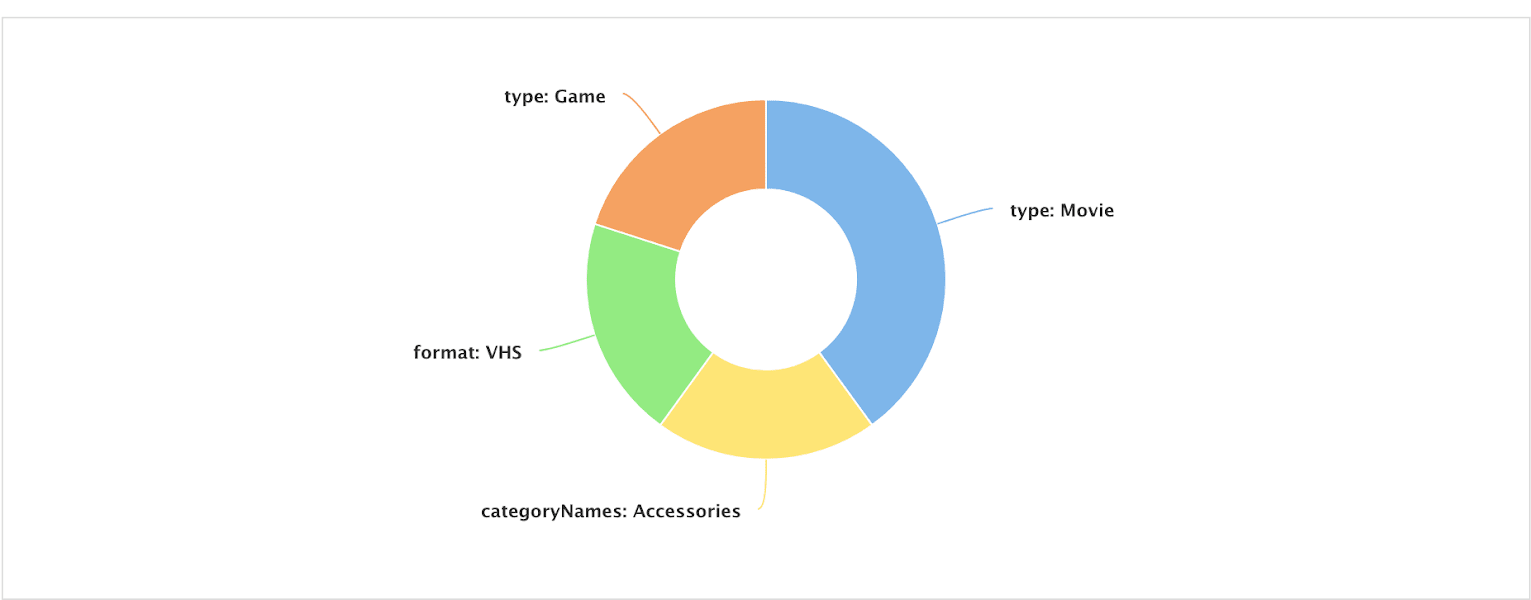
For each incoming signal, Fusion calculates a value for the `query_id` field, which [App Insights](/docs/4/fusion-ai/concepts/insights/overview) uses to create group-by-query reports like the one shown below:
The `query_id` field should not be confused with the `fusion_query_id`, which is a unique ID for each query processed by a Fusion query pipeline, or with `query_s` which is the query string.
To calculate the value, Fusion creates a hash based on `session`, `query`, and `filter` fields, then saves it into the `query_id` field.
The `filter` field can either be passed in by the search app,
or computed by the SignalFormatterStage (the first stage in the [`_signals_ingest` pipeline](/docs/4/fusion-ai/concepts/signals-and-aggregations/signals/default-index-pipeline)) using the raw filter queries. For instance, on a response signal that is generated by a query pipeline, the following `fq` query params get translated into the multi-valued `filter` field:
* Raw query parameters:
```
fq={!tag=format}format:(VHS)&fq={!tag=type}type:(Movie)
```
* `filters_s` field (created by the SearchLogger component):
```json theme={"dark"}
{!tag=format}format:(vhs) $ {!tag=type}type:(movie)
```
* `filter` field:
```
"filter":["format/VHS", "type/Movie"]
```
App Insights uses the `filter` field to generate various reports.
### Signal type ranking
When you have defined some custom fields, it is useful to rank them according to how strongly they indicate a user’s interest in an item. While it is not necessary to exclude certain signal types from the main signals collection, some can be excluded from signal aggregations in order to focus on the most important fields when generating [recommendations](/docs/4/fusion-ai/concepts/boosting/overview).