> ## Documentation Index
> Fetch the complete documentation index at: https://doc.lucidworks.com/llms.txt
> Use this file to discover all available pages before exploring further.
# Aggregations
export const LwTemplate = ({title = "Key questions to get you started", icon = "sparkles", cta = "Powered by Agent Studio", linkHref = "https://lucidworks.com/demo/?utm_source=docs&utm_medium=referral&utm_campaign=docs_cta_ai"}) => {
const [isLoaded, setIsLoaded] = useState(false);
useEffect(() => {
const timer = setTimeout(() => {
setIsLoaded(true);
}, 500);
return () => clearTimeout(timer);
}, []);
return
{isLoaded && `
}} />}
Powered by Lucidworks Agent Studio
;
};
[localhost link]: http://localhost:3000/docs/4/fusion-ai/concepts/signals-and-aggregations/aggregations/overview
[mintlify link]: https://doc.lucidworks.com/docs/4/fusion-ai/concepts/signals-and-aggregations/aggregations/overview
[old doc.lw link]: https://doc.lucidworks.com/fusion-ai/4.2/473
Aggregations compile [Signals](/docs/4/fusion-ai/concepts/signals-and-aggregations/signals/overview) into a set of summaries that you can use to enrich the search experience through [recommendations and boosting](/docs/4/fusion-ai/concepts/boosting/overview).
You can create two kinds of aggregations:
* [**SQL aggregations.**](/docs/4/fusion-ai/concepts/signals-and-aggregations/aggregations/sql-aggregations) Strongly recommended. SQL is a familiar query language that is well suited to data aggregation. Fusion’s new SQL Aggregation Engine has more power and flexibility than Fusion’s legacy aggregation engine.
* [**Legacy aggregations.**](/docs/4/fusion-ai/concepts/signals-and-aggregations/aggregations/legacy-aggregations) Deprecated. This aggregation approach available in prior Fusion releases is still available, though it is deprecated. [Aggregator functions](/docs/4/fusion-ai/concepts/signals-and-aggregations/aggregations/aggregator-functions) apply solely to legacy aggregations.
Aggregations are created automatically whenever you enable signals or recommendations. This topic explains how to create or modify aggregations individually. You can do this using the Fusion UI or the Jobs API.
Aggregations are created automatically whenever you enable signals or recommendations. This topic explains how to create or modify aggregations individually. You can do this using the Fusion UI or the Jobs API.
## Creating an aggregation job
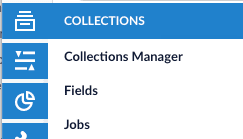
An aggregation is a type of job. Aggregation jobs can be created or modified under **Collections** or using **Search** > **Jobs** in the Fusion UI.
1. Navigate to **Jobs**.
2. Click **Add**.
Fusion 5.x.x supports only SQL aggregations. To avoid upgrade issues, Lucidworks recommends you use SQL aggregations in Fusion 4.x.x even though that release supports both regular (functional) aggregations and SQL aggregations.
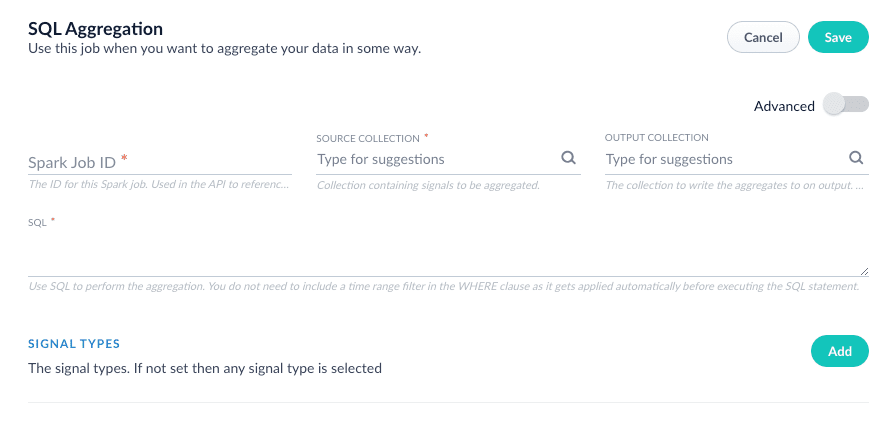
3. Select **SQL Aggregation**.
The New Job Configuration panel appears.
4. Enter an arbitrary Spark job ID.
5. Enter the name of the signals collection to be aggregated.
Be sure to specify the signals collection (usually `_signals`), not the primary (``) collection.
6. Configure the aggregation parameters as needed.
1. For SQL aggregation jobs, see the [parameter list](/docs/4/fusion-ai/reference/jobs/parameterized-sql-aggregation) here for more information.
7. Click **Save**.
The new aggregation job appears in the jobs list. Now you can run it or schedule the job.
 2. Click **Add**.
 3. Select **SQL Aggregation**.
The New Job Configuration panel appears.
3. Select **SQL Aggregation**.
The New Job Configuration panel appears.
 4. Enter an arbitrary Spark job ID.
5. Enter the name of the signals collection to be aggregated.
4. Enter an arbitrary Spark job ID.
5. Enter the name of the signals collection to be aggregated.