> ## Documentation Index
> Fetch the complete documentation index at: https://doc.lucidworks.com/llms.txt
> Use this file to discover all available pages before exploring further.

# toggle:panes

export const LwTemplate = ({title = "Key questions to get you started", icon = "sparkles", cta = "Powered by Agent Studio", linkHref = "https://lucidworks.com/demo/?utm_source=docs&utm_medium=referral&utm_campaign=docs_cta_ai"}) => {
  const [isLoaded, setIsLoaded] = useState(false);
  useEffect(() => {
    const timer = setTimeout(() => {
      setIsLoaded(true);
    }, 500);
    return () => clearTimeout(timer);
  }, []);
  return <div className="lw-template-container">
      <Card title={title} icon={icon}>
        {isLoaded && <span dangerouslySetInnerHTML={{
    __html: `<lw-template id="a029c1a9-28be-427e-b0e1-5d918920246a"></lw-template
            >`
  }} />}
        <Link href={linkHref} className="agent-studio-link text-left text-gray-600 gap-2 dark:text-gray-400 text-sm font-medium flex flex-row items-center hover:text-primary dark:hover:text-primary-light group-hover:text-primary group-hover:dark:text-primary-light">Powered by Lucidworks Agent Studio</Link>
      </Card>
    </div>;
};

[localhost link]: http://localhost:3000/docs/4/app-studio/reference/tags/lightning.directive.togglePanes

[mintlify link]: https://doc.lucidworks.com/docs/4/app-studio/reference/tags/lightning.directive.togglePanes

[old doc.lw link]: https://doc.lucidworks.com/app-studio/4.2/1088

<LwTemplate />

## Description

The toggle panes directive

## Usage

as element:

```xml wrap  theme={"dark"}
<toggle:panes
       id="{string}"
       [allow-multiple="{boolean}"]>
</toggle:panes>
```

### Directive info

* This directive creates new scope.

#### Parameters

| Param                        | Type        | Details                                                                  |
| ---------------------------- | ----------- | ------------------------------------------------------------------------ |
| id                           | **string**  | Id of the element                                                        |
| allow-multiple  *(optional)* | **boolean** | Whether or not multiple widgets should be shown at once. Default: false. |

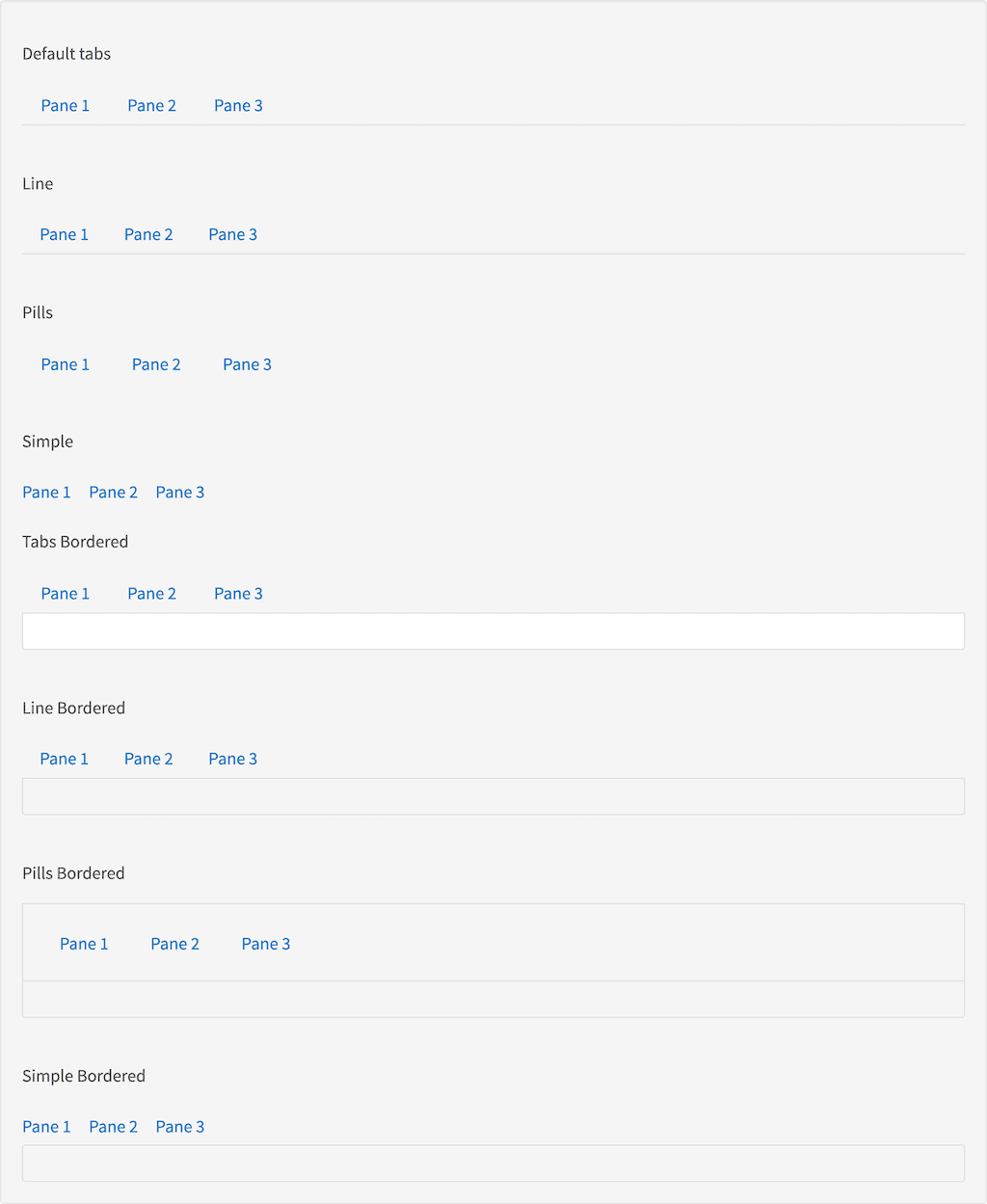
## Example

#### Source

```xml wrap  expandable  theme={"dark"}
<p>Default tabs</p>
<toggle:controls labels="Pane 1, Pane 2, Pane 3" panes="panes"></toggle:controls>
<toggle:panes id="panes">
    <toggle:pane>
        <h3 id="example_pane-1">Pane 1</h3>
    </toggle:pane>
    <toggle:pane>
        <h3 id="example_pane-2">Pane 2</h3>
    </toggle:pane>
    <toggle:pane>
        <h3 id="example_pane-3">Pane 3</h3>
    </toggle:pane>
</toggle:panes>

<br>
<p>Line</p>
<toggle:controls labels="Pane 1, Pane 2, Pane 3" panes="line" styling="line"></toggle:controls>
<toggle:panes id="line">
    <toggle:pane>
        <h3 id="example_pane-1">Pane 1</h3>
    </toggle:pane>
    <toggle:pane>
        <h3 id="example_pane-2">Pane 2</h3>
    </toggle:pane>
    <toggle:pane>
        <h3 id="example_pane-3">Pane 3</h3>
    </toggle:pane>
</toggle:panes>

<br>
<p>Pills</p>
<toggle:controls labels="Pane 1, Pane 2, Pane 3" panes="pills" styling="pill"></toggle:controls>
<toggle:panes id="pills">
    <toggle:pane>
        <h3 id="example_pane-1">Pane 1</h3>
    </toggle:pane>
    <toggle:pane>
        <h3 id="example_pane-2">Pane 2</h3>
    </toggle:pane>
    <toggle:pane>
        <h3 id="example_pane-3">Pane 3</h3>
    </toggle:pane>
</toggle:panes>

<br>
<p>Simple</p>
<toggle:controls labels="Pane 1, Pane 2, Pane 3" panes="simple" styling="simple"></toggle:controls>
<toggle:panes id="simple">
    <toggle:pane>
        <h3 id="example_pane-1">Pane 1</h3>
    </toggle:pane>
    <toggle:pane>
        <h3 id="example_pane-2">Pane 2</h3>
    </toggle:pane>
    <toggle:pane>
        <h3 id="example_pane-3">Pane 3</h3>
    </toggle:pane>
</toggle:panes>

<p>Tabs Bordered</p>
<toggle:controls labels="Pane 1, Pane 2, Pane 3" panes="bordered" styling="bordered"></toggle:controls>
<toggle:panes id="bordered">
    <toggle:pane>
        <h3 id="example_pane-1">Pane 1</h3>
    </toggle:pane>
    <toggle:pane>
        <h3 id="example_pane-2">Pane 2</h3>
    </toggle:pane>
    <toggle:pane>
        <h3 id="example_pane-3">Pane 3</h3>
    </toggle:pane>
</toggle:panes>

<br>
<p>Line Bordered</p>
<toggle:controls labels="Pane 1, Pane 2, Pane 3" panes="line-b" styling="line bordered"></toggle:controls>
<toggle:panes id="line-b">
    <toggle:pane>
        <h3 id="example_pane-1">Pane 1</h3>
    </toggle:pane>
    <toggle:pane>
        <h3 id="example_pane-2">Pane 2</h3>
    </toggle:pane>
    <toggle:pane>
        <h3 id="example_pane-3">Pane 3</h3>
    </toggle:pane>
</toggle:panes>

<br>
<p>Pills Bordered</p>
<toggle:controls labels="Pane 1, Pane 2, Pane 3" panes="pills-b" styling="pill bordered"></toggle:controls>
<toggle:panes id="pills-b">
    <toggle:pane>
        <h3 id="example_pane-1">Pane 1</h3>
    </toggle:pane>
    <toggle:pane>
        <h3 id="example_pane-2">Pane 2</h3>
    </toggle:pane>
    <toggle:pane>
        <h3 id="example_pane-3">Pane 3</h3>
    </toggle:pane>
</toggle:panes>

<br>
<p>Simple Bordered</p>
<toggle:controls labels="Pane 1, Pane 2, Pane 3" panes="simple-b" styling="simple bordered"></toggle:controls>
<toggle:panes id="simple-b">
    <toggle:pane>
        <h3 id="example_pane-1">Pane 1</h3>
    </toggle:pane>
    <toggle:pane>
        <h3 id="example_pane-2">Pane 2</h3>
    </toggle:pane>
    <toggle:pane>
        <h3 id="example_pane-3">Pane 3</h3>
    </toggle:pane>
</toggle:panes>
```

#### Result

<img src="https://mintcdn.com/lucidworks/ENcE8K39c0iEpL8J/assets/images/app-studio/as-examples/tags/togglePanes.png?fit=max&auto=format&n=ENcE8K39c0iEpL8J&q=85&s=11e12e33aab463ac33a72ce58bcf0dc4" alt="Result" width="1024" height="1249" data-path="assets/images/app-studio/as-examples/tags/togglePanes.png" />