> ## Documentation Index
> Fetch the complete documentation index at: https://doc.lucidworks.com/llms.txt
> Use this file to discover all available pages before exploring further.
# search:advanced
export const LwTemplate = ({title = "Key questions to get you started", icon = "sparkles", cta = "Powered by Agent Studio", linkHref = "https://lucidworks.com/demo/?utm_source=docs&utm_medium=referral&utm_campaign=docs_cta_ai"}) => {
const [isLoaded, setIsLoaded] = useState(false);
useEffect(() => {
const timer = setTimeout(() => {
setIsLoaded(true);
}, 500);
return () => clearTimeout(timer);
}, []);
return
{isLoaded && `
}} />}
Powered by Lucidworks Agent Studio
;
};
[localhost link]: http://localhost:3000/docs/4/app-studio/reference/tags/lightning.directive.searchAdvanced
[mintlify link]: https://doc.lucidworks.com/docs/4/app-studio/reference/tags/lightning.directive.searchAdvanced
[old doc.lw link]: https://doc.lucidworks.com/app-studio/4.2/1157
## Description
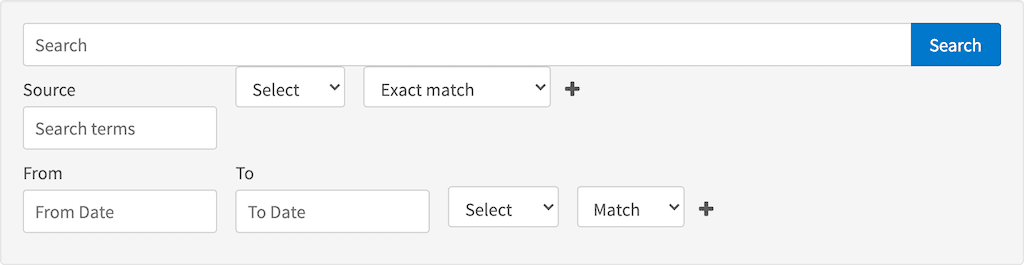
Creates an advanced search form to allow the user to add multiple
filters to a search query.
The following tags are commonly nested within a search advanced tag.
* [Search Box Tag](/docs/4/app-studio/reference/tags/lightning.directive.searchBox)
* [Advanced Text Tag](/docs/4/app-studio/reference/tags/lightning.directive.advancedText)
* [Advanced Date Range Tag](/docs/4/app-studio/reference/tags/lightning.directive.advancedDateRange)
* [Advanced Button Tag](/docs/4/app-studio/reference/tags/lightning.directive.advancedButton)
## Usage
as element:
```xml wrap theme={"dark"}
```
## Example
#### Source
```xml wrap theme={"dark"}
```
#### Result