> ## Documentation Index
> Fetch the complete documentation index at: https://doc.lucidworks.com/llms.txt
> Use this file to discover all available pages before exploring further.

# progress:radial

export const LwTemplate = ({title = "Key questions to get you started", icon = "sparkles", cta = "Powered by Agent Studio", linkHref = "https://lucidworks.com/demo/?utm_source=docs&utm_medium=referral&utm_campaign=docs_cta_ai"}) => {
  const [isLoaded, setIsLoaded] = useState(false);
  useEffect(() => {
    const timer = setTimeout(() => {
      setIsLoaded(true);
    }, 500);
    return () => clearTimeout(timer);
  }, []);
  return <div className="lw-template-container">
      <Card title={title} icon={icon}>
        {isLoaded && <span dangerouslySetInnerHTML={{
    __html: `<lw-template id="a029c1a9-28be-427e-b0e1-5d918920246a"></lw-template
            >`
  }} />}
        <Link href={linkHref} className="agent-studio-link text-left text-gray-600 gap-2 dark:text-gray-400 text-sm font-medium flex flex-row items-center hover:text-primary dark:hover:text-primary-light group-hover:text-primary group-hover:dark:text-primary-light">Powered by Lucidworks Agent Studio</Link>
      </Card>
    </div>;
};

[localhost link]: http://localhost:3000/docs/4/app-studio/reference/tags/lightning.directive.progressRadial

[mintlify link]: https://doc.lucidworks.com/docs/4/app-studio/reference/tags/lightning.directive.progressRadial

[old doc.lw link]: https://doc.lucidworks.com/app-studio/4.2/1180

<LwTemplate />

## Description

Creates a radial progress bar

## Usage

as element:

```xml wrap  theme={"dark"}
<progress:radial
       percentage="{string}"
       [fill-class="{string}"]
       [percentage-class="{string}"]>
</progress:radial>
```

#### Parameters

| Param                          | Type       | Details                               |
| ------------------------------ | ---------- | ------------------------------------- |
| percentage                     | **string** | The percentage progress               |
| fill-class  *(optional)*       | **string** | Add a class to the fill elements      |
| percentage-class  *(optional)* | **string** | Add a class to the percentage element |

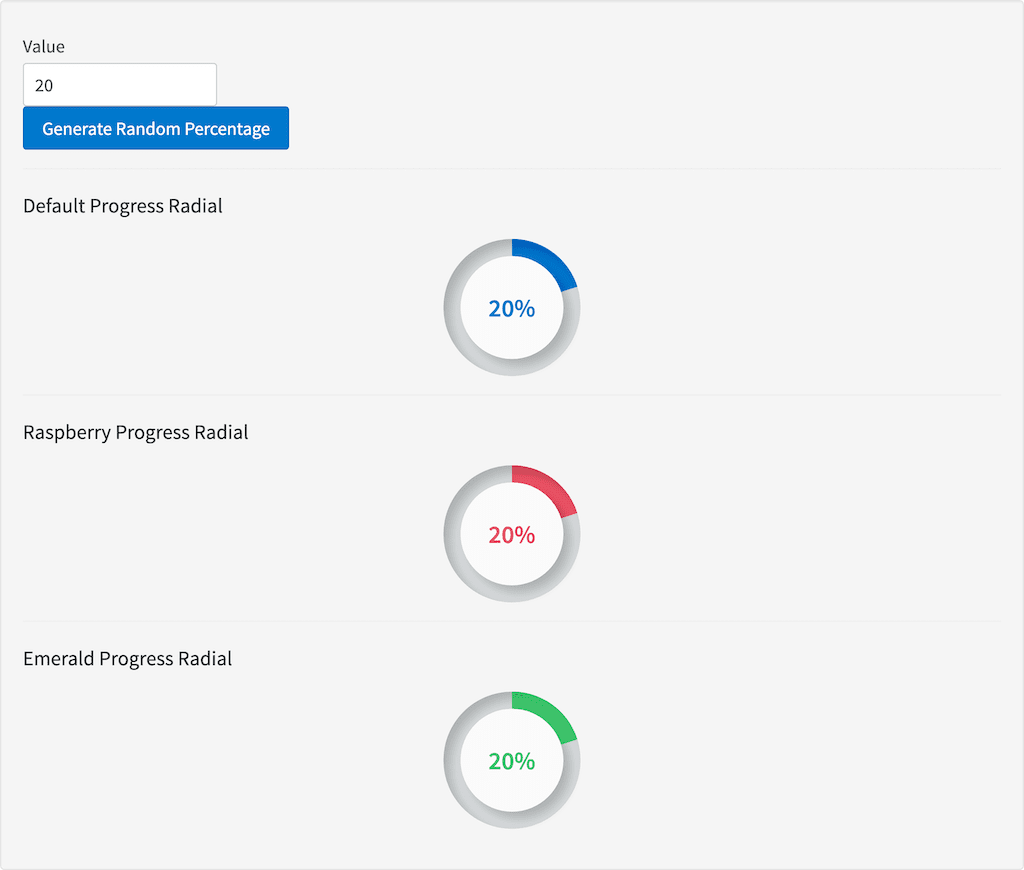
## Example

#### Source

```xml wrap  theme={"dark"}
<label for="value">Value</label>
<input id="value" type="number" placeholder="Value" ng-model="value"><br />
<button ng-click="generateNewNumber()" style="button">Generate Random Percentage</button>
<hr />
<h3 id="example_default-progress-radial">Default Progress Radial</h3>
<progress:radial percentage="value"></progress:radial>
<hr />
<h3 id="example_raspberry-progress-radial">Raspberry Progress Radial</h3>
<progress:radial percentage="value" fill-class="tk-stl-bg-raspberry" percentage-class="tk-stl-text-raspberry"></progress:radial>
<hr />
<h3 id="example_emerald-progress-radial">Emerald Progress Radial</h3>
<progress:radial percentage="value" fill-class="tk-stl-bg-emerald" percentage-class="tk-stl-text-emerald"></progress:radial>
```

```js wrap  theme={"dark"}
angular.module('lightning')
.controller('ExampleController', ['$scope','$timeout', function($scope,$timeout) {
            $scope.value = 20;

            $scope.generateNewNumber = function(){
            $scope.value = Math.floor(Math.random() * (100 - 0 + 1));
            };
        }]);
```

#### Result
<img src="https://mintcdn.com/lucidworks/ENcE8K39c0iEpL8J/assets/images/app-studio/as-examples/tags/progressRadial.png?fit=max&auto=format&n=ENcE8K39c0iEpL8J&q=85&s=9da4d6e9f4fd723324f9ed7d4426f2ba" alt="Result" width="1024" height="870" data-path="assets/images/app-studio/as-examples/tags/progressRadial.png" />
