> ## Documentation Index
> Fetch the complete documentation index at: https://doc.lucidworks.com/llms.txt
> Use this file to discover all available pages before exploring further.
# Developing Services and Servlets
export const LwTemplate = ({title = "Key questions to get you started", icon = "sparkles", cta = "Powered by Agent Studio", linkHref = "https://lucidworks.com/demo/?utm_source=docs&utm_medium=referral&utm_campaign=docs_cta_ai"}) => {
const [isLoaded, setIsLoaded] = useState(false);
useEffect(() => {
const timer = setTimeout(() => {
setIsLoaded(true);
}, 500);
return () => clearTimeout(timer);
}, []);
return
{isLoaded && `
}} />}
Powered by Lucidworks Agent Studio
;
};
[localhost link]: http://localhost:3000/docs/4/app-studio/concepts/extending-appkit/developing-services-and-servlets
[old doc.lw link]: https//doc.lucidworks.com/app-studio/4.2/3108
[mintlify link]: https://doc.lucidworks.com/docs/4/app-studio/concepts/extending-appkit/developing-services-and-servlets
You can develop services and servlets:
* Services encapsulate reusable processes that can be injected into providers such as Servlets. For example, different implementations of Query Suggestions are implement the `twigkit.service.AppkitService` interface and can be injected into the servlet responsible for returning the list of suggestions.
* Besides using standard JSP to generate output; Servlets are common way of doing custom HTTP responses with Java. You can deploy standard Java Servlets in Appkit application but in addition to that Appkit provides a convenient framework for developing and deploying servlets for search based applications.
## Services
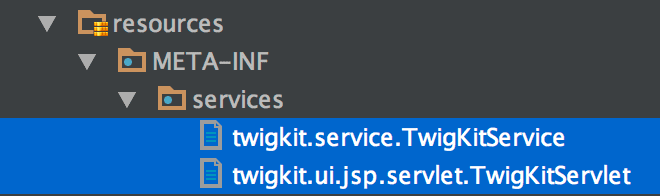
Services can be instantiated programmatically or using the Appkit configuration framework, making them available to other processes or programmatically via the `ConfiguredServiceProvider` class. To declare a service via the configuration framework, you must add a configuration file named `src/main/resources/META-INF/services/TwigKitService` that contains the fully-qualified Java class name of your services, one per line. See the screenshot for an example.
For legacy reasons, the service file must be named `TwigKitService`, with a capital "K".
Below is a sample signature for a Query Suggestion Service:
```java wrap theme={"dark"}
public class StaticQuerySuggestionService extends Parameters implements QuerySuggestionService, TwigKitService {
public List suggest(final Query query) {
// Do whatever here to generate a List of QuerySuggestions for the Query supplied!
}
}
```
## Servlets and custom output formats
An instance of an AppkitServlet is automatically discovered and deployed by the Appkit application on startup, as long as your class is annotated with the path you would like it published at, implements or extends a `AppkitServlet`, and is declared via the Appkit configuration framework. To declare a servlet via the configuration framework, you must add a configuration file named `src/main/resources/META-INF/services/TwigKitServlet` that contains the fully-qualified Java class name of your servlets, one per line. See the screenshot for an example.
For legacy reasons, the service file must be named `TwigKitServlet`, with a capital "K".
Below is an example of a `TwigKitServlet`.
```java wrap theme={"dark"}
@ServletPath(path = "/custom/excel/{platform}")
public class SomeServlet extends TwigKitServlet {
protected void doGet(HttpServletRequest req, HttpServletResponse resp, Query query, Config conf) throws ServletException, IOException {
// Query instances and Appkit configurations are automatically provided to your method!
}
}
```
This means that the process of changing stateless HTTP requests to queries is handled for you, and the Servlet is automatically declared and published, in this case to respond at this URL: `/twigkit/services/custom/excel/`. Using the ServletPath annotation will guarantee that the HTTP Request/Response is correctly filtered by Appkit for example, for security and URL mapping.